---
title: "Crawling through Umbraco with Robots"
excerpt: "The robots.txt file’s main purpose is to tell robots (Google Bot, Bing Bot, etc.) what to index for their search engine, and also what not to. Usually you want most of your website crawled by Google, such as blog posts, product pages, etc., but most websites will have some pages/sections that shouldn’t be indexed or listed in search engines."
publishDate: "2018-12-31T00:00:00"
createDate: "2018-12-30T03:07:07.093"
updateDate: "2020-11-24T05:06:46.58"
category: "umbraco"
categoryName: "Umbraco"
tags: ["Umbraco","SEO","Web","DotNet","CSharp","ASPNET"]
permalink: "/blog/umbraco/crawling-through-umbraco-with-robots"
canonical: "/blog/umbraco/crawling-through-umbraco-with-robots"
image: {"src":"/media/1090/robot-umbraco-long.png","focalPoint":{"left":0.5,"top":0.5},"crops":[{"alias":"Banner","width":1120,"height":400,"coordinates":null}]}
imageAlt: "Robot with Umbraco logo"
imageBackgroundColor: "#2D2D2D"
thumbnailImage: {"src":"/media/1091/robot-umbraco-square.png","focalPoint":{"left":0.5,"top":0.5},"crops":[{"alias":"thumbnail","width":250,"height":250,"coordinates":null}]}
thumbnailImageAlt: "Robot with Umbraco logo"
metaTitle: "Crawling through Umbraco with Robots"
metaDescription: "The robots.txt file’s main purpose is to tell robots (Google Bot, Bing Bot, etc.) what to index for their search engine, and what not to."
ogTitle: "Crawling through Umbraco with Robots"
ogDescription: "The robots.txt file’s main purpose is to tell robots (Google Bot, Bing Bot, etc.) what to index for their search engine, and also what not to. Usually you want most of your website crawled by Google, such as blog posts, product pages, etc., but most websites will have some pages/sections that shouldn’t be indexed or listed in search engines."
ogImage: {"src":"/media/1096/robot-umbraco-social.png","focalPoint":{"left":0.5,"top":0.5},"crops":[{"alias":"OpenGraph","width":1200,"height":630,"coordinates":null}]}
ogImageAlt: "Robot with Umbraco logo"
relatedPostKeys: ["b4856fdce24c4f478d0312c69c5e8b02","03477c6d533c43a9b80368772b92f611"]
noIndex: false
noFollow: false
sitemapExclude: false
source: {"nodeId":1143,"contentKey":"05bd483f744348bfaa6052abc278ae6a","sortOrder":18}
---


This series is all about making your Umbraco website more crawlable, discoverable for Search Engine Spiders. <a href="/blog/umbraco/crawling-through-umbraco-with-sitemaps" title="Crawling through Umbraco with Sitemaps">Last post discussed how to generate sitemaps dynamically</a>, and this week we're covering another thing every website needs: the “**robots.txt**” file and the “**robots**” meta tag.


Series:


1.  <a href="/blog/umbraco/crawling-through-umbraco-with-sitemaps" title="Crawling through Umbraco with Sitemaps">Crawling through Umbraco with Sitemaps</a>
2.  Crawling through Umbraco with Robots (this post 👍)


## What is the Robots file? {#what-is-the-robots-file}

The robots.txt file’s main purpose is to tell robots (Google Bot, Bing Bot, etc.) what to index for their search engine, and also what not to. Usually you want most of your website crawled by Google, such as blog posts, product pages, etc., but most websites will have some pages/sections that shouldn’t be indexed or listed in search engines. Some common examples of pages not to index:


-   Form Confirmation pages (fe: /contact-us/thank-you)
-   Direct link pages such as secret promotions or surveys (fe: /dk89f9/rate-talk?talk=keynote-2018)
-   CMS backend section (fe: /umbraco)


## Robots.txt basics {#robotstxt-basics}

The robots.txt file is a simple text file letting us disallow certain bots from visiting sections of our website.<br>There’s no guarantee that bots will respect your robots.txt file.

Here’s an example that allows ALL bots to visit the entire website:

<pre style='color:#000000;background:#ffffff;'>User<span style='color:#808030; '>-</span>agent<span style='color:#808030; '>:</span> <span style='color:#808030; '>*</span>&#10;</pre>

Here’s an example disallowing different sections of the website to different bots:

<pre style='color:#000000;background:#ffffff;'>User<span style='color:#808030; '>-</span>agent<span style='color:#808030; '>:</span> Google&#10;Disallow<span style='color:#808030; '>:</span> <span style='color:#808030; '>/</span>dont<span style='color:#808030; '>-</span>show<span style='color:#808030; '>-</span>google&#10;&#10;User<span style='color:#808030; '>-</span>Agent<span style='color:#808030; '>:</span> bingbot&#10;Disallow<span style='color:#808030; '>:</span> <span style='color:#808030; '>/</span>dont<span style='color:#808030; '>-</span>show<span style='color:#808030; '>-</span>bing&#10;</pre>

Here’s a robots.txt file to disallow bots from visiting the Umbraco admin section:

<pre style='color:#000000;background:#ffffff;'>User<span style='color:#808030; '>-</span>agent<span style='color:#808030; '>:</span> <span style='color:#808030; '>*</span>&#10;Disallow<span style='color:#808030; '>:</span> <span style='color:#808030; '>/</span>umbraco&#10;</pre>


## Robots.txt and sitemaps {#robotstxt-and-sitemaps}

In our sitemap we have to make sure to <u>not</u> list any URL’s that are disallowed by our robots.txt and vice versa. This could lead to your pages unexpectedly indexed or not indexed.


There’s also another property allowed inside of the robots.txt file called “**Sitemap**”. When you have a sitemap, you can submit them manually to Google and Bing webmaster tools, but many search engines don’t have webmaster tools. Using the “Sitemap” property inside of the robots.txt file, we can share the location of our sitemap.


<pre style='color:#000000;background:#ffffff;'>Sitemap<span style='color:#808030; '>:</span> <span style='color:#5555dd; '>https://www.swimburger.net/sitemap.xml</span>&#10;User<span style='color:#808030; '>-</span>agent<span style='color:#808030; '>:</span> <span style='color:#808030; '>*</span>&#10;Disallow<span style='color:#808030; '>:</span> <span style='color:#808030; '>/</span>umbraco&#10;</pre>


Note that the “Sitemap” property **has to be an absolute URL**. Relative URL’s are not allowed.


## Implementing robots.txt in Umbraco {#implementing-robotstxt-in-umbraco}

For our robots.txt we could simply add a file called ‘robots.txt’ the root of our project, disallow the Umbraco admin section, and call it a day. We could also add the “Sitemap” property to the robots.txt and hardcode the full URL, but chances are that you have more than one environment or you have a multi-site setup with multiple domain names.<br>We’ll dynamically generate the “Sitemap” property and add the ability to add exclusions through Umbraco Content.

### Adding a new Sitemap custom document type {#adding-a-new-sitemap-custom-document-type}


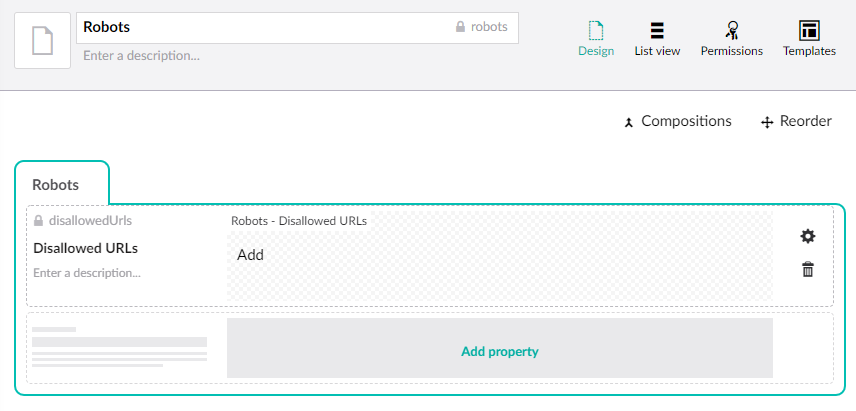
For this tutorial, we’ll be building upon our previous setup from <a href="/blog/umbraco/crawling-through-umbraco-with-sitemaps">“Crawling through Umbraco with Sitemaps”.</a><br>Let’s create a new custom document type (with template) called “Robots”.<br>Configure the Robots document type as below:


-   Robots (tab)
    -   Disallowed URLs
        -   Type: Repeatable textstrings
        -   Alias: disallowedUrls


<p><img loading="lazy" class="img-responsive" src="/media/1095/robots-content-type.png" alt="Robots Umbraco Document type" width="856" height="411"></p>

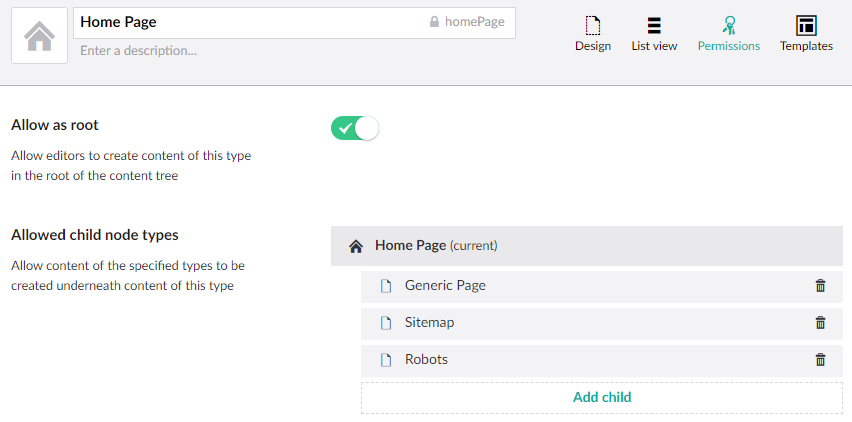
Before we can add the Robots content, we need to allow it to be added under the Home page.
<p><img loading="lazy" class="img-responsive" src="/media/1093/allow-under-home.png" alt="Allow Robots Document Type under home" width="852" height="422"></p>

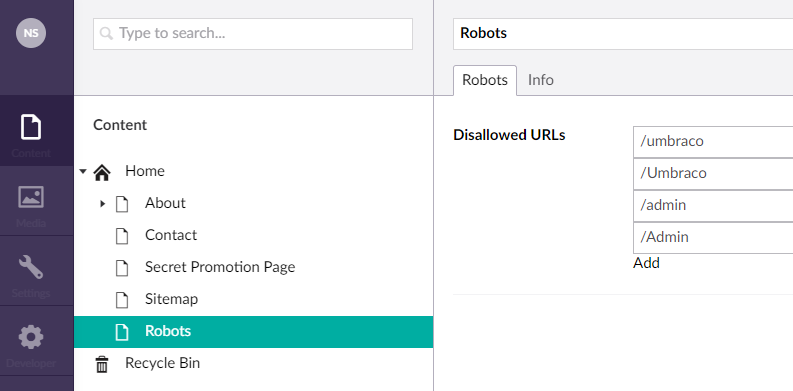
Let’s add the Robots content under the homepage and disallow some URL’s.
<p><img loading="lazy" class="img-responsive" src="/media/1094/disallow-urls.png" alt="Disallow URL's using Robots document type" width="794" height="391"></p>


### Generating the Robots.txt file {#generating-the-robotstxt-file}

Now that the content is setup, let’s work on our Robots view template.<br>Change the template to the following code:

<pre style="color:#d1d1d1;background:#000000;">@inherits Umbraco<span style="color:#d2cd86; ">.</span>Web<span style="color:#d2cd86; ">.</span>Mvc<span style="color:#d2cd86; ">.</span>UmbracoTemplatePage<span style="color:#d2cd86; ">&lt;</span>ContentModels<span style="color:#d2cd86; ">.</span>Robots<span style="color:#d2cd86; ">&gt;</span>&#10;@<span style="color:#e66170; font-weight:bold; ">using</span> ContentModels <span style="color:#d2cd86; ">=</span> Umbraco<span style="color:#d2cd86; ">.</span>Web<span style="color:#d2cd86; ">.</span>PublishedContentModels<span style="color:#b060b0; ">;</span>&#10;@<span style="color:#b060b0; ">{</span>&#10;    Layout <span style="color:#d2cd86; ">=</span> <span style="color:#e66170; font-weight:bold; ">null</span><span style="color:#b060b0; ">;</span>&#10;    umbraco<span style="color:#d2cd86; ">.</span>library<span style="color:#d2cd86; ">.</span>ChangeContentType<span style="color:#d2cd86; ">(</span><span style="color:#02d045; ">"</span><span style="color:#00c4c4; ">text/plain</span><span style="color:#02d045; ">"</span><span style="color:#d2cd86; ">)</span><span style="color:#b060b0; ">;</span>&#10;    <span style="color:#e66170; font-weight:bold; ">var</span> rootUrl <span style="color:#d2cd86; ">=</span> Request<span style="color:#d2cd86; ">.</span>Url<span style="color:#d2cd86; ">.</span>GetLeftPart<span style="color:#d2cd86; ">(</span>UriPartial<span style="color:#d2cd86; ">.</span>Authority<span style="color:#d2cd86; ">)</span><span style="color:#b060b0; ">;</span>&#10;<span style="color:#b060b0; ">}</span>Sitemap<span style="color:#d2cd86; ">:</span> @<span style="color:#d2cd86; ">(</span>rootUrl <span style="color:#d2cd86; ">+</span> <span style="color:#02d045; ">"</span><span style="color:#00c4c4; ">/sitemap.xml</span><span style="color:#02d045; ">"</span><span style="color:#d2cd86; ">)</span>&#10;User<span style="color:#d2cd86; ">-</span>agent<span style="color:#d2cd86; ">:</span> <span style="color:#d2cd86; ">*</span>&#10;@<span style="color:#e66170; font-weight:bold; ">foreach</span><span style="color:#d2cd86; ">(</span><span style="color:#e66170; font-weight:bold; ">var</span> url <span style="color:#e66170; font-weight:bold; ">in</span> Model<span style="color:#d2cd86; ">.</span>Content<span style="color:#d2cd86; ">.</span>DisallowedUrls<span style="color:#d2cd86; ">)</span>&#10;<span style="color:#b060b0; ">{</span>&#10;    @Html<span style="color:#d2cd86; ">.</span>Raw<span style="color:#d2cd86; ">(</span><span style="color:#e66170; font-weight:bold; ">string</span><span style="color:#d2cd86; ">.</span>Format<span style="color:#d2cd86; ">(</span><span style="color:#02d045; ">"</span><span style="color:#00c4c4; ">Disallow: {0}\n</span><span style="color:#02d045; ">"</span><span style="color:#d2cd86; ">,</span> url<span style="color:#d2cd86; ">)</span><span style="color:#d2cd86; ">)</span>&#10;<span style="color:#b060b0; ">}</span>&#10;</pre>

This snippet does three things:


1.  Set the content type to text
2.  Dynamically point to the Sitemap file
3.  Disallow all URL’s we specify in the Umbraco document type


When we browse to \`/robots\` we should see the following output:

<pre style="color:#000000;background:#ffffff;">Sitemap<span style="color:#808030; ">:</span> <span style="color:#5555dd; ">http://localhost:55848/sitemap.xml</span>&#10;User<span style="color:#808030; ">-</span>agent<span style="color:#808030; ">:</span> <span style="color:#808030; ">*</span>&#10;Disallow<span style="color:#808030; ">:</span> <span style="color:#808030; ">/</span>umbraco&#10;Disallow<span style="color:#808030; ">:</span> <span style="color:#808030; ">/</span>Umbraco&#10;Disallow<span style="color:#808030; ">:</span> <span style="color:#808030; ">/</span>admin&#10;Disallow<span style="color:#808030; ">:</span> <span style="color:#808030; ">/</span>Admin&#10;</pre>


### Setting up a rewrite rule to /robots.txt {#setting-up-a-rewrite-rule-to-robotstxt}

Defined by the standard, the robots.txt file has to be accessible at the root of the site using ‘robots.txt’ filename. Currently we only return the content at the /robots URL. Just like we did for the Sitemap, we can setup an IIS Rewrite so the content will be available via /robots.txt.<br>Add the following rewrite configuration to your web.config file:

<pre style="color:#d1d1d1;background:#000000;"><span style="color:#008073; ">&lt;?</span><span style="color:#e66170; font-weight:bold; ">xml</span><span style="color:#008073; "> </span><span style="color:#008073; ">version</span><span style="color:#d2cd86; ">=</span><span style="color:#02d045; ">"</span><span style="color:#007d45; ">1.0</span><span style="color:#02d045; ">"</span><span style="color:#008073; "> </span><span style="color:#008073; ">encoding</span><span style="color:#d2cd86; ">=</span><span style="color:#02d045; ">"</span><span style="color:#00c4c4; ">utf-8</span><span style="color:#02d045; ">"</span><span style="color:#008073; ">?&gt;</span>&#10;   ...&#10;   <span style="color:#ff8906; ">&lt;</span><span style="color:#f6c1d0; ">system.webServer</span><span style="color:#ff8906; ">&gt;</span>&#10;     ...&#10;     <span style="color:#ff8906; ">&lt;</span><span style="color:#f6c1d0; ">rewrite</span><span style="color:#ff8906; ">&gt;</span>&#10;      <span style="color:#ff8906; ">&lt;</span><span style="color:#f6c1d0; ">rules</span><span style="color:#ff8906; ">&gt;</span>&#10;        <span style="color:#ff8906; ">&lt;</span><span style="color:#f6c1d0; ">rule</span> name<span style="color:#d2cd86; ">=</span><span style="color:#02d045; ">"</span><span style="color:#00c4c4; ">Rewrite to Sitemap.xml</span><span style="color:#02d045; ">"</span><span style="color:#ff8906; ">&gt;</span>&#10;          <span style="color:#ff8906; ">&lt;</span><span style="color:#f6c1d0; ">match</span> url<span style="color:#d2cd86; ">=</span><span style="color:#02d045; ">"</span><span style="color:#00c4c4; ">^sitemap.xml</span><span style="color:#02d045; ">"</span> <span style="color:#ff8906; ">/&gt;</span>&#10;          <span style="color:#ff8906; ">&lt;</span><span style="color:#f6c1d0; ">action</span> type<span style="color:#d2cd86; ">=</span><span style="color:#02d045; ">"</span><span style="color:#00c4c4; ">Rewrite</span><span style="color:#02d045; ">"</span> url<span style="color:#d2cd86; ">=</span><span style="color:#02d045; ">"</span><span style="color:#00c4c4; ">sitemap</span><span style="color:#02d045; ">"</span> <span style="color:#ff8906; ">/&gt;</span>&#10;        <span style="color:#fb8400; ">&lt;/</span><span style="color:#f6c1d0; ">rule</span><span style="color:#fb8400; ">&gt;</span>&#10;        <span style="color:#ff8906; ">&lt;</span><span style="color:#f6c1d0; ">rule</span> name<span style="color:#d2cd86; ">=</span><span style="color:#02d045; ">"</span><span style="color:#00c4c4; ">Rewrite to Robots.txt</span><span style="color:#02d045; ">"</span><span style="color:#ff8906; ">&gt;</span>&#10;          <span style="color:#ff8906; ">&lt;</span><span style="color:#f6c1d0; ">match</span> url<span style="color:#d2cd86; ">=</span><span style="color:#02d045; ">"</span><span style="color:#00c4c4; ">^robots.txt</span><span style="color:#02d045; ">"</span> <span style="color:#ff8906; ">/&gt;</span>&#10;          <span style="color:#ff8906; ">&lt;</span><span style="color:#f6c1d0; ">action</span> type<span style="color:#d2cd86; ">=</span><span style="color:#02d045; ">"</span><span style="color:#00c4c4; ">Rewrite</span><span style="color:#02d045; ">"</span> url<span style="color:#d2cd86; ">=</span><span style="color:#02d045; ">"</span><span style="color:#00c4c4; ">robots</span><span style="color:#02d045; ">"</span> <span style="color:#ff8906; ">/&gt;</span>&#10;        <span style="color:#fb8400; ">&lt;/</span><span style="color:#f6c1d0; ">rule</span><span style="color:#fb8400; ">&gt;</span>&#10;      <span style="color:#fb8400; ">&lt;/</span><span style="color:#f6c1d0; ">rules</span><span style="color:#fb8400; ">&gt;</span>&#10;     <span style="color:#fb8400; ">&lt;/</span><span style="color:#f6c1d0; ">rewrite</span><span style="color:#fb8400; ">&gt;</span>&#10;     ...&#10;  <span style="color:#fb8400; ">&lt;/</span><span style="color:#f6c1d0; ">system.webServer</span><span style="color:#fb8400; ">&gt;</span>&#10;  ...&#10;<span style="color:#fb8400; ">&lt;/</span><span style="color:#f6c1d0; ">configuration</span><span style="color:#fb8400; ">&gt;</span>&#10;</pre>

Both \`/robots.txt\` and \`/robots\` now return our new robots file.

## What is the robots meta tag? {#what-is-the-robots-meta-tag}

The robots meta tag serves the same purpose as the robots.txt file. The difference though, is that you only specify that the **current** **page** should be **indexed** and that robots should **follow links** on the current page. There are 4 different combinations you can make with this meta tag.

<pre style="color:#d1d1d1;background:#000000;"><span style="color:#ff8906; ">&lt;</span><span style="color:#e66170; font-weight:bold; ">meta</span> name<span style="color:#d2cd86; ">=</span><span style="color:#00c4c4; ">"robots"</span> content<span style="color:#d2cd86; ">=</span><span style="color:#00c4c4; ">"index, follow"</span><span style="color:#ff8906; ">&gt;</span>&#10;<span style="color:#ff8906; ">&lt;</span><span style="color:#e66170; font-weight:bold; ">meta</span> name<span style="color:#d2cd86; ">=</span><span style="color:#00c4c4; ">"robots"</span> content<span style="color:#d2cd86; ">=</span><span style="color:#00c4c4; ">"noindex, nofollow"</span><span style="color:#ff8906; ">&gt;</span>&#10;<span style="color:#ff8906; ">&lt;</span><span style="color:#e66170; font-weight:bold; ">meta</span> name<span style="color:#d2cd86; ">=</span><span style="color:#00c4c4; ">"robots"</span> content<span style="color:#d2cd86; ">=</span><span style="color:#00c4c4; ">"index, nofollow"</span><span style="color:#ff8906; ">&gt;</span>&#10;<span style="color:#ff8906; ">&lt;</span><span style="color:#e66170; font-weight:bold; ">meta</span> name<span style="color:#d2cd86; ">=</span><span style="color:#00c4c4; ">"robots"</span> content<span style="color:#d2cd86; ">=</span><span style="color:#00c4c4; ">"noindex, follow"</span><span style="color:#ff8906; ">&gt;</span>&#10;</pre>


<ul>
<li><strong>Index</strong>: index this page</li>
<li><strong>noindex</strong>: do not index this page</li>
</ul>


<ul>
<li><strong>follow</strong>: follow links on this page</li>
<li><strong>nofollow</strong>: do not follow links on this page</li>
</ul>


### Implementing the robots meta tag in Umbraco {#implementing-the-robots-meta-tag-in-umbraco}


We want to be able to specify the value for this meta tag for every page we have in Umbraco. Let’s add two checkboxes to our existing BasePage composition from the <a href="/blog/umbraco/crawling-through-umbraco-with-sitemaps" title="Crawling through Umbraco with Sitemaps">previous post</a>.


-   Crawling (tab)
    -   Index
        -   Type: Custom Checkbox Editor
        -   Default Value: true
        -   Alias: robotsIndex
    -   Follow
        -   Type: Custom Checkbox Editor
        -   Default Value: true
        -   Alias: robotsFollow


<p><img loading="lazy" class="img-responsive" src="/media/1092/add-index-and-follow-properties-to-basepage.png" alt="Add index and follow checkbox properties to base page document type" width="929" height="744"></p>

Now that every page has these new properties, let’s add some template code to output the meta data tag. Update the HomePage.cshtml as below:

<pre style="color:#d1d1d1;background:#000000;">@inherits Umbraco<span style="color:#d2cd86; ">.</span>Web<span style="color:#d2cd86; ">.</span>Mvc<span style="color:#d2cd86; ">.</span>UmbracoTemplatePage<span style="color:#d2cd86; ">&lt;</span>ContentModels<span style="color:#d2cd86; ">.</span>HomePage<span style="color:#d2cd86; ">&gt;</span>&#10;@<span style="color:#e66170; font-weight:bold; ">using</span> ContentModels <span style="color:#d2cd86; ">=</span> Umbraco<span style="color:#d2cd86; ">.</span>Web<span style="color:#d2cd86; ">.</span>PublishedContentModels<span style="color:#b060b0; ">;</span>&#10;@<span style="color:#b060b0; ">{</span>&#10;    Layout <span style="color:#d2cd86; ">=</span> <span style="color:#e66170; font-weight:bold; ">null</span><span style="color:#b060b0; ">;</span>&#10;    <span style="color:#e66170; font-weight:bold; ">var</span> robotsValue <span style="color:#d2cd86; ">=</span> <span style="color:#e66170; font-weight:bold; ">string</span><span style="color:#d2cd86; ">.</span>Format<span style="color:#d2cd86; ">(</span><span style="color:#02d045; ">"</span><span style="color:#00c4c4; ">{0}, {1}</span><span style="color:#02d045; ">"</span><span style="color:#d2cd86; ">,</span> Model<span style="color:#d2cd86; ">.</span>Content<span style="color:#d2cd86; ">.</span>RobotsIndex ? <span style="color:#02d045; ">"</span><span style="color:#00c4c4; ">index</span><span style="color:#02d045; ">"</span> <span style="color:#d2cd86; ">:</span> <span style="color:#02d045; ">"</span><span style="color:#00c4c4; ">noindex</span><span style="color:#02d045; ">"</span><span style="color:#d2cd86; ">,</span> Model<span style="color:#d2cd86; ">.</span>Content<span style="color:#d2cd86; ">.</span>RobotsFollow ? <span style="color:#02d045; ">"</span><span style="color:#00c4c4; ">follow</span><span style="color:#02d045; ">"</span> <span style="color:#d2cd86; ">:</span> <span style="color:#02d045; ">"</span><span style="color:#00c4c4; ">nofollow</span><span style="color:#02d045; ">"</span><span style="color:#d2cd86; ">)</span><span style="color:#b060b0; ">;</span>&#10;<span style="color:#b060b0; ">}</span>&#10;<span style="color:#d2cd86; ">&lt;</span><span style="color:#d2cd86; ">!</span>DOCTYPE html<span style="color:#d2cd86; ">&gt;</span>&#10;<span style="color:#d2cd86; ">&lt;</span>html<span style="color:#d2cd86; ">&gt;</span>&#10;<span style="color:#d2cd86; ">&lt;</span>head<span style="color:#d2cd86; ">&gt;</span>&#10;    <span style="color:#d2cd86; ">&lt;</span>meta name<span style="color:#d2cd86; ">=</span><span style="color:#02d045; ">"</span><span style="color:#00c4c4; ">robots</span><span style="color:#02d045; ">"</span> content<span style="color:#d2cd86; ">=</span><span style="color:#02d045; ">"</span><span style="color:#00c4c4; ">@robotsValue</span><span style="color:#02d045; ">"</span> <span style="color:#d2cd86; ">/</span><span style="color:#d2cd86; ">&gt;</span>&#10;<span style="color:#d2cd86; ">&lt;</span><span style="color:#d2cd86; ">/</span>head<span style="color:#d2cd86; ">&gt;</span>&#10;<span style="color:#d2cd86; ">&lt;</span>body<span style="color:#d2cd86; ">&gt;</span>&#10;    <span style="color:#d2cd86; ">&lt;</span>h1<span style="color:#d2cd86; ">&gt;</span>@Model<span style="color:#d2cd86; ">.</span>Content<span style="color:#d2cd86; ">.</span>Name<span style="color:#d2cd86; ">&lt;</span><span style="color:#d2cd86; ">/</span>h1<span style="color:#d2cd86; ">&gt;</span>&#10;<span style="color:#d2cd86; ">&lt;</span><span style="color:#d2cd86; ">/</span>body<span style="color:#d2cd86; ">&gt;</span>&#10;<span style="color:#d2cd86; ">&lt;</span><span style="color:#d2cd86; ">/</span>html<span style="color:#d2cd86; ">&gt;</span>&#10;</pre>

Now we can change the robots meta tag by changing the Umbraco property on the homepage. If you don’t see the metatag value being outputted correctly, try publishing your homepage.

We need the same functionality for all pages though, not just the homepage. Instead of copying over the code to every template, let’s create a “\_Layout.cshtml” and “\_ViewStart.cshtml” template to reuse the functionality across all page templates. Add the following files to your Umbraco templates:


*\_Layout.cshtml<br>*


<pre style="color:#d1d1d1;background:#000000;">@inherits Umbraco<span style="color:#d2cd86; ">.</span>Web<span style="color:#d2cd86; ">.</span>Mvc<span style="color:#d2cd86; ">.</span>UmbracoTemplatePage<span style="color:#d2cd86; ">&lt;</span>ContentModels<span style="color:#d2cd86; ">.</span>IBasePage<span style="color:#d2cd86; ">&gt;</span>&#10;@<span style="color:#e66170; font-weight:bold; ">using</span> ContentModels <span style="color:#d2cd86; ">=</span> Umbraco<span style="color:#d2cd86; ">.</span>Web<span style="color:#d2cd86; ">.</span>PublishedContentModels<span style="color:#b060b0; ">;</span>&#10;@<span style="color:#b060b0; ">{</span>&#10;    <span style="color:#e66170; font-weight:bold; ">var</span> robotsValue <span style="color:#d2cd86; ">=</span> <span style="color:#e66170; font-weight:bold; ">string</span><span style="color:#d2cd86; ">.</span>Format<span style="color:#d2cd86; ">(</span><span style="color:#02d045; ">"</span><span style="color:#00c4c4; ">{0}, {1}</span><span style="color:#02d045; ">"</span><span style="color:#d2cd86; ">,</span> Model<span style="color:#d2cd86; ">.</span>Content<span style="color:#d2cd86; ">.</span>RobotsIndex ? <span style="color:#02d045; ">"</span><span style="color:#00c4c4; ">index</span><span style="color:#02d045; ">"</span> <span style="color:#d2cd86; ">:</span> <span style="color:#02d045; ">"</span><span style="color:#00c4c4; ">noindex</span><span style="color:#02d045; ">"</span><span style="color:#d2cd86; ">,</span> Model<span style="color:#d2cd86; ">.</span>Content<span style="color:#d2cd86; ">.</span>RobotsFollow ? <span style="color:#02d045; ">"</span><span style="color:#00c4c4; ">follow</span><span style="color:#02d045; ">"</span> <span style="color:#d2cd86; ">:</span> <span style="color:#02d045; ">"</span><span style="color:#00c4c4; ">nofollow</span><span style="color:#02d045; ">"</span><span style="color:#d2cd86; ">)</span><span style="color:#b060b0; ">;</span>&#10;<span style="color:#b060b0; ">}</span>&#10;<span style="color:#d2cd86; ">&lt;</span><span style="color:#d2cd86; ">!</span>DOCTYPE html<span style="color:#d2cd86; ">&gt;</span>&#10;<span style="color:#d2cd86; ">&lt;</span>html<span style="color:#d2cd86; ">&gt;</span>&#10;<span style="color:#d2cd86; ">&lt;</span>head<span style="color:#d2cd86; ">&gt;</span>&#10;    <span style="color:#d2cd86; ">&lt;</span>meta name<span style="color:#d2cd86; ">=</span><span style="color:#02d045; ">"</span><span style="color:#00c4c4; ">robots</span><span style="color:#02d045; ">"</span> content<span style="color:#d2cd86; ">=</span><span style="color:#02d045; ">"</span><span style="color:#00c4c4; ">@robotsValue</span><span style="color:#02d045; ">"</span> <span style="color:#d2cd86; ">/</span><span style="color:#d2cd86; ">&gt;</span>&#10;<span style="color:#d2cd86; ">&lt;</span><span style="color:#d2cd86; ">/</span>head<span style="color:#d2cd86; ">&gt;</span>&#10;<span style="color:#d2cd86; ">&lt;</span>body<span style="color:#d2cd86; ">&gt;</span>&#10;    @RenderBody<span style="color:#d2cd86; ">(</span><span style="color:#d2cd86; ">)</span>&#10;<span style="color:#d2cd86; ">&lt;</span><span style="color:#d2cd86; ">/</span>body<span style="color:#d2cd86; ">&gt;</span>&#10;<span style="color:#d2cd86; ">&lt;</span><span style="color:#d2cd86; ">/</span>html<span style="color:#d2cd86; ">&gt;</span>&#10;</pre>


*\_ViewStart.cshtml<br>*


<pre style="color:#d1d1d1;background:#000000;">@<span style="color:#b060b0; ">{</span>&#10;    Layout <span style="color:#d2cd86; ">=</span> <span style="color:#02d045; ">"</span><span style="color:#00c4c4; ">~/Views/_Layout.cshtml</span><span style="color:#02d045; ">"</span><span style="color:#b060b0; ">;</span>&#10;<span style="color:#b060b0; ">}</span>&#10;</pre>

For this change to take effect, we also need to remove the “Layout = null;” references in our page-templates. For example, our homepage should look something like this:

<pre style="color:#d1d1d1;background:#000000;">@inherits Umbraco<span style="color:#d2cd86; ">.</span>Web<span style="color:#d2cd86; ">.</span>Mvc<span style="color:#d2cd86; ">.</span>UmbracoTemplatePage<span style="color:#d2cd86; ">&lt;</span>ContentModels<span style="color:#d2cd86; ">.</span>HomePage<span style="color:#d2cd86; ">&gt;</span>&#10;@<span style="color:#e66170; font-weight:bold; ">using</span> ContentModels <span style="color:#d2cd86; ">=</span> Umbraco<span style="color:#d2cd86; ">.</span>Web<span style="color:#d2cd86; ">.</span>PublishedContentModels<span style="color:#b060b0; ">;</span>&#10;<span style="color:#d2cd86; ">&lt;</span>h1<span style="color:#d2cd86; ">&gt;</span>@Model<span style="color:#d2cd86; ">.</span>Content<span style="color:#d2cd86; ">.</span>Name<span style="color:#d2cd86; ">&lt;</span><span style="color:#d2cd86; ">/</span>h1<span style="color:#d2cd86; ">&gt;</span>&#10;</pre>

Now that all page templates are using the new layout, our robots meta tag is functional everywhere!

### Further reading {#further-reading}

Here’s some helpful links when implementing robots.txt and robots meta tags for the first time:


-   [http://www.robotstxt.org/](http://www.robotstxt.org/)
-   [https://moz.com/learn/seo/robotstxt](https://moz.com/learn/seo/robotstxt)
-   [https://support.google.com/webmasters/answer/6062608?hl=en](https://support.google.com/webmasters/answer/6062608?hl=en)
-   Google Robots.txt Validator: [https://www.google.com/webmasters/tools/robots-testing-tool?pli=1](https://www.google.com/webmasters/tools/robots-testing-tool?pli=1)


<strong>Source code: </strong>You can find <a rel="noopener" href="https://github.com/SNiels/Umbraco.Crawling.Sitemap" target="_blank">the robots code on GitHub</a><br>Also, don’t forget to check out the other posts in this series:


1.  <a href="/blog/umbraco/crawling-through-umbraco-with-sitemaps" title="Crawling through Umbraco with Sitemaps">Crawling through Umbraco with Sitemaps</a>
2.  Crawling through Umbraco with Robots (this post)


Cheerz! 


(like, subscribe, and hit that notification bell 🙃)
