---
title: "Introducing Online GZIP de/compressor, built with Blazor WebAssembly"
excerpt: "Using Blazor WASM and the GZIP API's I created this little web application which you can use to compress and decompress multiple files using GZIP."
publishDate: "2021-01-10T00:00:00"
createDate: "2021-01-08T04:01:22.297"
updateDate: "2021-01-10T22:00:07.047"
category: "dotnet"
categoryName: ".NET"
tags: [".NET",".NET Core","ASP.NET Core","Blazor","Blazor WASM","WASM","Blazor WebAssembly"]
permalink: "/blog/dotnet/introducing-online-gzip-decompressor"
canonical: "/blog/dotnet/introducing-online-gzip-decompressor"
image: null
imageAlt: ""
imageBackgroundColor: "#007bff"
thumbnailImage: {"src":"/media/aoihtoda/512x512.png","focalPoint":{"left":0.5,"top":0.5},"crops":[{"alias":"thumbnail","width":250,"height":250,"coordinates":null}]}
thumbnailImageAlt: ".gz on a blue background"
metaTitle: "Introducing Online GZIP de/compressor, built with Blazor WebAssembly"
metaDescription: "Using Blazor WASM and the GZIP API's I created this little web application which you can use to compress and decompress multiple files using GZIP."
ogTitle: "Introducing Online GZIP de/compressor, built with Blazor WebAssembly"
ogDescription: "Using Blazor WASM and the GZIP API's I created this little web application which you can use to compress and decompress multiple files using GZIP."
ogImage: {"src":"/media/inanvouu/screenshot-of-gzip.png","focalPoint":{"left":0.5,"top":0.5},"crops":[{"alias":"OpenGraph","width":1200,"height":630,"coordinates":{"x1":0.024748552784985823,"y1":0.0010060936344875203,"x2":0.19558161867532495,"y2":0}}]}
ogImageAlt: "Screenshot of the gzip tool"
relatedPostKeys: ["05cf47f1c9ef49078fde78cde0b30f6c"]
noIndex: false
noFollow: false
sitemapExclude: false
source: {"nodeId":1402,"contentKey":"b86ec3b5c702431b86c6633bdbd18f2f","sortOrder":75}
---
Web Assembly (WASM) has allowed many different programming platforms to now be supported inside of the web browser. You can now develop C# .NET applications that run inside of the browser using Blazor WebAssembly.
A large amount of the .NET API is now usable right inside the browser when you use Blazor WASM. One of those API's is the GzipStream class which you can use to compress and decompress files using the GZIP algorithm. Unfortunately, the Brotli API's aren't supported in Blazor WASM.
Using Blazor WASM and the GZIP API's I created this little web application which you can use to compress and decompress multiple files using GZIP. All the files are de/compressed right inside of the browser without transmitting them to a server. This does mean that it is using your device to perform this task and the size of the files are limited depending on the limitation of your browser. Here's a preview:
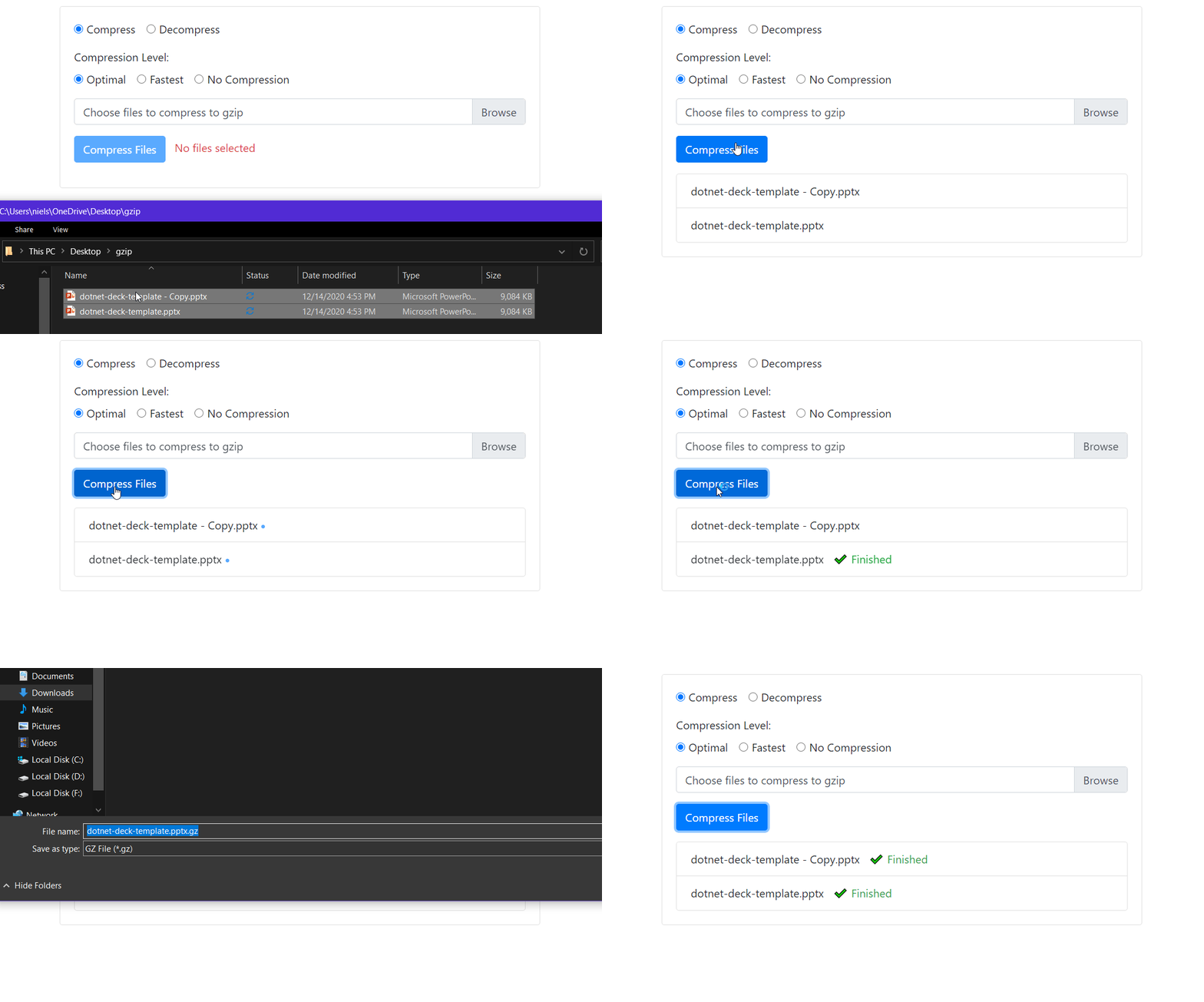
The application also works offline and is installable thanks to the PWA capabilities built-in to Blazor WASM.
Both Windows, Mac, and Linux operating systems already have built-in ways to de/compress files using GZIP, but you can also use this tool if you prefer a web application over the command line utilities. You can find the source code on GitHub.