---
title: "Swimburger - Blog - C#"
description: "Swimburger.net is a blog about .NET, cloud, web development, and whatever comes across Swimburger's plate. Swimburger.net is run by Niels Swimberghe."
canonical: "https://swimburger.net/blog/csharp/all"
---

[

<picture><img class="blog-post-card__image" src="/cdn-cgi/image/width=250,format=auto,quality=90,height=250,fit=cover/media/5ezl35cf/dotnet-logo.png" srcset="/cdn-cgi/image/width=250,format=auto,quality=90,height=250,fit=cover/media/5ezl35cf/dotnet-logo.png 250w, /cdn-cgi/image/width=375,format=auto,quality=90,height=375,fit=cover/media/5ezl35cf/dotnet-logo.png 375w, /cdn-cgi/image/width=500,format=auto,quality=90,height=500,fit=cover/media/5ezl35cf/dotnet-logo.png 500w" sizes="250px" width="250" height="250" alt=".NET logo" decoding="async" loading="lazy"></picture>

## Change the ServiceLifetime after the service has been added to the .NET ServiceCollection

3/31/2023 - .NET

Learn how to change the lifetime of services already added to a service collection.


](/blog/dotnet/change-the-servicelifetime-after-the-service-has-been-added-to-the-net-servicecollection)[

<picture><img class="blog-post-card__image" src="/cdn-cgi/image/width=250,format=auto,quality=90,height=250,fit=cover/media/c3thcerb/e5fgllibudqmqzrhto24l1mwmelv9nvhm2tidiepbro1twidth-1616.png" srcset="/cdn-cgi/image/width=250,format=auto,quality=90,height=250,fit=cover/media/c3thcerb/e5fgllibudqmqzrhto24l1mwmelv9nvhm2tidiepbro1twidth-1616.png 250w, /cdn-cgi/image/width=375,format=auto,quality=90,height=375,fit=cover/media/c3thcerb/e5fgllibudqmqzrhto24l1mwmelv9nvhm2tidiepbro1twidth-1616.png 375w, /cdn-cgi/image/width=500,format=auto,quality=90,height=500,fit=cover/media/c3thcerb/e5fgllibudqmqzrhto24l1mwmelv9nvhm2tidiepbro1twidth-1616.png 500w" sizes="250px" width="250" height="250" alt="Build a URL Shortener with .NET and Redis" decoding="async" loading="lazy"></picture>

## How to build a URL Shortener with C# .NET and Redis

3/21/2023 - .NET

Learn how to build a link shortener using C#, .NET, and Redis. You'll be using ASP.NET Core to build the URL forwarder and the System.CommandLine libraries to manage the data.


](/blog/dotnet/how-to-build-a-url-shortener-with-csharp-dotnet-and-redis)[
<picture><img class="blog-post-card__image" src="/cdn-cgi/image/width=250,format=auto,quality=90,height=250,fit=cover/media/g20lioy2/tj9v5o0oobs8fux5ohohkjcuqxnjk-nyjawidth-1616format-png.png" srcset="/cdn-cgi/image/width=250,format=auto,quality=90,height=250,fit=cover/media/g20lioy2/tj9v5o0oobs8fux5ohohkjcuqxnjk-nyjawidth-1616format-png.png 250w, /cdn-cgi/image/width=375,format=auto,quality=90,height=375,fit=cover/media/g20lioy2/tj9v5o0oobs8fux5ohohkjcuqxnjk-nyjawidth-1616format-png.png 375w, /cdn-cgi/image/width=500,format=auto,quality=90,height=500,fit=cover/media/g20lioy2/tj9v5o0oobs8fux5ohohkjcuqxnjk-nyjawidth-1616format-png.png 500w" sizes="250px" width="250" height="250" alt="Generate TwiML using Strings in C#" decoding="async" loading="lazy" style="background-color:#121c2d"></picture>

## How to generate TwiML using Strings in C#

2/21/2023 - .NET

Learn how Twilio uses webhooks and TwiML to give you control over how to respond to a call or text message. You can generate TwiML using strings in many ways, and with C# 11 you can now also use Raw String Literals.


](/blog/dotnet/how-to-generate-twiml-using-strings-in-csharp)[
<picture><img class="blog-post-card__image" src="/cdn-cgi/image/width=250,format=auto,quality=90,height=250,fit=cover/media/aiddtixz/py9oh53qzeh8edhp301dzk4s05noejgmod-_cncljfkrrwidth-1616.png" srcset="/cdn-cgi/image/width=250,format=auto,quality=90,height=250,fit=cover/media/aiddtixz/py9oh53qzeh8edhp301dzk4s05noejgmod-_cncljfkrrwidth-1616.png 250w, /cdn-cgi/image/width=375,format=auto,quality=90,height=375,fit=cover/media/aiddtixz/py9oh53qzeh8edhp301dzk4s05noejgmod-_cncljfkrrwidth-1616.png 375w, /cdn-cgi/image/width=500,format=auto,quality=90,height=500,fit=cover/media/aiddtixz/py9oh53qzeh8edhp301dzk4s05noejgmod-_cncljfkrrwidth-1616.png 500w" sizes="250px" width="250" height="250" alt="Use Raw String Literals to generate TwiML in C# 11" decoding="async" loading="lazy" style="background-color:#fff"></picture>

## Use Raw String Literals to generate TwiML in C# 11

2/15/2023 - .NET

Learn how Twilio uses webhooks and TwiML to give you control over how to respond to a call or text message. You can generate TwiML in many ways, and with C# 11 you can now also use Raw String Literals.


](/blog/dotnet/use-raw-string-literals-to-generate-twiml-in-csharp-11)[
<picture><img class="blog-post-card__image" src="/cdn-cgi/image/width=250,format=auto,quality=90,height=250,fit=cover/media/lyung0ju/use_visual_studio_port_tunneling.png" srcset="/cdn-cgi/image/width=250,format=auto,quality=90,height=250,fit=cover/media/lyung0ju/use_visual_studio_port_tunneling.png 250w, /cdn-cgi/image/width=375,format=auto,quality=90,height=375,fit=cover/media/lyung0ju/use_visual_studio_port_tunneling.png 375w, /cdn-cgi/image/width=500,format=auto,quality=90,height=500,fit=cover/media/lyung0ju/use_visual_studio_port_tunneling.png 500w" sizes="250px" width="250" height="250" alt="Use Visual Studio dev tunnels to handle Twilio Webhooks" decoding="async" loading="lazy" style="background-color:#fff"></picture>

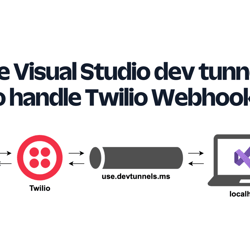
## Use Visual Studio dev tunnels to handle Twilio Webhooks

2/8/2023 - .NET

Learn how to develop webhooks on your local machine using Visual Studio dev tunnels and ASP.NET Core.


](/blog/dotnet/use-visual-studio-dev-tunnels-to-handle-twilio-webhooks)[

<picture><img class="blog-post-card__image" src="/media/j0idt3az/vb-net_logo.svg" width="250" height="250" alt="Visual Basic logo" decoding="async" loading="lazy" style="background-color:#fff"></picture>

## How to create an ASP.NET Core Minimal API with Visual Basic .NET (there's no template)

8/25/2022 - .NET

Visual Basic .NET (VB) is not dead, but it's not getting the same amount of love as C# or even F#. Luckily, all that is .NET can be used by all .NET languages including VB, so you can still use ASP.NET Core and Minimal APIs with the VB language.


](/blog/dotnet/create-an-aspdotnet-core-minimal-api-with-vbdotnet)[
<picture><img class="blog-post-card__image" src="/cdn-cgi/image/width=250,format=auto,quality=90,height=250,fit=cover,gravity=0.5x0.25765433625642226/media/fbubucw4/ios-screenshot_iphone13red_portrait.png" srcset="/cdn-cgi/image/width=250,format=auto,quality=90,height=250,fit=cover,gravity=0.5x0.25765433625642226/media/fbubucw4/ios-screenshot_iphone13red_portrait.png 250w, /cdn-cgi/image/width=375,format=auto,quality=90,height=375,fit=cover,gravity=0.5x0.25765433625642226/media/fbubucw4/ios-screenshot_iphone13red_portrait.png 375w, /cdn-cgi/image/width=500,format=auto,quality=90,height=500,fit=cover,gravity=0.5x0.25765433625642226/media/fbubucw4/ios-screenshot_iphone13red_portrait.png 500w" sizes="250px" width="250" height="250" alt="Conversation between an iPhone user and the SMS bot. The user says &quot;Hi&quot; and the bot responds with &quot;Welcome to the U.S. Representative lookup bot. Respond with your address. The user sends an address and the bot responds with &quot;Your representative is Gerald E. Connolly (Democratic Party) representing Virginia&quot;s 11th congressional district. Then the bot sends an image of the representative." decoding="async" loading="lazy" style="background-color:#0f1038"></picture>

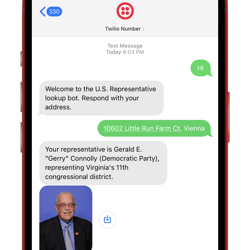
## Find your US Representatives and Congressional Districts with SMS and ASP.NET Core

8/2/2022 - .NET

Learn how to create an SMS bot that looks up U.S. Congressional Districts and Representatives using the Google Civic Information API, C#, ASP.NET Core Minimal API, and Twilio SMS.


](/blog/dotnet/find-your-us-representatives-and-congressional-districts-with-sms-and-aspdotnet-core)[

<picture><img class="blog-post-card__image" src="/cdn-cgi/image/width=250,format=auto,quality=90,height=250,fit=cover,gravity=1x0/media/0rymdlyj/how-to-bulk-email-with-c-and-net.png" srcset="/cdn-cgi/image/width=250,format=auto,quality=90,height=250,fit=cover,gravity=1x0/media/0rymdlyj/how-to-bulk-email-with-c-and-net.png 250w, /cdn-cgi/image/width=375,format=auto,quality=90,height=375,fit=cover,gravity=1x0/media/0rymdlyj/how-to-bulk-email-with-c-and-net.png 375w, /cdn-cgi/image/width=500,format=auto,quality=90,height=500,fit=cover,gravity=1x0/media/0rymdlyj/how-to-bulk-email-with-c-and-net.png 500w" sizes="250px" width="250" height="250" alt=".NET bot flying with a jetpack" decoding="async" loading="lazy" style="background-color:#0d122b"></picture>

## How to Bulk Email with C# and .NET: Zero to Hero

8/2/2022 - .NET

There are many ways to bulk email, each with their own strengths. Learn how to bulk email with C# and .NET using SendGrid.


](/blog/dotnet/how-to-bulk-email-with-csharp-and-dotnet-zero-to-hero)[

<picture><img class="blog-post-card__image" src="/cdn-cgi/image/width=250,format=auto,quality=90,height=250,fit=cover/media/kcceyrkd/dotnet-bot.png" srcset="/cdn-cgi/image/width=250,format=auto,quality=90,height=250,fit=cover/media/kcceyrkd/dotnet-bot.png 250w, /cdn-cgi/image/width=375,format=auto,quality=90,height=375,fit=cover/media/kcceyrkd/dotnet-bot.png 375w, /cdn-cgi/image/width=500,format=auto,quality=90,height=500,fit=cover/media/kcceyrkd/dotnet-bot.png 500w" sizes="250px" width="250" height="250" alt="Provide default configuration to your .NET applications" decoding="async" loading="lazy"></picture>

## Provide default configuration to your .NET applications

5/23/2022 - .NET

Learn how to provide default options into your .NET configuration to reduce redundancy


](/blog/dotnet/provide-default-configuration-to-your-dotnet-applications)[

<picture><img class="blog-post-card__image" src="/media/hygn4t2f/twilio-icon.svg" width="250" height="250" alt="Twilio logo" decoding="async" loading="lazy"></picture>

## How to better configure C# and .NET applications for SendGrid

5/12/2022 - .NET

Learn how to configure your .NET applications better for sending SendGrid emails


](/blog/dotnet/how-to-better-configure-csharp-and-dotnet-applications-for-sendgrid)[

<picture><img class="blog-post-card__image" src="/cdn-cgi/image/width=250,format=auto,quality=90,height=250,fit=cover,gravity=0.5x0.5/media/daadzjni/dotnet-bot_builder.png" srcset="/cdn-cgi/image/width=250,format=auto,quality=90,height=250,fit=cover,gravity=0.5x0.5/media/daadzjni/dotnet-bot_builder.png 250w, /cdn-cgi/image/width=375,format=auto,quality=90,height=375,fit=cover,gravity=0.5x0.5/media/daadzjni/dotnet-bot_builder.png 375w, /cdn-cgi/image/width=500,format=auto,quality=90,height=500,fit=cover,gravity=0.5x0.5/media/daadzjni/dotnet-bot_builder.png 500w" sizes="250px" width="250" height="250" alt=".NET Bot holding a browser URL bar and a toolbox" decoding="async" loading="lazy"></picture>

## How to get the full public URL of ASP.NET Core

4/24/2022 - .NET

Learn how to get the public full URL of your ASP.NET Core application


](/blog/dotnet/how-to-get-the-full-public-url-of-aspdotnet-core)[

<picture><img class="blog-post-card__image" src="/cdn-cgi/image/width=250,format=auto,quality=90,height=250,fit=cover,gravity=0.5x0.5/media/3chhuuzk/dotnet-bot_builder.png" srcset="/cdn-cgi/image/width=250,format=auto,quality=90,height=250,fit=cover,gravity=0.5x0.5/media/3chhuuzk/dotnet-bot_builder.png 250w, /cdn-cgi/image/width=375,format=auto,quality=90,height=375,fit=cover,gravity=0.5x0.5/media/3chhuuzk/dotnet-bot_builder.png 375w, /cdn-cgi/image/width=500,format=auto,quality=90,height=500,fit=cover,gravity=0.5x0.5/media/3chhuuzk/dotnet-bot_builder.png 500w" sizes="250px" width="250" height="250" alt=".NET Bot holding a browser URL bar and a toolbox" decoding="async" loading="lazy"></picture>

## How to generate absolute URLs in ASP.NET Core

4/19/2022 - .NET

Learn how to generate full absolute URLs in C# and ASP.NET Core web applications.


](/blog/dotnet/how-to-generate-absolute-urls-in-aspdotnet-core)[

<picture><img class="blog-post-card__image" src="/media/sc2jqzpo/twilio-icon.svg" width="250" height="250" alt="Twilio logo" decoding="async" loading="lazy"></picture>

## How to better configure C# and .NET applications for Twilio

4/11/2022 - .NET

Learn how to use multiple configuration sources, strongly-typed objects, and implement the options pattern in your .NET applications


](/blog/dotnet/how-to-better-configure-csharp-and-dotnet-applications-for-twilio)[

<picture><img class="blog-post-card__image" src="/cdn-cgi/image/width=250,format=auto,quality=90,height=250,fit=cover,gravity=0.9774396673856787x0.9247216931560068/media/nlup5klu/what-s-new-in-the-twilio-helper-library-for-asp-net-v5-73-0-march-2022.png" srcset="/cdn-cgi/image/width=250,format=auto,quality=90,height=250,fit=cover,gravity=0.9774396673856787x0.9247216931560068/media/nlup5klu/what-s-new-in-the-twilio-helper-library-for-asp-net-v5-73-0-march-2022.png 250w, /cdn-cgi/image/width=375,format=auto,quality=90,height=375,fit=cover,gravity=0.9774396673856787x0.9247216931560068/media/nlup5klu/what-s-new-in-the-twilio-helper-library-for-asp-net-v5-73-0-march-2022.png 375w, /cdn-cgi/image/width=500,format=auto,quality=90,height=500,fit=cover,gravity=0.9774396673856787x0.9247216931560068/media/nlup5klu/what-s-new-in-the-twilio-helper-library-for-asp-net-v5-73-0-march-2022.png 500w" sizes="250px" width="250" height="250" alt=".NET Bot holding a phone and bag with the Twilio logo" decoding="async" loading="lazy"></picture>

## What's new in the Twilio helper library for ASP.NET (v5.73.0 - April 2022)

4/6/2022 - .NET

Learn about what's new and old with the Twilio helper library for ASP.NET in version 5.73.0


](/blog/dotnet/whats-new-in-the-twilio-helper-library-for-aspdotnet-april-2022)[

<picture><img class="blog-post-card__image" src="/media/rffnhcsk/twilio-icon.svg" width="250" height="250" alt="Twilio logo" decoding="async" loading="lazy"></picture>

## How to Send SMS without a Phone Number using C# .NET and an Alphanumeric Sender ID

4/5/2022 - .NET

You don't always need a phone number to send SMS! Learn how to send text messages using Alphanumeric Sender IDs.


](/blog/dotnet/send-sms-without-phone-number-using-csharp-dotnet-and-alphanumeric-sender-id)[

<picture><img class="blog-post-card__image" src="/cdn-cgi/image/width=250,format=auto,quality=90,height=250,fit=cover,gravity=1x1/media/jn2ohzgd/how-to-prevent-email-html-injection-in-c-and-net.png" srcset="/cdn-cgi/image/width=250,format=auto,quality=90,height=250,fit=cover,gravity=1x1/media/jn2ohzgd/how-to-prevent-email-html-injection-in-c-and-net.png 250w, /cdn-cgi/image/width=375,format=auto,quality=90,height=375,fit=cover,gravity=1x1/media/jn2ohzgd/how-to-prevent-email-html-injection-in-c-and-net.png 375w, /cdn-cgi/image/width=500,format=auto,quality=90,height=500,fit=cover,gravity=1x1/media/jn2ohzgd/how-to-prevent-email-html-injection-in-c-and-net.png 500w" sizes="250px" width="250" height="250" alt="How to prevent Email HTML injection in C# and .NET" decoding="async" loading="lazy" style="background-color:#06033a"></picture>

## How to prevent email HTML injection in C# and .NET

4/1/2022 - .NET

Learn how bad actors can inject HTML into your emails in your C# .NET applications and how to mitigate it.


](/blog/dotnet/how-to-prevent-email-html-injection-in-csharp-and-dotnet)[

<picture><img class="blog-post-card__image" src="/cdn-cgi/image/width=250,format=auto,quality=90,height=250,fit=cover,gravity=0.5x0.5/media/xw3pvku3/sendgrid-logomark.png" srcset="/cdn-cgi/image/width=250,format=auto,quality=90,height=250,fit=cover,gravity=0.5x0.5/media/xw3pvku3/sendgrid-logomark.png 250w, /cdn-cgi/image/width=375,format=auto,quality=90,height=375,fit=cover,gravity=0.5x0.5/media/xw3pvku3/sendgrid-logomark.png 375w, /cdn-cgi/image/width=500,format=auto,quality=90,height=500,fit=cover,gravity=0.5x0.5/media/xw3pvku3/sendgrid-logomark.png 500w" sizes="250px" width="250" height="250" alt="Twilio SendGrid logo" decoding="async" loading="lazy"></picture>

## How to send ASP.NET Core Identity emails with Twilio SendGrid

3/15/2022 - .NET

Learn how to use SendGrid to send account verification and password recovery emails in ASP.NET Core


](/blog/dotnet/send-aspdotnet-core-identity-emails-with-twilio-sendgrid)[

<picture><img class="blog-post-card__image" src="/cdn-cgi/image/width=250,format=auto,quality=90,height=250,fit=cover,gravity=0.5x0.5/media/0y4b3pnt/sendgrid-logomark.png" srcset="/cdn-cgi/image/width=250,format=auto,quality=90,height=250,fit=cover,gravity=0.5x0.5/media/0y4b3pnt/sendgrid-logomark.png 250w, /cdn-cgi/image/width=375,format=auto,quality=90,height=375,fit=cover,gravity=0.5x0.5/media/0y4b3pnt/sendgrid-logomark.png 375w, /cdn-cgi/image/width=500,format=auto,quality=90,height=500,fit=cover,gravity=0.5x0.5/media/0y4b3pnt/sendgrid-logomark.png 500w" sizes="250px" width="250" height="250" alt="Twilio SendGrid logo" decoding="async" loading="lazy" style="background-color:#fff"></picture>

## How to send Email in C# .NET using SMTP and SendGrid

3/8/2022 - .NET

You can use the SendGrid APIs to send emails, but you can also use SMTP with SendGrid. Learn how to send emails using SMTP, SendGrid C# .NET


](/blog/dotnet/how-to-send-email-in-csharp-dotnet-using-smtp-and-sendgrid)[

<picture><img class="blog-post-card__image" src="/media/vgye2zpp/twilio-mark-red-e1886ea5f.svg" width="250" height="250" alt="Twilio logo" decoding="async" loading="lazy" style="background-color:#fff"></picture>

## Send Scheduled SMS with C# .NET and Twilio Programmable Messaging

2/4/2022 - .NET

Learn how to schedule SMS with C# .NET and Twilio Messaging's latest feature: Scheduled Messaging!


](/blog/dotnet/send-scheduled-sms-with-csharp-dotnet-and-twilio-programmable-messaging)[

<picture><img class="blog-post-card__image" src="/media/dikleklg/dotnet-bot_builder.svg" width="250" height="250" alt=".NET Bot" decoding="async" loading="lazy" style="background-color:#fff"></picture>

## How to get ASP.NET Core's local server URLs

1/25/2022 - .NET

Learn how to access the ASP.NET Core's local server URLs in Program.cs, in controllers using Dependency Injection, and in IHostedService or BackgroundService.


](/blog/dotnet/how-to-get-aspdotnet-core-server-urls)[

<picture><img class="blog-post-card__image" src="/cdn-cgi/image/width=250,format=auto,quality=90,height=250,fit=cover,gravity=0.5x0.5/media/g3cl40tv/sendgrid-logomark.png" srcset="/cdn-cgi/image/width=250,format=auto,quality=90,height=250,fit=cover,gravity=0.5x0.5/media/g3cl40tv/sendgrid-logomark.png 250w, /cdn-cgi/image/width=375,format=auto,quality=90,height=375,fit=cover,gravity=0.5x0.5/media/g3cl40tv/sendgrid-logomark.png 375w, /cdn-cgi/image/width=500,format=auto,quality=90,height=500,fit=cover,gravity=0.5x0.5/media/g3cl40tv/sendgrid-logomark.png 500w" sizes="250px" width="250" height="250" alt="Twilio SendGrid logo" decoding="async" loading="lazy" style="background-color:#fff"></picture>

## How to send recurring emails in C# .NET using SendGrid and Quartz.NET

1/19/2022 - .NET

Learn how to send recurring emails with C# .NET using Quartz.NET and SendGrid's APIs


](/blog/dotnet/how-to-send-recurring-emails-in-csharp-dotnet-using-sendgrid-and-quartzdotnet)[

<picture><img class="blog-post-card__image" src="/cdn-cgi/image/width=250,format=auto,quality=90,height=250,fit=cover,gravity=0.5x0.5/media/3hfbcxrc/sendgrid-logomark.png" srcset="/cdn-cgi/image/width=250,format=auto,quality=90,height=250,fit=cover,gravity=0.5x0.5/media/3hfbcxrc/sendgrid-logomark.png 250w, /cdn-cgi/image/width=375,format=auto,quality=90,height=375,fit=cover,gravity=0.5x0.5/media/3hfbcxrc/sendgrid-logomark.png 375w, /cdn-cgi/image/width=500,format=auto,quality=90,height=500,fit=cover,gravity=0.5x0.5/media/3hfbcxrc/sendgrid-logomark.png 500w" sizes="250px" width="250" height="250" alt="Twilio SendGrid logo" decoding="async" loading="lazy" style="background-color:#fff"></picture>

## Send Emails using the SendGrid API with .NET 6 and C#

12/13/2021 - .NET

Learn how to send emails using the SendGrid API with a .NET 6 console application and C#


](/blog/dotnet/send-emails-using-the-sendgrid-api-with-dotnet-6-and-csharp)[

<picture><img class="blog-post-card__image" src="/cdn-cgi/image/width=250,format=auto,quality=90,height=250,fit=cover,gravity=0.4981684981684982x0.4981684981684982/media/etqdhqzv/dotnet-bot_presenting.png" srcset="/cdn-cgi/image/width=250,format=auto,quality=90,height=250,fit=cover,gravity=0.4981684981684982x0.4981684981684982/media/etqdhqzv/dotnet-bot_presenting.png 250w, /cdn-cgi/image/width=375,format=auto,quality=90,height=375,fit=cover,gravity=0.4981684981684982x0.4981684981684982/media/etqdhqzv/dotnet-bot_presenting.png 375w, /cdn-cgi/image/width=500,format=auto,quality=90,height=500,fit=cover,gravity=0.4981684981684982x0.4981684981684982/media/etqdhqzv/dotnet-bot_presenting.png 500w" sizes="250px" width="250" height="250" alt=".NET bot writing on whitebpard" decoding="async" loading="lazy" style="background-color:#fff"></picture>

## Generic Linear Search/Sequential Search for a sequence in C# .NET

8/6/2021 - .NET

To practice algorithms and data structures, I reimplemented Linear Search/Sequential Search for a sequence using C#'s generic type parameters.


](/blog/dotnet/generic-linear-search-sequential-search-for-a-sequence-in-csharp-dotnet)[

<picture><img class="blog-post-card__image" src="/cdn-cgi/image/width=250,format=auto,quality=90,height=250,fit=cover,gravity=0.4981684981684982x0.4981684981684982/media/uwkijblh/dotnet-bot_presenting.png" srcset="/cdn-cgi/image/width=250,format=auto,quality=90,height=250,fit=cover,gravity=0.4981684981684982x0.4981684981684982/media/uwkijblh/dotnet-bot_presenting.png 250w, /cdn-cgi/image/width=375,format=auto,quality=90,height=375,fit=cover,gravity=0.4981684981684982x0.4981684981684982/media/uwkijblh/dotnet-bot_presenting.png 375w, /cdn-cgi/image/width=500,format=auto,quality=90,height=500,fit=cover,gravity=0.4981684981684982x0.4981684981684982/media/uwkijblh/dotnet-bot_presenting.png 500w" sizes="250px" width="250" height="250" alt=".NET bot writing on whitebpard" decoding="async" loading="lazy" style="background-color:#fff"></picture>

## Generic Boyer–Moore–Horspool algorithm in C# .NET

8/6/2021 - .NET

To practice algorithms and data structures, I reimplemented Boyer–Moore–Horspool algorithm for a sequence using C#'s generic type parameters.


](/blog/dotnet/generic-boyer-moore-horspool-algorithm-in-csharp-dotnet)[

<picture><img class="blog-post-card__image" src="/cdn-cgi/image/width=250,format=auto,quality=90,height=250,fit=cover,gravity=0.4981684981684982x0.4981684981684982/media/dq2fnspy/dotnet-bot_presenting.png" srcset="/cdn-cgi/image/width=250,format=auto,quality=90,height=250,fit=cover,gravity=0.4981684981684982x0.4981684981684982/media/dq2fnspy/dotnet-bot_presenting.png 250w, /cdn-cgi/image/width=375,format=auto,quality=90,height=375,fit=cover,gravity=0.4981684981684982x0.4981684981684982/media/dq2fnspy/dotnet-bot_presenting.png 375w, /cdn-cgi/image/width=500,format=auto,quality=90,height=500,fit=cover,gravity=0.4981684981684982x0.4981684981684982/media/dq2fnspy/dotnet-bot_presenting.png 500w" sizes="250px" width="250" height="250" alt=".NET bot writing on whitebpard" decoding="async" loading="lazy" style="background-color:#fff"></picture>

## Generic Binary Search in C# .NET

8/5/2021 - .NET

To practice algorithms and data structures, I reimplemented binary search using C#'s generic type parameters.


](/blog/dotnet/generic-binary-search-in-csharp-dotnet)[

<picture><img class="blog-post-card__image" src="/cdn-cgi/image/width=250,format=auto,quality=90,height=250,fit=cover,gravity=0.4981684981684982x0.4981684981684982/media/yuojqreb/dotnet-bot_presenting.png" srcset="/cdn-cgi/image/width=250,format=auto,quality=90,height=250,fit=cover,gravity=0.4981684981684982x0.4981684981684982/media/yuojqreb/dotnet-bot_presenting.png 250w, /cdn-cgi/image/width=375,format=auto,quality=90,height=375,fit=cover,gravity=0.4981684981684982x0.4981684981684982/media/yuojqreb/dotnet-bot_presenting.png 375w, /cdn-cgi/image/width=500,format=auto,quality=90,height=500,fit=cover,gravity=0.4981684981684982x0.4981684981684982/media/yuojqreb/dotnet-bot_presenting.png 500w" sizes="250px" width="250" height="250" alt=".NET bot writing on whitebpard" decoding="async" loading="lazy" style="background-color:#fff"></picture>

## Generic Insertion Sort in C# .NET

8/4/2021 - .NET

To practice algorithms and data structures, I reimplemented insertion sort using C#'s generic type parameters.


](/blog/dotnet/generic-insertion-sort-in-csharp-dotnet)[

<picture><img class="blog-post-card__image" src="/cdn-cgi/image/width=250,format=auto,quality=90,height=250,fit=cover,gravity=0.4981684981684982x0.4981684981684982/media/hz3pd4p2/dotnet-bot_presenting.png" srcset="/cdn-cgi/image/width=250,format=auto,quality=90,height=250,fit=cover,gravity=0.4981684981684982x0.4981684981684982/media/hz3pd4p2/dotnet-bot_presenting.png 250w, /cdn-cgi/image/width=375,format=auto,quality=90,height=375,fit=cover,gravity=0.4981684981684982x0.4981684981684982/media/hz3pd4p2/dotnet-bot_presenting.png 375w, /cdn-cgi/image/width=500,format=auto,quality=90,height=500,fit=cover,gravity=0.4981684981684982x0.4981684981684982/media/hz3pd4p2/dotnet-bot_presenting.png 500w" sizes="250px" width="250" height="250" alt=".NET bot writing on whitebpard" decoding="async" loading="lazy" style="background-color:#fff"></picture>

## Generic Quick Sort in C# .NET

8/4/2021 - .NET

To practice algorithms and data structures, I reimplemented Quick Sort using C#'s generic type parameters.


](/blog/dotnet/generic-quick-sort-in-csharp-dotnet)[

<picture><img class="blog-post-card__image" src="/cdn-cgi/image/width=250,format=auto,quality=90,height=250,fit=cover,gravity=0.4981684981684982x0.4981684981684982/media/xphezdes/dotnet-bot_presenting.png" srcset="/cdn-cgi/image/width=250,format=auto,quality=90,height=250,fit=cover,gravity=0.4981684981684982x0.4981684981684982/media/xphezdes/dotnet-bot_presenting.png 250w, /cdn-cgi/image/width=375,format=auto,quality=90,height=375,fit=cover,gravity=0.4981684981684982x0.4981684981684982/media/xphezdes/dotnet-bot_presenting.png 375w, /cdn-cgi/image/width=500,format=auto,quality=90,height=500,fit=cover,gravity=0.4981684981684982x0.4981684981684982/media/xphezdes/dotnet-bot_presenting.png 500w" sizes="250px" width="250" height="250" alt=".NET bot writing on whitebpard" decoding="async" loading="lazy" style="background-color:#fff"></picture>

## Generic Merge Sort in C# .NET

8/3/2021 - .NET

To practice algorithms and data structures, I reimplemented merge sort using C#'s generic type parameters.


](/blog/dotnet/generic-merge-sort-in-csharp-dotnet)[

<picture><img class="blog-post-card__image" src="/cdn-cgi/image/width=250,format=auto,quality=90,height=250,fit=cover/media/415kogkd/dotnet-bot_presenting.png" srcset="/cdn-cgi/image/width=250,format=auto,quality=90,height=250,fit=cover/media/415kogkd/dotnet-bot_presenting.png 250w, /cdn-cgi/image/width=375,format=auto,quality=90,height=375,fit=cover/media/415kogkd/dotnet-bot_presenting.png 375w, /cdn-cgi/image/width=500,format=auto,quality=90,height=500,fit=cover/media/415kogkd/dotnet-bot_presenting.png 500w" sizes="250px" width="250" height="250" alt=".NET bot writing on whitebpard" decoding="async" loading="lazy" style="background-color:#fff"></picture>

## Generic Bubble Sort in C# .NET

8/1/2021 - .NET

To practice algorithms and data structures, I reimplemented bubble sort using C#'s generic type parameters.


](/blog/dotnet/generic-bubble-sort-in-csharp-dotnet)[
<picture><img class="blog-post-card__image" src="/cdn-cgi/image/width=250,format=auto,quality=90,height=250,fit=cover,gravity=0.5x0.5002459542608448/media/23pjfhze/chrome-csharp-square.png" srcset="/cdn-cgi/image/width=250,format=auto,quality=90,height=250,fit=cover,gravity=0.5x0.5002459542608448/media/23pjfhze/chrome-csharp-square.png 250w, /cdn-cgi/image/width=375,format=auto,quality=90,height=375,fit=cover,gravity=0.5x0.5002459542608448/media/23pjfhze/chrome-csharp-square.png 375w, /cdn-cgi/image/width=500,format=auto,quality=90,height=500,fit=cover,gravity=0.5x0.5002459542608448/media/23pjfhze/chrome-csharp-square.png 500w" sizes="250px" width="250" height="250" alt="C# and Chrome logo" decoding="async" loading="lazy" style="background-color:#0c0c0c"></picture>

## Download the right ChromeDriver version & keep it up to date on Windows/Linux/macOS using C# .NET

3/7/2021 - .NET

Chrome frequently updates automatically causing ChromeDriver versions to mismatch. Using C# .NET you can download the correct version of the ChromeDriver and keep it up-to-date.


](/blog/dotnet/download-the-right-chromedriver-version-and-keep-it-up-to-date-on-windows-linux-macos-using-csharp-dotnet)[

<picture><img class="blog-post-card__image" src="/cdn-cgi/image/width=250,format=auto,quality=90,height=250,fit=cover,gravity=0.5x0.5/media/eryi1kgw/twilio-authentication-square.png" srcset="/cdn-cgi/image/width=250,format=auto,quality=90,height=250,fit=cover,gravity=0.5x0.5/media/eryi1kgw/twilio-authentication-square.png 250w, /cdn-cgi/image/width=375,format=auto,quality=90,height=375,fit=cover,gravity=0.5x0.5/media/eryi1kgw/twilio-authentication-square.png 375w, /cdn-cgi/image/width=500,format=auto,quality=90,height=500,fit=cover,gravity=0.5x0.5/media/eryi1kgw/twilio-authentication-square.png 500w" sizes="250px" width="250" height="250" alt="An illustration of a lock and a key. The key handle is in the shape of the Twilio logo." decoding="async" loading="lazy" style="background-color:#fff"></picture>

## Better Authentication with Twilio API Keys

3/1/2021 - .NET

API Keys are now the preferred way to authenticate with Twilio's API. You can create as many API Keys as you need and remove them if they are compromised or no longer used.


](/blog/dotnet/better-authentication-with-twilio-api-keys)[

<picture><img class="blog-post-card__image" src="/cdn-cgi/image/width=250,format=auto,quality=90,height=250,fit=cover,gravity=0.5x0.5002459542608448/media/ggrmwooo/dotnet-yarp-square.png" srcset="/cdn-cgi/image/width=250,format=auto,quality=90,height=250,fit=cover,gravity=0.5x0.5002459542608448/media/ggrmwooo/dotnet-yarp-square.png 250w, /cdn-cgi/image/width=375,format=auto,quality=90,height=375,fit=cover,gravity=0.5x0.5002459542608448/media/ggrmwooo/dotnet-yarp-square.png 375w, /cdn-cgi/image/width=500,format=auto,quality=90,height=500,fit=cover,gravity=0.5x0.5002459542608448/media/ggrmwooo/dotnet-yarp-square.png 500w" sizes="250px" width="250" height="250" alt=".NET Bot building an application" decoding="async" loading="lazy" style="background-color:#fff"></picture>

## Use project Tye to host Blazor WASM and ASP.NET Web API on a single origin to avoid CORS

2/14/2021 - .NET

Using Microsoft's experimental Project Tye, you configured the proxy to forward requests to '/api' to the Web API, and all other requests to the Blazor WASM client.


](/blog/dotnet/use-project-tye-to-host-blazor-wasm-and-aspdotnet-web-api-on-a-single-origin)[

<picture><img class="blog-post-card__image" src="/cdn-cgi/image/width=250,format=auto,quality=90,height=250,fit=cover,gravity=0.5x0.5/media/3cxh1whu/dotnet-yarp-square.png" srcset="/cdn-cgi/image/width=250,format=auto,quality=90,height=250,fit=cover,gravity=0.5x0.5/media/3cxh1whu/dotnet-yarp-square.png 250w, /cdn-cgi/image/width=375,format=auto,quality=90,height=375,fit=cover,gravity=0.5x0.5/media/3cxh1whu/dotnet-yarp-square.png 375w, /cdn-cgi/image/width=500,format=auto,quality=90,height=500,fit=cover,gravity=0.5x0.5/media/3cxh1whu/dotnet-yarp-square.png 500w" sizes="250px" width="250" height="250" alt=".NET Bot building an application" decoding="async" loading="lazy" style="background-color:#fff"></picture>

## Use YARP to host client and API server on a single origin to avoid CORS

1/24/2021 - .NET

Using Microsoft's new reverse proxy "YARP", you configured the proxy to forward requests to '/api' to the Web API, and all other requests to the Blazor WASM client.


](/blog/dotnet/use-yarp-to-host-client-and-api-server-on-a-single-origin)[
<picture><img class="blog-post-card__image" src="/cdn-cgi/image/width=250,format=auto,quality=90,height=250,fit=cover,gravity=0.5x0.5/media/sabcadlf/blazor-github-firebase-square.png" srcset="/cdn-cgi/image/width=250,format=auto,quality=90,height=250,fit=cover,gravity=0.5x0.5/media/sabcadlf/blazor-github-firebase-square.png 250w, /cdn-cgi/image/width=375,format=auto,quality=90,height=375,fit=cover,gravity=0.5x0.5/media/sabcadlf/blazor-github-firebase-square.png 375w, /cdn-cgi/image/width=500,format=auto,quality=90,height=500,fit=cover,gravity=0.5x0.5/media/sabcadlf/blazor-github-firebase-square.png 500w" sizes="250px" width="250" height="250" alt=" Blazor logo next to an arrow pointing to the GitHub logo next to a double arrow pointing from the GitHub logo to the Firebase Hosting logo " decoding="async" loading="lazy" style="background-color:#fff"></picture>

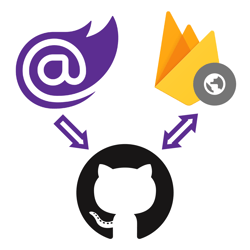
## How to deploy Blazor WebAssembly to Firebase Hosting

12/27/2020 - .NET

With ASP.NET Blazor WebAssembly you can create .NET applications that run completely inside of the browser. The output of a Blazor WASM project are all static files. You can deploy these applications to various static site hosts like Firebase Hosting.


](/blog/dotnet/how-to-deploy-blazor-webassembly-to-firebase-hosting)[

<picture><img class="blog-post-card__image" src="/cdn-cgi/image/width=250,format=auto,quality=90,height=250,fit=cover,gravity=0.4982464937912058x0.4982464937912058/media/ad2llt0w/javascript-in-blazor-ijso-square.png" srcset="/cdn-cgi/image/width=250,format=auto,quality=90,height=250,fit=cover,gravity=0.4982464937912058x0.4982464937912058/media/ad2llt0w/javascript-in-blazor-ijso-square.png 250w, /cdn-cgi/image/width=375,format=auto,quality=90,height=375,fit=cover,gravity=0.4982464937912058x0.4982464937912058/media/ad2llt0w/javascript-in-blazor-ijso-square.png 375w, /cdn-cgi/image/width=500,format=auto,quality=90,height=500,fit=cover,gravity=0.4982464937912058x0.4982464937912058/media/ad2llt0w/javascript-in-blazor-ijso-square.png 500w" sizes="250px" width="250" height="250" alt="Blazor next to JavaScript logo" decoding="async" loading="lazy" style="background-color:#fafafa"></picture>

## Interacting with JavaScript Objects using the new IJSObjectReference in Blazor

12/21/2020 - .NET

A new type is introduced in .NET 5 called IJSObjectReference. This type holds a reference to a JavaScript object and can be used to invoke functions available on that JavaScript object.


](/blog/dotnet/interacting-with-javascript-objects-using-the-new-ijsobjectreference-in-blazor)[

<picture><img class="blog-post-card__image" src="/cdn-cgi/image/width=250,format=auto,quality=90,height=250,fit=cover,gravity=0.4982464937912058x0.4984916607169275/media/ifzbm55o/dotnet-framework-square.png" srcset="/cdn-cgi/image/width=250,format=auto,quality=90,height=250,fit=cover,gravity=0.4982464937912058x0.4984916607169275/media/ifzbm55o/dotnet-framework-square.png 250w, /cdn-cgi/image/width=375,format=auto,quality=90,height=375,fit=cover,gravity=0.4982464937912058x0.4984916607169275/media/ifzbm55o/dotnet-framework-square.png 375w, /cdn-cgi/image/width=500,format=auto,quality=90,height=500,fit=cover,gravity=0.4982464937912058x0.4984916607169275/media/ifzbm55o/dotnet-framework-square.png 500w" sizes="250px" width="250" height="250" alt=".NET Bot" decoding="async" loading="lazy" style="background-color:#fff"></picture>

## Harden Anti-Forgery Tokens with IAntiforgeryAdditionalDataProvider in ASP.NET Core

12/13/2020 - .NET

Using IAntiforgeryAdditionalDataProvider you can harden ASP.NET Core's anti-forgery token feature by adding additional data and validating the additional data.


](/blog/dotnet/harden-anti-forgery-tokens-with-iantiforgeryadditionaldataprovider-in-aspnet-core)[

<picture><img class="blog-post-card__image" src="/cdn-cgi/image/width=250,format=auto,quality=90,height=250,fit=cover,gravity=0.5x0.5/media/3pthemoc/dotnet-logo.png" srcset="/cdn-cgi/image/width=250,format=auto,quality=90,height=250,fit=cover,gravity=0.5x0.5/media/3pthemoc/dotnet-logo.png 250w, /cdn-cgi/image/width=375,format=auto,quality=90,height=375,fit=cover,gravity=0.5x0.5/media/3pthemoc/dotnet-logo.png 375w, /cdn-cgi/image/width=500,format=auto,quality=90,height=500,fit=cover,gravity=0.5x0.5/media/3pthemoc/dotnet-logo.png 500w" sizes="250px" width="250" height="250" alt=".NET logo" decoding="async" loading="lazy" style="background-color:#512bd4"></picture>

## Rethrowing your exceptions wrong in .NET could erase your stacktrace

12/4/2020 - .NET

You may be erasing your stacktrace if you are catching and rethrowing exceptions the wrong way. This could make debugging a nightmare because you don't know where the exception was originally thrown.


](/blog/dotnet/rethrowing-your-exceptions-wrong-in-dotnet-could-erase-your-stacktrace)[

<picture><img class="blog-post-card__image" src="/cdn-cgi/image/width=250,format=auto,quality=90,height=250,fit=cover,gravity=0.5174072383681385x0.4690625146777922/media/mpim22mx/ndepend-logo.png" srcset="/cdn-cgi/image/width=250,format=auto,quality=90,height=250,fit=cover,gravity=0.5174072383681385x0.4690625146777922/media/mpim22mx/ndepend-logo.png 250w, /cdn-cgi/image/width=375,format=auto,quality=90,height=375,fit=cover,gravity=0.5174072383681385x0.4690625146777922/media/mpim22mx/ndepend-logo.png 375w, /cdn-cgi/image/width=500,format=auto,quality=90,height=500,fit=cover,gravity=0.5174072383681385x0.4690625146777922/media/mpim22mx/ndepend-logo.png 500w" sizes="250px" width="250" height="250" alt="NDepend Logo" decoding="async" loading="lazy" style="background-color:#0077C6"></picture>

## Checking out NDepend: a static code analysis tool for .NET

8/11/2020 - .NET

NDepend is a static code analysis tool (SAST) for .NET. NDepend will analyze your code for code smells, best practices, complexity, dead code, naming conventions, and much more.


](/blog/dotnet/checking-out-ndepend-a-static-code-analysis-tool-for-dotnet)[

<picture><img class="blog-post-card__image" src="/cdn-cgi/image/width=250,format=auto,quality=90,height=250,fit=cover,gravity=0.5x0.5/media/qbfo2sl3/dnnlogo.png" srcset="/cdn-cgi/image/width=250,format=auto,quality=90,height=250,fit=cover,gravity=0.5x0.5/media/qbfo2sl3/dnnlogo.png 250w, /cdn-cgi/image/width=375,format=auto,quality=90,height=375,fit=cover,gravity=0.5x0.5/media/qbfo2sl3/dnnlogo.png 375w, /cdn-cgi/image/width=500,format=auto,quality=90,height=500,fit=cover,gravity=0.5x0.5/media/qbfo2sl3/dnnlogo.png 500w" sizes="250px" width="250" height="250" alt="DNN Logo" decoding="async" loading="lazy" style="background-color:#fff"></picture>

## How to add Hangfire to DNN

8/6/2020 - .NET

DNN already has an excellent built-in scheduler you can use to schedule tasks. But you may be more familiar with and prefer Hangfire for running background jobs. These instruction will walk you through configuring Hangfire in with DNN.


](/blog/dotnet/how-to-add-hangfire-to-dnn)[
<picture><img class="blog-post-card__image" src="/cdn-cgi/image/width=250,format=auto,quality=90,height=250,fit=cover,gravity=0.0710139009711151x0.22766818987527038/media/i2knqbmn/capture.png" srcset="/cdn-cgi/image/width=250,format=auto,quality=90,height=250,fit=cover,gravity=0.0710139009711151x0.22766818987527038/media/i2knqbmn/capture.png 250w, /cdn-cgi/image/width=375,format=auto,quality=90,height=375,fit=cover,gravity=0.0710139009711151x0.22766818987527038/media/i2knqbmn/capture.png 375w, /cdn-cgi/image/width=500,format=auto,quality=90,height=500,fit=cover,gravity=0.0710139009711151x0.22766818987527038/media/i2knqbmn/capture.png 500w" sizes="250px" width="250" height="250" alt="Screenshot of NCrontab Expression Tester tool" decoding="async" loading="lazy" style="background-color:#fff"></picture>

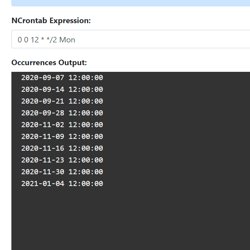
## Introducing NCrontab Tester (Blazor WebAssembly)

8/5/2020 - .NET

Introducing NCrontab Expression tester, made using NCrontab .NET library, Blazor WebAssembly, and hosted on Azure Static Web Apps


](/blog/dotnet/introducing-ncrontab-tester-blazor-webassembly)[

<picture><img class="blog-post-card__image" src="/cdn-cgi/image/width=250,format=auto,quality=90,height=250,fit=cover,gravity=0.5x0.5/media/kaklx3z1/dotnet-logo.png" srcset="/cdn-cgi/image/width=250,format=auto,quality=90,height=250,fit=cover,gravity=0.5x0.5/media/kaklx3z1/dotnet-logo.png 250w, /cdn-cgi/image/width=375,format=auto,quality=90,height=375,fit=cover,gravity=0.5x0.5/media/kaklx3z1/dotnet-logo.png 375w, /cdn-cgi/image/width=500,format=auto,quality=90,height=500,fit=cover,gravity=0.5x0.5/media/kaklx3z1/dotnet-logo.png 500w" sizes="250px" width="250" height="250" alt=".NET" decoding="async" loading="lazy" style="background-color:#512BD4"></picture>

## Download .NET Windows Theme based on the new .NET Brand GitHub repo

6/15/2020 - .NET

The .NET GitHub org has a new Brand repository containing a detailed Brand guidelines PDF, logo's, illustrations, and wallpapers. Using these resources I put together a Windows Theme for .NET which you can download here!


](/blog/dotnet/download-dotnet-windows-theme-based-on-the-new-dotnet-brand-github-repo)[

<picture><img class="blog-post-card__image" src="/cdn-cgi/image/width=250,format=auto,quality=90,height=250,fit=cover,gravity=0.5x0.5000116669388952/media/fodlodm5/dotnet_redhat-square.png" srcset="/cdn-cgi/image/width=250,format=auto,quality=90,height=250,fit=cover,gravity=0.5x0.5000116669388952/media/fodlodm5/dotnet_redhat-square.png 250w, /cdn-cgi/image/width=375,format=auto,quality=90,height=375,fit=cover,gravity=0.5x0.5000116669388952/media/fodlodm5/dotnet_redhat-square.png 375w, /cdn-cgi/image/width=500,format=auto,quality=90,height=500,fit=cover,gravity=0.5x0.5000116669388952/media/fodlodm5/dotnet_redhat-square.png 500w" sizes="250px" width="250" height="250" alt=".NET Core logo + Dotnet bot wearing Red Hat" decoding="async" loading="lazy" style="background-color:#2D2D2D"></picture>

## How to run ASP.NET Core Web Application as a service on Linux without reverse proxy, no NGINX or Apache

2/10/2020 - .NET

This article walks us through running a ASP.NET Core web application on Linux (RHEL) using systemd. The end goal is to serve ASP.NET Core directly via the built-in Kestrel webserver over port 80/443.


](/blog/dotnet/how-to-run-aspnet-core-as-a-service-on-linux)[

<picture><img class="blog-post-card__image" src="/cdn-cgi/image/width=250,format=auto,quality=90,height=250,fit=cover,gravity=0.5x0.5/media/hlph3suu/dotnet_redhat-square.png" srcset="/cdn-cgi/image/width=250,format=auto,quality=90,height=250,fit=cover,gravity=0.5x0.5/media/hlph3suu/dotnet_redhat-square.png 250w, /cdn-cgi/image/width=375,format=auto,quality=90,height=375,fit=cover,gravity=0.5x0.5/media/hlph3suu/dotnet_redhat-square.png 375w, /cdn-cgi/image/width=500,format=auto,quality=90,height=500,fit=cover,gravity=0.5x0.5/media/hlph3suu/dotnet_redhat-square.png 500w" sizes="250px" width="250" height="250" alt=".NET Core logo + Dotnet bot wearing Red Hat" decoding="async" loading="lazy" style="background-color:#2D2D2D"></picture>

## How to run a .NET Core console app as a service using Systemd on Linux (RHEL)

1/31/2020 - .NET

Let's learn how to run a .NET Core console application on systemd. After running a console app as a service, we'll upgrade to using the dotnet core worker service template designed for long running services/daemons. Lastly, we'll add the systemd package integration.


](/blog/dotnet/how-to-run-a-dotnet-core-console-app-as-a-service-using-systemd-on-linux)[

<picture><img class="blog-post-card__image" src="/cdn-cgi/image/width=250,format=auto,quality=90,height=250,fit=cover/media/0xmbgtlb/umbraco-images-square.png" srcset="/cdn-cgi/image/width=250,format=auto,quality=90,height=250,fit=cover/media/0xmbgtlb/umbraco-images-square.png 250w, /cdn-cgi/image/width=375,format=auto,quality=90,height=375,fit=cover/media/0xmbgtlb/umbraco-images-square.png 375w, /cdn-cgi/image/width=500,format=auto,quality=90,height=500,fit=cover/media/0xmbgtlb/umbraco-images-square.png 500w" sizes="250px" width="250" height="250" alt="Phone/Tablet/Laptop displaying Umbraco logo" decoding="async" loading="lazy" style="background-color:#2D2D2D"></picture>

## Implementing Responsive Images in Umbraco

12/24/2019 - Umbraco

The web platform has responsive image capabilities such as the srcset-attribute, sizes-attribute, and the picture-element. These capabilities may seem daunting sometimes. We'll learn how to make them available and maintainable to Umbraco content editors.


](/blog/umbraco/implementing-responsive-images-in-umbraco)[

<picture><img class="blog-post-card__image" src="/cdn-cgi/image/width=250,format=auto,quality=90,height=250,fit=cover,gravity=0.5x0.5/media/ghtp0qun/vscode-complain-dotnet-redhat.png" srcset="/cdn-cgi/image/width=250,format=auto,quality=90,height=250,fit=cover,gravity=0.5x0.5/media/ghtp0qun/vscode-complain-dotnet-redhat.png 250w, /cdn-cgi/image/width=375,format=auto,quality=90,height=375,fit=cover,gravity=0.5x0.5/media/ghtp0qun/vscode-complain-dotnet-redhat.png 375w, /cdn-cgi/image/width=500,format=auto,quality=90,height=500,fit=cover,gravity=0.5x0.5/media/ghtp0qun/vscode-complain-dotnet-redhat.png 500w" sizes="250px" width="250" height="250" alt="Visual Studio Code logo cursing at .NET Core logo with Red Hat logo" decoding="async" loading="lazy" style="background-color:#fff"></picture>

## VS Code C# Extension not working in Remote SSH mode on Red Hat Linux? Here's a workaround

12/18/2019 - .NET

Unfortunately, the C# Extension for VS Code malfunctions when following the official steps to install .NET Core on Red Hat and using the Remote SSH extension. OmniSharp is not able to find the .NET Core installation but we can work around this.


](/blog/dotnet/vs-code-csharp-extension-not-working-in-remote-ssh-mode-on-red-hat-linux-heres-a-workaround)[

<picture><img class="blog-post-card__image" src="/cdn-cgi/image/width=250,format=auto,quality=90,height=250,fit=cover,gravity=0.5x0.5/media/5cxfbnm2/html-agility-pack-net_.png" srcset="/cdn-cgi/image/width=250,format=auto,quality=90,height=250,fit=cover,gravity=0.5x0.5/media/5cxfbnm2/html-agility-pack-net_.png 250w, /cdn-cgi/image/width=375,format=auto,quality=90,height=375,fit=cover,gravity=0.5x0.5/media/5cxfbnm2/html-agility-pack-net_.png 375w, /cdn-cgi/image/width=500,format=auto,quality=90,height=500,fit=cover,gravity=0.5x0.5/media/5cxfbnm2/html-agility-pack-net_.png 500w" sizes="250px" width="250" height="250" alt="Screenshot of the HTML Agility Pack homepage" decoding="async" loading="lazy" style="background-color:#c00"></picture>

## Auto generate Heading Anchors using HTML AgilityPack DOM Manipulation

9/22/2019 - .NET

Manually adding an anchor to every heading would be a painful solution. So let's learn how we can achieve this by generating the Heading Anchors using the HTML AgilityPack .NET library.


](/blog/dotnet/auto-generate-heading-anchors-using-html-agilitypack-dom-manipulation)[
<picture><img class="blog-post-card__image" src="/cdn-cgi/image/width=250,format=auto,quality=90,height=250,fit=cover,gravity=0.5x0.5003335557038026/media/1191/dotnet-core-selenium-tests-in-azure-devops-thumb.png" srcset="/cdn-cgi/image/width=250,format=auto,quality=90,height=250,fit=cover,gravity=0.5x0.5003335557038026/media/1191/dotnet-core-selenium-tests-in-azure-devops-thumb.png 250w, /cdn-cgi/image/width=375,format=auto,quality=90,height=375,fit=cover,gravity=0.5x0.5003335557038026/media/1191/dotnet-core-selenium-tests-in-azure-devops-thumb.png 375w, /cdn-cgi/image/width=500,format=auto,quality=90,height=500,fit=cover,gravity=0.5x0.5003335557038026/media/1191/dotnet-core-selenium-tests-in-azure-devops-thumb.png 500w" sizes="250px" width="250" height="250" alt=".NET and Selenium logo connected to Azure DevOps Pipelines logo driving browser" decoding="async" loading="lazy" style="background-color:#2D2D2D"></picture>

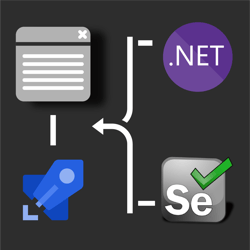
## How to run .NET Core Selenium UI tests on Azure DevOps Pipelines Windows/Ubuntu agents? 🚀

8/11/2019 - .NET

his post discusses how to take those UI tests and run them in Azure DevOps Pipelines on both Windows & Ubuntu agents. Use this GitHub repository which contains the UI test project necessary to follow along in this post.


](/blog/dotnet/how-to-run-net-core-selenium-ui-tests-on-azure-devops-pipelines)[
<picture><img class="blog-post-card__image" src="/cdn-cgi/image/width=250,format=auto,quality=90,height=250,fit=cover,gravity=0.5x0.5/media/1163/dotnet-core-selenium-square.png" srcset="/cdn-cgi/image/width=250,format=auto,quality=90,height=250,fit=cover,gravity=0.5x0.5/media/1163/dotnet-core-selenium-square.png 250w, /cdn-cgi/image/width=375,format=auto,quality=90,height=375,fit=cover,gravity=0.5x0.5/media/1163/dotnet-core-selenium-square.png 375w, /cdn-cgi/image/width=500,format=auto,quality=90,height=500,fit=cover,gravity=0.5x0.5/media/1163/dotnet-core-selenium-square.png 500w" sizes="250px" width="250" height="250" alt=".NET Core + Selenium logo steering a web browser window" decoding="async" loading="lazy" style="background-color:#2D2D2D"></picture>

## How to UI test using Selenium and .NET Core on Windows, Ubuntu, and MacOS

7/25/2019 - .NET

Selenium is a browser 🌐 automation tool mainly used for UI testing and automating tasks. Selenium is agnostic of operating system, programming language, and browser. You can automate Chrome on MacOS using C#, FireFox using Python on Windows, or Opera using NodeJS on Linux to give you a few examples.


](/blog/dotnet/how-to-ui-test-using-selenium-and-net-core-on-windows-ubuntu-and-maybe-macos)[

<picture><img class="blog-post-card__image" src="/cdn-cgi/image/width=250,format=auto,quality=90,height=250,fit=cover/media/1123/azure-discord-square.png" srcset="/cdn-cgi/image/width=250,format=auto,quality=90,height=250,fit=cover/media/1123/azure-discord-square.png 250w, /cdn-cgi/image/width=375,format=auto,quality=90,height=375,fit=cover/media/1123/azure-discord-square.png 375w, /cdn-cgi/image/width=500,format=auto,quality=90,height=500,fit=cover/media/1123/azure-discord-square.png 500w" sizes="250px" width="250" height="250" alt="Azure &amp; .NET &amp; Discord Logo" decoding="async" loading="lazy" style="background-color:#5B2D91"></picture>

## Creating a Discord Bot using .NET Core and hosting it on Azure App Services

4/29/2019 - Azure

Discord is an online communication platform built specifically for gaming. Using .NET Core and Azure App Service WebJobs we can host a Discord bot that can listen and respond to voice and text input.


](/blog/azure/creating-a-discord-bot-using-net-core-and-azure-app-services)[

<picture><img class="blog-post-card__image" src="/cdn-cgi/image/width=250,format=auto,quality=90,height=250,fit=cover,gravity=0.5x0.5/media/1091/robot-umbraco-square.png" srcset="/cdn-cgi/image/width=250,format=auto,quality=90,height=250,fit=cover,gravity=0.5x0.5/media/1091/robot-umbraco-square.png 250w, /cdn-cgi/image/width=375,format=auto,quality=90,height=375,fit=cover,gravity=0.5x0.5/media/1091/robot-umbraco-square.png 375w, /cdn-cgi/image/width=500,format=auto,quality=90,height=500,fit=cover,gravity=0.5x0.5/media/1091/robot-umbraco-square.png 500w" sizes="250px" width="250" height="250" alt="Robot with Umbraco logo" decoding="async" loading="lazy" style="background-color:#2D2D2D"></picture>

## Crawling through Umbraco with Robots

12/31/2018 - Umbraco

The robots.txt file’s main purpose is to tell robots (Google Bot, Bing Bot, etc.) what to index for their search engine, and also what not to. Usually you want most of your website crawled by Google, such as blog posts, product pages, etc., but most websites will have some pages/sections that shouldn’t be indexed or listed in search engines.


](/blog/umbraco/crawling-through-umbraco-with-robots)[

<picture><img class="blog-post-card__image" src="/cdn-cgi/image/width=250,format=auto,quality=90,height=250,fit=cover,gravity=0.5x0.5/media/1080/umbraco_and_insight.png" srcset="/cdn-cgi/image/width=250,format=auto,quality=90,height=250,fit=cover,gravity=0.5x0.5/media/1080/umbraco_and_insight.png 250w, /cdn-cgi/image/width=375,format=auto,quality=90,height=375,fit=cover,gravity=0.5x0.5/media/1080/umbraco_and_insight.png 375w, /cdn-cgi/image/width=500,format=auto,quality=90,height=500,fit=cover,gravity=0.5x0.5/media/1080/umbraco_and_insight.png 500w" sizes="250px" width="250" height="250" alt="Azure Application Insights logo + Umbraco logo" decoding="async" loading="lazy" style="background-color:#691C7C"></picture>

## Ignoring Umbraco ping.aspx from Azure Application Insights

10/30/2018 - Umbraco

Application Performance Monitors provide you with a lot of data, but some of that data may not be relevant. Specifically, in Umbraco there is a page at \\umbraco\\ping.aspx that is being called frequently to keep the site alive. This is very useful to prevent the site from "dying" (?), but the data for this request isn't that relevant and could skew your statistics. Using Azure Application Insights ITelemetryProcessor, we can prevent ping request from being sent to Azure Application Insights.


](/blog/umbraco/ignoring-umbraco-ping-from-azure-application-insights)[

<picture><img class="blog-post-card__image" src="/cdn-cgi/image/width=250,format=auto,quality=90,height=250,fit=cover,gravity=0.5017667844522968x0.5017667844522968/media/1084/crawling-through-umbraco-square.png" srcset="/cdn-cgi/image/width=250,format=auto,quality=90,height=250,fit=cover,gravity=0.5017667844522968x0.5017667844522968/media/1084/crawling-through-umbraco-square.png 250w, /cdn-cgi/image/width=375,format=auto,quality=90,height=375,fit=cover,gravity=0.5017667844522968x0.5017667844522968/media/1084/crawling-through-umbraco-square.png 375w, /cdn-cgi/image/width=500,format=auto,quality=90,height=500,fit=cover,gravity=0.5017667844522968x0.5017667844522968/media/1084/crawling-through-umbraco-square.png 500w" sizes="250px" width="250" height="250" alt="Spider Web with Umbraco logo" decoding="async" loading="lazy" style="background-color:#2D2D2D"></picture>

## Crawling through Umbraco with Sitemaps

10/14/2018 - Umbraco

Websites come in all shapes and sizes. Some are fast, some are beautiful, and some are a complete mess. Whether it's a high-quality site is irrelevant if people can’t find it, but search engines are here to help. Though the competition to get on first page is tough, this series will dive into some common practices to make your website crawlable.


](/blog/umbraco/crawling-through-umbraco-with-sitemaps)
