---
title: "Swimburger - Blog - Blazor"
description: "Swimburger.net is a blog about .NET, cloud, web development, and whatever comes across Swimburger's plate. Swimburger.net is run by Niels Swimberghe."
canonical: "https://swimburger.net/blog/blazor/all"
---

[

<picture><img class="blog-post-card__image" src="/cdn-cgi/image/width=250,format=auto,quality=90,height=250,fit=cover,gravity=0.5x0.5/media/4hxim0g5/brandblazor_nohalo_1000x.png" srcset="/cdn-cgi/image/width=250,format=auto,quality=90,height=250,fit=cover,gravity=0.5x0.5/media/4hxim0g5/brandblazor_nohalo_1000x.png 250w, /cdn-cgi/image/width=375,format=auto,quality=90,height=375,fit=cover,gravity=0.5x0.5/media/4hxim0g5/brandblazor_nohalo_1000x.png 375w, /cdn-cgi/image/width=500,format=auto,quality=90,height=500,fit=cover,gravity=0.5x0.5/media/4hxim0g5/brandblazor_nohalo_1000x.png 500w" sizes="250px" width="250" height="250" alt="Blazor logo" decoding="async" loading="lazy"></picture>

## Get Your Head Together With Blazor’s New HeadContent and PageTitle

10/14/2021 - .NET

Let’s take a look at the three Blazor components .NET 6 is introducing to help you manage the head of your document—PageTitle, HeadContent, and HeadOutlet.


](/blog/dotnet/get-your-head-together-with-blazors-new-headcontent-and-pagetitle)[

<picture><img class="blog-post-card__image" src="/cdn-cgi/image/width=250,format=auto,quality=90,height=250,fit=cover,gravity=0.6080352198975559x0.5/media/aqwjy45w/e3s921dwuaeaft.jpg" srcset="/cdn-cgi/image/width=250,format=auto,quality=90,height=250,fit=cover,gravity=0.6080352198975559x0.5/media/aqwjy45w/e3s921dwuaeaft.jpg 250w, /cdn-cgi/image/width=375,format=auto,quality=90,height=375,fit=cover,gravity=0.6080352198975559x0.5/media/aqwjy45w/e3s921dwuaeaft.jpg 375w, /cdn-cgi/image/width=500,format=auto,quality=90,height=500,fit=cover,gravity=0.6080352198975559x0.5/media/aqwjy45w/e3s921dwuaeaft.jpg 500w" sizes="250px" width="250" height="250" alt="Picture of Niels—white male with long blond hair— with a shocked expression" decoding="async" loading="lazy" style="background-color:#fff"></picture>

## Guest on .NET Docs Show: Making Phone Calls 📞 from Blazor WebAssembly with Twilio Voice

6/11/2021 - .NET

Earlier this week, the folks at the .NET Docs Show invited me over to talk about Twilio, .NET, and Blazor WebAssembly. We discussed different architectures, workflow diagrams, Twilio capabilities, and how to integrate them using ASP.NET WebAPI's and Blazor WebAssembly.


](/blog/dotnet/guest-on-dotnet-docs-show-making-phone-calls-from-blazor-webassembly-with-twilio-voice)[

<picture><img class="blog-post-card__image" src="/cdn-cgi/image/width=250,format=auto,quality=90,height=250,fit=cover,gravity=0.5x0.5/media/lrdndfux/blazor-digitalocean-app-square.png" srcset="/cdn-cgi/image/width=250,format=auto,quality=90,height=250,fit=cover,gravity=0.5x0.5/media/lrdndfux/blazor-digitalocean-app-square.png 250w, /cdn-cgi/image/width=375,format=auto,quality=90,height=375,fit=cover,gravity=0.5x0.5/media/lrdndfux/blazor-digitalocean-app-square.png 375w, /cdn-cgi/image/width=500,format=auto,quality=90,height=500,fit=cover,gravity=0.5x0.5/media/lrdndfux/blazor-digitalocean-app-square.png 500w" sizes="250px" width="250" height="250" alt="Blazor logo pointing to the GitHub logo pointing to the DigitalOcean logo" decoding="async" loading="lazy" style="background-color:#fff"></picture>

## How to deploy Blazor WebAssembly to DigitalOcean App Platform

3/30/2021 - .NET

Blazor WebAssembly can be served as static files. These files can be hosted in static hosting services such as DigitalOcean App Platform.


](/blog/dotnet/how-to-deploy-blazor-webassembly-to-digitalocean-app-platform)[

<picture><img class="blog-post-card__image" src="/cdn-cgi/image/width=250,format=auto,quality=90,height=250,fit=cover,gravity=0.5x0.5/media/bwpo5hbt/blazor-cloudflare-pages-square.png" srcset="/cdn-cgi/image/width=250,format=auto,quality=90,height=250,fit=cover,gravity=0.5x0.5/media/bwpo5hbt/blazor-cloudflare-pages-square.png 250w, /cdn-cgi/image/width=375,format=auto,quality=90,height=375,fit=cover,gravity=0.5x0.5/media/bwpo5hbt/blazor-cloudflare-pages-square.png 375w, /cdn-cgi/image/width=500,format=auto,quality=90,height=500,fit=cover,gravity=0.5x0.5/media/bwpo5hbt/blazor-cloudflare-pages-square.png 500w" sizes="250px" width="250" height="250" alt="Blazor logo pointing to the GitHub logo pointing to the Cloudflare Pages logo" decoding="async" loading="lazy" style="background-color:#fff"></picture>

## How to deploy Blazor WebAssembly to Cloudflare Pages

3/14/2021 - .NET

Blazor WebAssembly can be served as static files. These files can be hosted in static hosting services such as Cloudflare Pages.


](/blog/dotnet/how-to-deploy-blazor-webassembly-to-cloudflare-pages)[

<picture><img class="blog-post-card__image" src="/cdn-cgi/image/width=250,format=auto,quality=90,height=250,fit=cover,gravity=0.5x0.5/media/bx5dy2pl/blazor-heroku-square.png" srcset="/cdn-cgi/image/width=250,format=auto,quality=90,height=250,fit=cover,gravity=0.5x0.5/media/bx5dy2pl/blazor-heroku-square.png 250w, /cdn-cgi/image/width=375,format=auto,quality=90,height=375,fit=cover,gravity=0.5x0.5/media/bx5dy2pl/blazor-heroku-square.png 375w, /cdn-cgi/image/width=500,format=auto,quality=90,height=500,fit=cover,gravity=0.5x0.5/media/bx5dy2pl/blazor-heroku-square.png 500w" sizes="250px" width="250" height="250" alt="Heroku and Blazor logo" decoding="async" loading="lazy" style="background-color:#fff"></picture>

## How to deploy Blazor WebAssembly to Heroku

2/28/2021 - .NET

Heroku doesn't officially offer a static hosting service but does have an experimental 'buildpack' which gives you static hosting capabilities you can use to deploy and host Blazor WebAssembly.


](/blog/dotnet/how-to-deploy-blazor-webassembly-to-heroku)[

<picture><img class="blog-post-card__image" src="/cdn-cgi/image/width=250,format=auto,quality=90,height=250,fit=cover,gravity=0.5x0.5/media/l3rhhbsm/blazor-amplify-square.png" srcset="/cdn-cgi/image/width=250,format=auto,quality=90,height=250,fit=cover,gravity=0.5x0.5/media/l3rhhbsm/blazor-amplify-square.png 250w, /cdn-cgi/image/width=375,format=auto,quality=90,height=375,fit=cover,gravity=0.5x0.5/media/l3rhhbsm/blazor-amplify-square.png 375w, /cdn-cgi/image/width=500,format=auto,quality=90,height=500,fit=cover,gravity=0.5x0.5/media/l3rhhbsm/blazor-amplify-square.png 500w" sizes="250px" width="250" height="250" alt="Blazor logo pointing to the GitHub logo pointing to the AWS Amplify logo." decoding="async" loading="lazy" style="background-color:#fff"></picture>

## How to deploy Blazor WebAssembly to AWS Amplify

2/21/2021 - .NET

Blazor WebAssembly can be served as static files. These files can be hosted in static hosting services such as AWS Amplify.


](/blog/dotnet/how-to-deploy-blazor-webassembly-to-aws-amplify)[

<picture><img class="blog-post-card__image" src="/cdn-cgi/image/width=250,format=auto,quality=90,height=250,fit=cover,gravity=0.5x0.5002459542608448/media/ggrmwooo/dotnet-yarp-square.png" srcset="/cdn-cgi/image/width=250,format=auto,quality=90,height=250,fit=cover,gravity=0.5x0.5002459542608448/media/ggrmwooo/dotnet-yarp-square.png 250w, /cdn-cgi/image/width=375,format=auto,quality=90,height=375,fit=cover,gravity=0.5x0.5002459542608448/media/ggrmwooo/dotnet-yarp-square.png 375w, /cdn-cgi/image/width=500,format=auto,quality=90,height=500,fit=cover,gravity=0.5x0.5002459542608448/media/ggrmwooo/dotnet-yarp-square.png 500w" sizes="250px" width="250" height="250" alt=".NET Bot building an application" decoding="async" loading="lazy" style="background-color:#fff"></picture>

## Use project Tye to host Blazor WASM and ASP.NET Web API on a single origin to avoid CORS

2/14/2021 - .NET

Using Microsoft's experimental Project Tye, you configured the proxy to forward requests to '/api' to the Web API, and all other requests to the Blazor WASM client.


](/blog/dotnet/use-project-tye-to-host-blazor-wasm-and-aspdotnet-web-api-on-a-single-origin)[

<picture><img class="blog-post-card__image" src="/cdn-cgi/image/width=250,format=auto,quality=90,height=250,fit=cover,gravity=0.5x0.5/media/2qddoewj/blazor-netlify-square.png" srcset="/cdn-cgi/image/width=250,format=auto,quality=90,height=250,fit=cover,gravity=0.5x0.5/media/2qddoewj/blazor-netlify-square.png 250w, /cdn-cgi/image/width=375,format=auto,quality=90,height=375,fit=cover,gravity=0.5x0.5/media/2qddoewj/blazor-netlify-square.png 375w, /cdn-cgi/image/width=500,format=auto,quality=90,height=500,fit=cover,gravity=0.5x0.5/media/2qddoewj/blazor-netlify-square.png 500w" sizes="250px" width="250" height="250" alt="Blazor logo pointing to the GitHub logo and the GitHub logo pointing to the Netlify logo." decoding="async" loading="lazy" style="background-color:#fff"></picture>

## How to deploy Blazor WebAssembly to Netlify

2/7/2021 - .NET

Now that you can run .NET web applications without server-side code, you can deploy these applications to various static site hosts, such as Netlify.


](/blog/dotnet/how-to-deploy-blazor-webassembly-to-netlify)[

<picture><img class="blog-post-card__image" src="/cdn-cgi/image/width=250,format=auto,quality=90,height=250,fit=cover,gravity=0.5x0.5/media/3cxh1whu/dotnet-yarp-square.png" srcset="/cdn-cgi/image/width=250,format=auto,quality=90,height=250,fit=cover,gravity=0.5x0.5/media/3cxh1whu/dotnet-yarp-square.png 250w, /cdn-cgi/image/width=375,format=auto,quality=90,height=375,fit=cover,gravity=0.5x0.5/media/3cxh1whu/dotnet-yarp-square.png 375w, /cdn-cgi/image/width=500,format=auto,quality=90,height=500,fit=cover,gravity=0.5x0.5/media/3cxh1whu/dotnet-yarp-square.png 500w" sizes="250px" width="250" height="250" alt=".NET Bot building an application" decoding="async" loading="lazy" style="background-color:#fff"></picture>

## Use YARP to host client and API server on a single origin to avoid CORS

1/24/2021 - .NET

Using Microsoft's new reverse proxy "YARP", you configured the proxy to forward requests to '/api' to the Web API, and all other requests to the Blazor WASM client.


](/blog/dotnet/use-yarp-to-host-client-and-api-server-on-a-single-origin)[

<picture><img class="blog-post-card__image" src="/cdn-cgi/image/width=250,format=auto,quality=90,height=250,fit=cover,gravity=0.5x0.5/media/q02nayce/blazor-github-firebase-square.png" srcset="/cdn-cgi/image/width=250,format=auto,quality=90,height=250,fit=cover,gravity=0.5x0.5/media/q02nayce/blazor-github-firebase-square.png 250w, /cdn-cgi/image/width=375,format=auto,quality=90,height=375,fit=cover,gravity=0.5x0.5/media/q02nayce/blazor-github-firebase-square.png 375w, /cdn-cgi/image/width=500,format=auto,quality=90,height=500,fit=cover,gravity=0.5x0.5/media/q02nayce/blazor-github-firebase-square.png 500w" sizes="250px" width="250" height="250" alt=" Blazor logo next to an arrow pointing to the GitHub logo next to a double arrow pointing from the GitHub logo to the Firebase Hosting logo " decoding="async" loading="lazy" style="background-color:#fff"></picture>

## Video: How to deploy Blazor WebAssembly to Firebase Hosting

1/21/2021 - .NET

With ASP.NET Blazor WebAssembly you can create .NET applications that run completely inside of the browser. The output of a Blazor WASM project are all static files. You can deploy these applications to various static site hosts like Firebase Hosting.


](/blog/dotnet/video-how-to-deploy-blazor-webassembly-to-firebase-hosting)[

<picture><img class="blog-post-card__image" src="/cdn-cgi/image/width=250,format=auto,quality=90,height=250,fit=cover,gravity=0.5x0.5/media/aoihtoda/512x512.png" srcset="/cdn-cgi/image/width=250,format=auto,quality=90,height=250,fit=cover,gravity=0.5x0.5/media/aoihtoda/512x512.png 250w, /cdn-cgi/image/width=375,format=auto,quality=90,height=375,fit=cover,gravity=0.5x0.5/media/aoihtoda/512x512.png 375w, /cdn-cgi/image/width=500,format=auto,quality=90,height=500,fit=cover,gravity=0.5x0.5/media/aoihtoda/512x512.png 500w" sizes="250px" width="250" height="250" alt=".gz on a blue background" decoding="async" loading="lazy" style="background-color:#007bff"></picture>

## Introducing Online GZIP de/compressor, built with Blazor WebAssembly

1/10/2021 - .NET

Using Blazor WASM and the GZIP API's I created this little web application which you can use to compress and decompress multiple files using GZIP.


](/blog/dotnet/introducing-online-gzip-decompressor)[

<picture><img class="blog-post-card__image" src="/cdn-cgi/image/width=250,format=auto,quality=90,height=250,fit=cover,gravity=0.5x0.5/media/3tmmtvxg/blazor-square.png" srcset="/cdn-cgi/image/width=250,format=auto,quality=90,height=250,fit=cover,gravity=0.5x0.5/media/3tmmtvxg/blazor-square.png 250w, /cdn-cgi/image/width=375,format=auto,quality=90,height=375,fit=cover,gravity=0.5x0.5/media/3tmmtvxg/blazor-square.png 375w, /cdn-cgi/image/width=500,format=auto,quality=90,height=500,fit=cover,gravity=0.5x0.5/media/3tmmtvxg/blazor-square.png 500w" sizes="250px" width="250" height="250" alt="Blazor logo" decoding="async" loading="lazy" style="background-color:#fafafa"></picture>

## Pre-render Blazor WebAssembly at build time to optimize for search engines

1/3/2021 - .NET

Using pre-rendering tools like react-snap, you can pre-render Blazor WASM. Additionally, you can integrate these pre-rendering tools inside of your continuous integration and continuous deployment pipelines.


](/blog/dotnet/pre-render-blazor-webassembly-at-build-time-to-optimize-for-search-engines)[

<picture><img class="blog-post-card__image" src="/cdn-cgi/image/width=250,format=auto,quality=90,height=250,fit=cover,gravity=0.5x0.5/media/ttaf0suj/blazor-square.png" srcset="/cdn-cgi/image/width=250,format=auto,quality=90,height=250,fit=cover,gravity=0.5x0.5/media/ttaf0suj/blazor-square.png 250w, /cdn-cgi/image/width=375,format=auto,quality=90,height=375,fit=cover,gravity=0.5x0.5/media/ttaf0suj/blazor-square.png 375w, /cdn-cgi/image/width=500,format=auto,quality=90,height=500,fit=cover,gravity=0.5x0.5/media/ttaf0suj/blazor-square.png 500w" sizes="250px" width="250" height="250" alt="Blazor logo" decoding="async" loading="lazy" style="background-color:#fafafa"></picture>

## Fix Blazor WebAssembly PWA integrity checks

12/30/2020 - .NET

The service-worker-assets.js file is generated during publish and any modification made to the listed files after publish will cause the integrity check to fail.


](/blog/dotnet/fix-blazor-webassembly-pwa-integrity-checks)[

<picture><img class="blog-post-card__image" src="/cdn-cgi/image/width=250,format=auto,quality=90,height=250,fit=cover,gravity=0.5x0.5/media/sabcadlf/blazor-github-firebase-square.png" srcset="/cdn-cgi/image/width=250,format=auto,quality=90,height=250,fit=cover,gravity=0.5x0.5/media/sabcadlf/blazor-github-firebase-square.png 250w, /cdn-cgi/image/width=375,format=auto,quality=90,height=375,fit=cover,gravity=0.5x0.5/media/sabcadlf/blazor-github-firebase-square.png 375w, /cdn-cgi/image/width=500,format=auto,quality=90,height=500,fit=cover,gravity=0.5x0.5/media/sabcadlf/blazor-github-firebase-square.png 500w" sizes="250px" width="250" height="250" alt=" Blazor logo next to an arrow pointing to the GitHub logo next to a double arrow pointing from the GitHub logo to the Firebase Hosting logo " decoding="async" loading="lazy" style="background-color:#fff"></picture>

## How to deploy Blazor WebAssembly to Firebase Hosting

12/27/2020 - .NET

With ASP.NET Blazor WebAssembly you can create .NET applications that run completely inside of the browser. The output of a Blazor WASM project are all static files. You can deploy these applications to various static site hosts like Firebase Hosting.


](/blog/dotnet/how-to-deploy-blazor-webassembly-to-firebase-hosting)[

<picture><img class="blog-post-card__image" src="/cdn-cgi/image/width=250,format=auto,quality=90,height=250,fit=cover,gravity=0.5x0.5/media/aqmeempb/blazor-github-square.png" srcset="/cdn-cgi/image/width=250,format=auto,quality=90,height=250,fit=cover,gravity=0.5x0.5/media/aqmeempb/blazor-github-square.png 250w, /cdn-cgi/image/width=375,format=auto,quality=90,height=375,fit=cover,gravity=0.5x0.5/media/aqmeempb/blazor-github-square.png 375w, /cdn-cgi/image/width=500,format=auto,quality=90,height=500,fit=cover,gravity=0.5x0.5/media/aqmeempb/blazor-github-square.png 500w" sizes="250px" width="250" height="250" alt="Blazor and GitHub logo" decoding="async" loading="lazy" style="background-color:#fff"></picture>

## Video: How to deploy ASP.NET Blazor WebAssembly to GitHub Pages

12/23/2020 - .NET

With ASP.NET Blazor WebAssembly you can create .NET applications that run completely inside of the browser. The output of a Blazor WASM project are all static files. You can deploy these applications to various static site hosts like GitHub Pages.


](/blog/dotnet/video-how-to-deploy-aspnet-blazor-webassembly-to-github-pages)[

<picture><img class="blog-post-card__image" src="/cdn-cgi/image/width=250,format=auto,quality=90,height=250,fit=cover,gravity=0.4982464937912058x0.4982464937912058/media/ad2llt0w/javascript-in-blazor-ijso-square.png" srcset="/cdn-cgi/image/width=250,format=auto,quality=90,height=250,fit=cover,gravity=0.4982464937912058x0.4982464937912058/media/ad2llt0w/javascript-in-blazor-ijso-square.png 250w, /cdn-cgi/image/width=375,format=auto,quality=90,height=375,fit=cover,gravity=0.4982464937912058x0.4982464937912058/media/ad2llt0w/javascript-in-blazor-ijso-square.png 375w, /cdn-cgi/image/width=500,format=auto,quality=90,height=500,fit=cover,gravity=0.4982464937912058x0.4982464937912058/media/ad2llt0w/javascript-in-blazor-ijso-square.png 500w" sizes="250px" width="250" height="250" alt="Blazor next to JavaScript logo" decoding="async" loading="lazy" style="background-color:#fafafa"></picture>

## Interacting with JavaScript Objects using the new IJSObjectReference in Blazor

12/21/2020 - .NET

A new type is introduced in .NET 5 called IJSObjectReference. This type holds a reference to a JavaScript object and can be used to invoke functions available on that JavaScript object.


](/blog/dotnet/interacting-with-javascript-objects-using-the-new-ijsobjectreference-in-blazor)[

<picture><img class="blog-post-card__image" src="/cdn-cgi/image/width=250,format=auto,quality=90,height=250,fit=cover,gravity=0.5x0.5/media/rfhjjgka/blazor-twilio-calls-square.png" srcset="/cdn-cgi/image/width=250,format=auto,quality=90,height=250,fit=cover,gravity=0.5x0.5/media/rfhjjgka/blazor-twilio-calls-square.png 250w, /cdn-cgi/image/width=375,format=auto,quality=90,height=375,fit=cover,gravity=0.5x0.5/media/rfhjjgka/blazor-twilio-calls-square.png 375w, /cdn-cgi/image/width=500,format=auto,quality=90,height=500,fit=cover,gravity=0.5x0.5/media/rfhjjgka/blazor-twilio-calls-square.png 500w" sizes="250px" width="250" height="250" alt="Blazor and Twilio logo" decoding="async" loading="lazy" style="background-color:#fafafa"></picture>

## Making Phone Calls from Blazor WebAssembly with Twilio Voice

11/30/2020 - .NET

Using Twilio Voice you can add the ability to make and receive phone calls from your own ASP.NET web applications. Twilio’s helper library for JavaScript makes it easy to integrate client functionality into web front ends built with Blazor WebAssembly, and the Twilio NuGet packages provide you with convenient interfaces to Twilio’s APIs for server-side tasks.


](/blog/dotnet/making-phone-calls-from-blazor-webassembly-with-twilio-voice)[

<picture><img class="blog-post-card__image" src="/cdn-cgi/image/width=250,format=auto,quality=90,height=250,fit=cover,gravity=0.5x0.5/media/ku0blkjc/javascript-in-blazor-square.png" srcset="/cdn-cgi/image/width=250,format=auto,quality=90,height=250,fit=cover,gravity=0.5x0.5/media/ku0blkjc/javascript-in-blazor-square.png 250w, /cdn-cgi/image/width=375,format=auto,quality=90,height=375,fit=cover,gravity=0.5x0.5/media/ku0blkjc/javascript-in-blazor-square.png 375w, /cdn-cgi/image/width=500,format=auto,quality=90,height=500,fit=cover,gravity=0.5x0.5/media/ku0blkjc/javascript-in-blazor-square.png 500w" sizes="250px" width="250" height="250" alt="Blazor logo next to JavaScript logo" decoding="async" loading="lazy" style="background-color:#fafafa"></picture>

## Communicating between .NET and JavaScript in Blazor with in-browser samples

11/5/2020 - .NET

The success of Blazor relies heavily upon how well it can integrate with the existing rich JavaScript ecosystem. The way Blazor allows you to integrate, is by enabling you to call JavaScript functions from Blazor and .NET functions from JavaScript also referred to as 'JavaScript interoperability'.


](/blog/dotnet/communicating-between-dotnet-and-javascript-in-blazor-with-in-browser-samples)[

<picture><img class="blog-post-card__image" src="/cdn-cgi/image/width=250,format=auto,quality=90,height=250,fit=cover,gravity=0.5002263467632413x0.5002263467632413/media/fjjjglcr/blazor-firebase-square.png" srcset="/cdn-cgi/image/width=250,format=auto,quality=90,height=250,fit=cover,gravity=0.5002263467632413x0.5002263467632413/media/fjjjglcr/blazor-firebase-square.png 250w, /cdn-cgi/image/width=375,format=auto,quality=90,height=375,fit=cover,gravity=0.5002263467632413x0.5002263467632413/media/fjjjglcr/blazor-firebase-square.png 375w, /cdn-cgi/image/width=500,format=auto,quality=90,height=500,fit=cover,gravity=0.5002263467632413x0.5002263467632413/media/fjjjglcr/blazor-firebase-square.png 500w" sizes="250px" width="250" height="250" alt="Blazor and Firebase logo" decoding="async" loading="lazy" style="background-color:#fafafa"></picture>

## Real-time applications with Blazor Server and Firestore

10/16/2020 - DotNet

Blazor Server is built on SignalR, which is built on websockets. Among things, websockets enable Blazor Server to push changes from the server to the browser at any time. You can build real-time UI's when you combine this with a real-time database.


](/blog/dotnet/real-time-applications-with-blazor-server-and-firestore)[

<picture><img class="blog-post-card__image" src="/cdn-cgi/image/width=250,format=auto,quality=90,height=250,fit=cover,gravity=0.5x0.5/media/bkdbc3rw/blazor-logo.png" srcset="/cdn-cgi/image/width=250,format=auto,quality=90,height=250,fit=cover,gravity=0.5x0.5/media/bkdbc3rw/blazor-logo.png 250w, /cdn-cgi/image/width=375,format=auto,quality=90,height=375,fit=cover,gravity=0.5x0.5/media/bkdbc3rw/blazor-logo.png 375w, /cdn-cgi/image/width=500,format=auto,quality=90,height=500,fit=cover,gravity=0.5x0.5/media/bkdbc3rw/blazor-logo.png 500w" sizes="250px" width="250" height="250" alt="Blazor logo" decoding="async" loading="lazy" style="background-color:#fafafa"></picture>

## Pushing UI changes from Blazor Server to browser on server raised events

10/12/2020 - .NET

Blazor Server is built on SignalR, and SignalR is built on websockets among other techniques. The combination of these technologies allow Blazor Server to push UI changes into the client without the client requesting those changes.


](/blog/dotnet/pushing-ui-changes-from-blazor-server-to-browser-on-server-raised-events)[

<picture><img class="blog-post-card__image" src="/cdn-cgi/image/width=250,format=auto,quality=90,height=250,fit=cover,gravity=0.5x0.5/media/rivavmck/blazor-github-square.png" srcset="/cdn-cgi/image/width=250,format=auto,quality=90,height=250,fit=cover,gravity=0.5x0.5/media/rivavmck/blazor-github-square.png 250w, /cdn-cgi/image/width=375,format=auto,quality=90,height=375,fit=cover,gravity=0.5x0.5/media/rivavmck/blazor-github-square.png 375w, /cdn-cgi/image/width=500,format=auto,quality=90,height=500,fit=cover,gravity=0.5x0.5/media/rivavmck/blazor-github-square.png 500w" sizes="250px" width="250" height="250" alt="Blazor and GitHub logo" decoding="async" loading="lazy" style="background-color:#fff"></picture>

## How to deploy ASP.NET Blazor WebAssembly to GitHub Pages

8/31/2020 - .NET

With ASP.NET Blazor WebAssembly you can create .NET applications that run completely inside of the browser. The output of a Blazor WASM project are all static files. You can deploy these applications to various static site hosts like GitHub Pages.


](/blog/dotnet/how-to-deploy-aspnet-blazor-webassembly-to-github-pages)[

<picture><img class="blog-post-card__image" src="/cdn-cgi/image/width=250,format=auto,quality=90,height=250,fit=cover,gravity=0.5x0.5/media/jqilmp1y/blazor-github-azure-square.png" srcset="/cdn-cgi/image/width=250,format=auto,quality=90,height=250,fit=cover,gravity=0.5x0.5/media/jqilmp1y/blazor-github-azure-square.png 250w, /cdn-cgi/image/width=375,format=auto,quality=90,height=375,fit=cover,gravity=0.5x0.5/media/jqilmp1y/blazor-github-azure-square.png 375w, /cdn-cgi/image/width=500,format=auto,quality=90,height=500,fit=cover,gravity=0.5x0.5/media/jqilmp1y/blazor-github-azure-square.png 500w" sizes="250px" width="250" height="250" alt="How to deploy ASP.NET Blazor WebAssembly to Azure Static Web Apps. Blazor logo pointing to a GitHub logo pointing to an Azure logo." decoding="async" loading="lazy" style="background-color:#fff"></picture>

## How to deploy Blazor WASM & Azure Functions to Azure Static Web Apps using GitHub

8/24/2020 - .NET

With ASP.NET Blazor WebAssembly you can create .NET applications that run inside of the browser . The output of a Blazor WASM project are all static files. You can deploy these applications to static site hosts, such as Azure Static Web Apps and GitHub Pages.


](/blog/dotnet/how-to-deploy-aspnet-blazor-webassembly-to-azure-static-web-apps)[

<picture><img class="blog-post-card__image" src="/cdn-cgi/image/width=250,format=auto,quality=90,height=250,fit=cover,gravity=0.5x0.5/media/npyes0h2/blazor-logo.png" srcset="/cdn-cgi/image/width=250,format=auto,quality=90,height=250,fit=cover,gravity=0.5x0.5/media/npyes0h2/blazor-logo.png 250w, /cdn-cgi/image/width=375,format=auto,quality=90,height=375,fit=cover,gravity=0.5x0.5/media/npyes0h2/blazor-logo.png 375w, /cdn-cgi/image/width=500,format=auto,quality=90,height=500,fit=cover,gravity=0.5x0.5/media/npyes0h2/blazor-logo.png 500w" sizes="250px" width="250" height="250" alt="ASP.NET Blazor Logo" decoding="async" loading="lazy" style="background-color:#fff"></picture>

## How to run code after Blazor component has rendered

8/17/2020 - .NET

Blazor components render their template whenever state has changed and sometimes you need to invoke some code after rendering has completed. This blog post will show you how to run code after your Blazor component has rendered, on every render or as needed.


](/blog/dotnet/how-to-run-code-after-blazor-component-has-rendered)[
<picture><img class="blog-post-card__image" src="/cdn-cgi/image/width=250,format=auto,quality=90,height=250,fit=cover,gravity=0.0710139009711151x0.22766818987527038/media/i2knqbmn/capture.png" srcset="/cdn-cgi/image/width=250,format=auto,quality=90,height=250,fit=cover,gravity=0.0710139009711151x0.22766818987527038/media/i2knqbmn/capture.png 250w, /cdn-cgi/image/width=375,format=auto,quality=90,height=375,fit=cover,gravity=0.0710139009711151x0.22766818987527038/media/i2knqbmn/capture.png 375w, /cdn-cgi/image/width=500,format=auto,quality=90,height=500,fit=cover,gravity=0.0710139009711151x0.22766818987527038/media/i2knqbmn/capture.png 500w" sizes="250px" width="250" height="250" alt="Screenshot of NCrontab Expression Tester tool" decoding="async" loading="lazy" style="background-color:#fff"></picture>

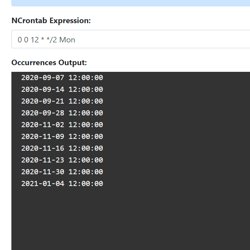
## Introducing NCrontab Tester (Blazor WebAssembly)

8/5/2020 - .NET

Introducing NCrontab Expression tester, made using NCrontab .NET library, Blazor WebAssembly, and hosted on Azure Static Web Apps


](/blog/dotnet/introducing-ncrontab-tester-blazor-webassembly)
