---
title: "Swimburger - Blog - asp.net - Page 3"
description: "Swimburger.net is a blog about .NET, cloud, web development, and whatever comes across Swimburger's plate. Swimburger.net is run by Niels Swimberghe."
canonical: "https://swimburger.net/blog/aspnet/page/3"
---

[

<picture><img class="blog-post-card__image" src="/cdn-cgi/image/width=250,format=auto,quality=90,height=250,fit=cover,gravity=0.5x0.5/media/kvwcs54s/net-framework-square.png" srcset="/cdn-cgi/image/width=250,format=auto,quality=90,height=250,fit=cover,gravity=0.5x0.5/media/kvwcs54s/net-framework-square.png 250w, /cdn-cgi/image/width=375,format=auto,quality=90,height=375,fit=cover,gravity=0.5x0.5/media/kvwcs54s/net-framework-square.png 375w, /cdn-cgi/image/width=500,format=auto,quality=90,height=500,fit=cover,gravity=0.5x0.5/media/kvwcs54s/net-framework-square.png 500w" sizes="250px" width="250" height="250" alt=".NET Bot writing on a whiteboard" decoding="async" loading="lazy" style="background-color:#fff"></picture>

## Configure CORS using AppSettings or Custom Configuration Sections in ASP.NET Web API

10/26/2020 - .NET

Microsoft's CORS library works, but the attributes force you to hardcode the CORS headers. By creating custom CORS attributes, you can read the CORS configuration from AppSettings or a custom config section.


](/blog/dotnet/configure-cors-using-appsettings-or-custom-configuration-sections-in-aspnet-web-api)[

<picture><img class="blog-post-card__image" src="/cdn-cgi/image/width=250,format=auto,quality=90,height=250,fit=cover,gravity=0.5002263467632413x0.5002263467632413/media/fjjjglcr/blazor-firebase-square.png" srcset="/cdn-cgi/image/width=250,format=auto,quality=90,height=250,fit=cover,gravity=0.5002263467632413x0.5002263467632413/media/fjjjglcr/blazor-firebase-square.png 250w, /cdn-cgi/image/width=375,format=auto,quality=90,height=375,fit=cover,gravity=0.5002263467632413x0.5002263467632413/media/fjjjglcr/blazor-firebase-square.png 375w, /cdn-cgi/image/width=500,format=auto,quality=90,height=500,fit=cover,gravity=0.5002263467632413x0.5002263467632413/media/fjjjglcr/blazor-firebase-square.png 500w" sizes="250px" width="250" height="250" alt="Blazor and Firebase logo" decoding="async" loading="lazy" style="background-color:#fafafa"></picture>

## Real-time applications with Blazor Server and Firestore

10/16/2020 - DotNet

Blazor Server is built on SignalR, which is built on websockets. Among things, websockets enable Blazor Server to push changes from the server to the browser at any time. You can build real-time UI's when you combine this with a real-time database.


](/blog/dotnet/real-time-applications-with-blazor-server-and-firestore)[

<picture><img class="blog-post-card__image" src="/cdn-cgi/image/width=250,format=auto,quality=90,height=250,fit=cover,gravity=0.5x0.5/media/bkdbc3rw/blazor-logo.png" srcset="/cdn-cgi/image/width=250,format=auto,quality=90,height=250,fit=cover,gravity=0.5x0.5/media/bkdbc3rw/blazor-logo.png 250w, /cdn-cgi/image/width=375,format=auto,quality=90,height=375,fit=cover,gravity=0.5x0.5/media/bkdbc3rw/blazor-logo.png 375w, /cdn-cgi/image/width=500,format=auto,quality=90,height=500,fit=cover,gravity=0.5x0.5/media/bkdbc3rw/blazor-logo.png 500w" sizes="250px" width="250" height="250" alt="Blazor logo" decoding="async" loading="lazy" style="background-color:#fafafa"></picture>

## Pushing UI changes from Blazor Server to browser on server raised events

10/12/2020 - .NET

Blazor Server is built on SignalR, and SignalR is built on websockets among other techniques. The combination of these technologies allow Blazor Server to push UI changes into the client without the client requesting those changes.


](/blog/dotnet/pushing-ui-changes-from-blazor-server-to-browser-on-server-raised-events)[

<picture><img class="blog-post-card__image" src="/cdn-cgi/image/width=250,format=auto,quality=90,height=250,fit=cover,gravity=0.5x0.5/media/fxujfoot/introducing-umbraco-square.png" srcset="/cdn-cgi/image/width=250,format=auto,quality=90,height=250,fit=cover,gravity=0.5x0.5/media/fxujfoot/introducing-umbraco-square.png 250w, /cdn-cgi/image/width=375,format=auto,quality=90,height=375,fit=cover,gravity=0.5x0.5/media/fxujfoot/introducing-umbraco-square.png 375w, /cdn-cgi/image/width=500,format=auto,quality=90,height=500,fit=cover,gravity=0.5x0.5/media/fxujfoot/introducing-umbraco-square.png 500w" sizes="250px" width="250" height="250" alt="Umbraco logo" decoding="async" loading="lazy" style="background-color:#2d2d2d"></picture>

## Introducing Umbraco's KeepAlive Ping configuration

9/15/2020 - Umbraco

Umbraco 8.6 introduces the new keepAlive configuration inside of \`umbracoSettings.config\` which allows you to change "keepAlivePingUrl" and "disableKeepAliveTask"


](/blog/umbraco/introducing-umbracos-keepalive-ping-configuration)[

<picture><img class="blog-post-card__image" src="/cdn-cgi/image/width=250,format=auto,quality=90,height=250,fit=cover,gravity=0.5x0.5/media/eqhh2qrt/application-insights-square-logo.png" srcset="/cdn-cgi/image/width=250,format=auto,quality=90,height=250,fit=cover,gravity=0.5x0.5/media/eqhh2qrt/application-insights-square-logo.png 250w, /cdn-cgi/image/width=375,format=auto,quality=90,height=375,fit=cover,gravity=0.5x0.5/media/eqhh2qrt/application-insights-square-logo.png 375w, /cdn-cgi/image/width=500,format=auto,quality=90,height=500,fit=cover,gravity=0.5x0.5/media/eqhh2qrt/application-insights-square-logo.png 500w" sizes="250px" width="250" height="250" alt="Azure Application Insights logo" decoding="async" loading="lazy" style="background-color:#fff"></picture>

## Capturing ASP.NET Framework RawUrl with Azure Application Insights

9/14/2020 - Azure

By default, Application Insights will capture a lot of data about your ASP.NET applications including HTTP Requests made to your website. Unfortunately, the URL captured by Application Insights doesn't always match the URL originally requested by the client.


](/blog/azure/capturing-aspnet-framework-rawurl-with-azure-application-insights)[

<picture><img class="blog-post-card__image" src="/cdn-cgi/image/width=250,format=auto,quality=90,height=250,fit=cover,gravity=0.5x0.5/media/zlzdyga4/application-insights-square-logo.png" srcset="/cdn-cgi/image/width=250,format=auto,quality=90,height=250,fit=cover,gravity=0.5x0.5/media/zlzdyga4/application-insights-square-logo.png 250w, /cdn-cgi/image/width=375,format=auto,quality=90,height=375,fit=cover,gravity=0.5x0.5/media/zlzdyga4/application-insights-square-logo.png 375w, /cdn-cgi/image/width=500,format=auto,quality=90,height=500,fit=cover,gravity=0.5x0.5/media/zlzdyga4/application-insights-square-logo.png 500w" sizes="250px" width="250" height="250" alt="Azure Application Insights logo" decoding="async" loading="lazy" style="background-color:#fff"></picture>

## Capturing ASP.NET Core original URL with Azure Application Insights

9/14/2020 - Azure

By default, Application Insights will capture a lot of data about your ASP.NET applications including HTTP Requests made to your website. Unfortunately, the URL captured by Application Insights doesn't always match the URL originally requested by the client.


](/blog/azure/capturing-aspnet-core-original-url-with-azure-application-insights)[

<picture><img class="blog-post-card__image" src="/cdn-cgi/image/width=250,format=auto,quality=90,height=250,fit=cover,gravity=0.5x0.5/media/rivavmck/blazor-github-square.png" srcset="/cdn-cgi/image/width=250,format=auto,quality=90,height=250,fit=cover,gravity=0.5x0.5/media/rivavmck/blazor-github-square.png 250w, /cdn-cgi/image/width=375,format=auto,quality=90,height=375,fit=cover,gravity=0.5x0.5/media/rivavmck/blazor-github-square.png 375w, /cdn-cgi/image/width=500,format=auto,quality=90,height=500,fit=cover,gravity=0.5x0.5/media/rivavmck/blazor-github-square.png 500w" sizes="250px" width="250" height="250" alt="Blazor and GitHub logo" decoding="async" loading="lazy" style="background-color:#fff"></picture>

## How to deploy ASP.NET Blazor WebAssembly to GitHub Pages

8/31/2020 - .NET

With ASP.NET Blazor WebAssembly you can create .NET applications that run completely inside of the browser. The output of a Blazor WASM project are all static files. You can deploy these applications to various static site hosts like GitHub Pages.


](/blog/dotnet/how-to-deploy-aspnet-blazor-webassembly-to-github-pages)[

<picture><img class="blog-post-card__image" src="/cdn-cgi/image/width=250,format=auto,quality=90,height=250,fit=cover,gravity=0.5x0.5/media/jqilmp1y/blazor-github-azure-square.png" srcset="/cdn-cgi/image/width=250,format=auto,quality=90,height=250,fit=cover,gravity=0.5x0.5/media/jqilmp1y/blazor-github-azure-square.png 250w, /cdn-cgi/image/width=375,format=auto,quality=90,height=375,fit=cover,gravity=0.5x0.5/media/jqilmp1y/blazor-github-azure-square.png 375w, /cdn-cgi/image/width=500,format=auto,quality=90,height=500,fit=cover,gravity=0.5x0.5/media/jqilmp1y/blazor-github-azure-square.png 500w" sizes="250px" width="250" height="250" alt="How to deploy ASP.NET Blazor WebAssembly to Azure Static Web Apps. Blazor logo pointing to a GitHub logo pointing to an Azure logo." decoding="async" loading="lazy" style="background-color:#fff"></picture>

## How to deploy Blazor WASM & Azure Functions to Azure Static Web Apps using GitHub

8/24/2020 - .NET

With ASP.NET Blazor WebAssembly you can create .NET applications that run inside of the browser . The output of a Blazor WASM project are all static files. You can deploy these applications to static site hosts, such as Azure Static Web Apps and GitHub Pages.


](/blog/dotnet/how-to-deploy-aspnet-blazor-webassembly-to-azure-static-web-apps)[

<picture><img class="blog-post-card__image" src="/cdn-cgi/image/width=250,format=auto,quality=90,height=250,fit=cover,gravity=0.5x0.5/media/npyes0h2/blazor-logo.png" srcset="/cdn-cgi/image/width=250,format=auto,quality=90,height=250,fit=cover,gravity=0.5x0.5/media/npyes0h2/blazor-logo.png 250w, /cdn-cgi/image/width=375,format=auto,quality=90,height=375,fit=cover,gravity=0.5x0.5/media/npyes0h2/blazor-logo.png 375w, /cdn-cgi/image/width=500,format=auto,quality=90,height=500,fit=cover,gravity=0.5x0.5/media/npyes0h2/blazor-logo.png 500w" sizes="250px" width="250" height="250" alt="ASP.NET Blazor Logo" decoding="async" loading="lazy" style="background-color:#fff"></picture>

## How to run code after Blazor component has rendered

8/17/2020 - .NET

Blazor components render their template whenever state has changed and sometimes you need to invoke some code after rendering has completed. This blog post will show you how to run code after your Blazor component has rendered, on every render or as needed.


](/blog/dotnet/how-to-run-code-after-blazor-component-has-rendered)[

<picture><img class="blog-post-card__image" src="/cdn-cgi/image/width=250,format=auto,quality=90,height=250,fit=cover,gravity=0.5x0.5/media/qbfo2sl3/dnnlogo.png" srcset="/cdn-cgi/image/width=250,format=auto,quality=90,height=250,fit=cover,gravity=0.5x0.5/media/qbfo2sl3/dnnlogo.png 250w, /cdn-cgi/image/width=375,format=auto,quality=90,height=375,fit=cover,gravity=0.5x0.5/media/qbfo2sl3/dnnlogo.png 375w, /cdn-cgi/image/width=500,format=auto,quality=90,height=500,fit=cover,gravity=0.5x0.5/media/qbfo2sl3/dnnlogo.png 500w" sizes="250px" width="250" height="250" alt="DNN Logo" decoding="async" loading="lazy" style="background-color:#fff"></picture>

## How to add Hangfire to DNN

8/6/2020 - .NET

DNN already has an excellent built-in scheduler you can use to schedule tasks. But you may be more familiar with and prefer Hangfire for running background jobs. These instruction will walk you through configuring Hangfire in with DNN.


](/blog/dotnet/how-to-add-hangfire-to-dnn)[
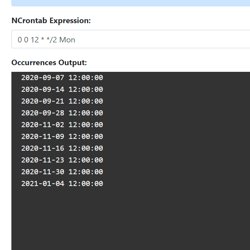
<picture><img class="blog-post-card__image" src="/cdn-cgi/image/width=250,format=auto,quality=90,height=250,fit=cover,gravity=0.0710139009711151x0.22766818987527038/media/i2knqbmn/capture.png" srcset="/cdn-cgi/image/width=250,format=auto,quality=90,height=250,fit=cover,gravity=0.0710139009711151x0.22766818987527038/media/i2knqbmn/capture.png 250w, /cdn-cgi/image/width=375,format=auto,quality=90,height=375,fit=cover,gravity=0.0710139009711151x0.22766818987527038/media/i2knqbmn/capture.png 375w, /cdn-cgi/image/width=500,format=auto,quality=90,height=500,fit=cover,gravity=0.0710139009711151x0.22766818987527038/media/i2knqbmn/capture.png 500w" sizes="250px" width="250" height="250" alt="Screenshot of NCrontab Expression Tester tool" decoding="async" loading="lazy" style="background-color:#fff"></picture>

## Introducing NCrontab Tester (Blazor WebAssembly)

8/5/2020 - .NET

Introducing NCrontab Expression tester, made using NCrontab .NET library, Blazor WebAssembly, and hosted on Azure Static Web Apps


](/blog/dotnet/introducing-ncrontab-tester-blazor-webassembly)[

<picture><img class="blog-post-card__image" src="/cdn-cgi/image/width=250,format=auto,quality=90,height=250,fit=cover,gravity=0.5x0.5/media/kaklx3z1/dotnet-logo.png" srcset="/cdn-cgi/image/width=250,format=auto,quality=90,height=250,fit=cover,gravity=0.5x0.5/media/kaklx3z1/dotnet-logo.png 250w, /cdn-cgi/image/width=375,format=auto,quality=90,height=375,fit=cover,gravity=0.5x0.5/media/kaklx3z1/dotnet-logo.png 375w, /cdn-cgi/image/width=500,format=auto,quality=90,height=500,fit=cover,gravity=0.5x0.5/media/kaklx3z1/dotnet-logo.png 500w" sizes="250px" width="250" height="250" alt=".NET" decoding="async" loading="lazy" style="background-color:#512BD4"></picture>

## Download .NET Windows Theme based on the new .NET Brand GitHub repo

6/15/2020 - .NET

The .NET GitHub org has a new Brand repository containing a detailed Brand guidelines PDF, logo's, illustrations, and wallpapers. Using these resources I put together a Windows Theme for .NET which you can download here!


](/blog/dotnet/download-dotnet-windows-theme-based-on-the-new-dotnet-brand-github-repo)[

<picture><img class="blog-post-card__image" src="/cdn-cgi/image/width=250,format=auto,quality=90,height=250,fit=cover,gravity=0.5x0.5000116669388952/media/fodlodm5/dotnet_redhat-square.png" srcset="/cdn-cgi/image/width=250,format=auto,quality=90,height=250,fit=cover,gravity=0.5x0.5000116669388952/media/fodlodm5/dotnet_redhat-square.png 250w, /cdn-cgi/image/width=375,format=auto,quality=90,height=375,fit=cover,gravity=0.5x0.5000116669388952/media/fodlodm5/dotnet_redhat-square.png 375w, /cdn-cgi/image/width=500,format=auto,quality=90,height=500,fit=cover,gravity=0.5x0.5000116669388952/media/fodlodm5/dotnet_redhat-square.png 500w" sizes="250px" width="250" height="250" alt=".NET Core logo + Dotnet bot wearing Red Hat" decoding="async" loading="lazy" style="background-color:#2D2D2D"></picture>

## How to run ASP.NET Core Web Application as a service on Linux without reverse proxy, no NGINX or Apache

2/10/2020 - .NET

This article walks us through running a ASP.NET Core web application on Linux (RHEL) using systemd. The end goal is to serve ASP.NET Core directly via the built-in Kestrel webserver over port 80/443.


](/blog/dotnet/how-to-run-aspnet-core-as-a-service-on-linux)[

<picture><img class="blog-post-card__image" src="/cdn-cgi/image/width=250,format=auto,quality=90,height=250,fit=cover/media/0xmbgtlb/umbraco-images-square.png" srcset="/cdn-cgi/image/width=250,format=auto,quality=90,height=250,fit=cover/media/0xmbgtlb/umbraco-images-square.png 250w, /cdn-cgi/image/width=375,format=auto,quality=90,height=375,fit=cover/media/0xmbgtlb/umbraco-images-square.png 375w, /cdn-cgi/image/width=500,format=auto,quality=90,height=500,fit=cover/media/0xmbgtlb/umbraco-images-square.png 500w" sizes="250px" width="250" height="250" alt="Phone/Tablet/Laptop displaying Umbraco logo" decoding="async" loading="lazy" style="background-color:#2D2D2D"></picture>

## Implementing Responsive Images in Umbraco

12/24/2019 - Umbraco

The web platform has responsive image capabilities such as the srcset-attribute, sizes-attribute, and the picture-element. These capabilities may seem daunting sometimes. We'll learn how to make them available and maintainable to Umbraco content editors.


](/blog/umbraco/implementing-responsive-images-in-umbraco)[

<picture><img class="blog-post-card__image" src="/cdn-cgi/image/width=250,format=auto,quality=90,height=250,fit=cover,gravity=0.5x0.5/media/5cxfbnm2/html-agility-pack-net_.png" srcset="/cdn-cgi/image/width=250,format=auto,quality=90,height=250,fit=cover,gravity=0.5x0.5/media/5cxfbnm2/html-agility-pack-net_.png 250w, /cdn-cgi/image/width=375,format=auto,quality=90,height=375,fit=cover,gravity=0.5x0.5/media/5cxfbnm2/html-agility-pack-net_.png 375w, /cdn-cgi/image/width=500,format=auto,quality=90,height=500,fit=cover,gravity=0.5x0.5/media/5cxfbnm2/html-agility-pack-net_.png 500w" sizes="250px" width="250" height="250" alt="Screenshot of the HTML Agility Pack homepage" decoding="async" loading="lazy" style="background-color:#c00"></picture>

## Auto generate Heading Anchors using HTML AgilityPack DOM Manipulation

9/22/2019 - .NET

Manually adding an anchor to every heading would be a painful solution. So let's learn how we can achieve this by generating the Heading Anchors using the HTML AgilityPack .NET library.


](/blog/dotnet/auto-generate-heading-anchors-using-html-agilitypack-dom-manipulation)[

<picture><img class="blog-post-card__image" src="/cdn-cgi/image/width=250,format=auto,quality=90,height=250,fit=cover,gravity=0.5x0.5/media/1091/robot-umbraco-square.png" srcset="/cdn-cgi/image/width=250,format=auto,quality=90,height=250,fit=cover,gravity=0.5x0.5/media/1091/robot-umbraco-square.png 250w, /cdn-cgi/image/width=375,format=auto,quality=90,height=375,fit=cover,gravity=0.5x0.5/media/1091/robot-umbraco-square.png 375w, /cdn-cgi/image/width=500,format=auto,quality=90,height=500,fit=cover,gravity=0.5x0.5/media/1091/robot-umbraco-square.png 500w" sizes="250px" width="250" height="250" alt="Robot with Umbraco logo" decoding="async" loading="lazy" style="background-color:#2D2D2D"></picture>

## Crawling through Umbraco with Robots

12/31/2018 - Umbraco

The robots.txt file’s main purpose is to tell robots (Google Bot, Bing Bot, etc.) what to index for their search engine, and also what not to. Usually you want most of your website crawled by Google, such as blog posts, product pages, etc., but most websites will have some pages/sections that shouldn’t be indexed or listed in search engines.


](/blog/umbraco/crawling-through-umbraco-with-robots)[

<picture><img class="blog-post-card__image" src="/cdn-cgi/image/width=250,format=auto,quality=90,height=250,fit=cover,gravity=0.5x0.5/media/1080/umbraco_and_insight.png" srcset="/cdn-cgi/image/width=250,format=auto,quality=90,height=250,fit=cover,gravity=0.5x0.5/media/1080/umbraco_and_insight.png 250w, /cdn-cgi/image/width=375,format=auto,quality=90,height=375,fit=cover,gravity=0.5x0.5/media/1080/umbraco_and_insight.png 375w, /cdn-cgi/image/width=500,format=auto,quality=90,height=500,fit=cover,gravity=0.5x0.5/media/1080/umbraco_and_insight.png 500w" sizes="250px" width="250" height="250" alt="Azure Application Insights logo + Umbraco logo" decoding="async" loading="lazy" style="background-color:#691C7C"></picture>

## Ignoring Umbraco ping.aspx from Azure Application Insights

10/30/2018 - Umbraco

Application Performance Monitors provide you with a lot of data, but some of that data may not be relevant. Specifically, in Umbraco there is a page at \\umbraco\\ping.aspx that is being called frequently to keep the site alive. This is very useful to prevent the site from "dying" (?), but the data for this request isn't that relevant and could skew your statistics. Using Azure Application Insights ITelemetryProcessor, we can prevent ping request from being sent to Azure Application Insights.


](/blog/umbraco/ignoring-umbraco-ping-from-azure-application-insights)[

<picture><img class="blog-post-card__image" src="/cdn-cgi/image/width=250,format=auto,quality=90,height=250,fit=cover,gravity=0.5017667844522968x0.5017667844522968/media/1084/crawling-through-umbraco-square.png" srcset="/cdn-cgi/image/width=250,format=auto,quality=90,height=250,fit=cover,gravity=0.5017667844522968x0.5017667844522968/media/1084/crawling-through-umbraco-square.png 250w, /cdn-cgi/image/width=375,format=auto,quality=90,height=375,fit=cover,gravity=0.5017667844522968x0.5017667844522968/media/1084/crawling-through-umbraco-square.png 375w, /cdn-cgi/image/width=500,format=auto,quality=90,height=500,fit=cover,gravity=0.5017667844522968x0.5017667844522968/media/1084/crawling-through-umbraco-square.png 500w" sizes="250px" width="250" height="250" alt="Spider Web with Umbraco logo" decoding="async" loading="lazy" style="background-color:#2D2D2D"></picture>

## Crawling through Umbraco with Sitemaps

10/14/2018 - Umbraco

Websites come in all shapes and sizes. Some are fast, some are beautiful, and some are a complete mess. Whether it's a high-quality site is irrelevant if people can’t find it, but search engines are here to help. Though the competition to get on first page is tough, this series will dive into some common practices to make your website crawlable.


](/blog/umbraco/crawling-through-umbraco-with-sitemaps)

[Previous Page](/blog/aspnet/page/2#main-content)[Show All Posts](/blog/aspnet/all#main-content)

[Prev](/blog/aspnet/page/2#main-content)
