---
title: "Swimburger - Blog - asp.net"
description: "Swimburger.net is a blog about .NET, cloud, web development, and whatever comes across Swimburger's plate. Swimburger.net is run by Niels Swimberghe."
canonical: "https://swimburger.net/blog/aspnet/all"
---

[

<picture><img class="blog-post-card__image" src="/cdn-cgi/image/width=250,format=auto,quality=90,height=250,fit=cover/media/c3thcerb/e5fgllibudqmqzrhto24l1mwmelv9nvhm2tidiepbro1twidth-1616.png" srcset="/cdn-cgi/image/width=250,format=auto,quality=90,height=250,fit=cover/media/c3thcerb/e5fgllibudqmqzrhto24l1mwmelv9nvhm2tidiepbro1twidth-1616.png 250w, /cdn-cgi/image/width=375,format=auto,quality=90,height=375,fit=cover/media/c3thcerb/e5fgllibudqmqzrhto24l1mwmelv9nvhm2tidiepbro1twidth-1616.png 375w, /cdn-cgi/image/width=500,format=auto,quality=90,height=500,fit=cover/media/c3thcerb/e5fgllibudqmqzrhto24l1mwmelv9nvhm2tidiepbro1twidth-1616.png 500w" sizes="250px" width="250" height="250" alt="Build a URL Shortener with .NET and Redis" decoding="async" loading="lazy"></picture>

## How to build a URL Shortener with C# .NET and Redis

3/21/2023 - .NET

Learn how to build a link shortener using C#, .NET, and Redis. You'll be using ASP.NET Core to build the URL forwarder and the System.CommandLine libraries to manage the data.


](/blog/dotnet/how-to-build-a-url-shortener-with-csharp-dotnet-and-redis)[

<picture><img class="blog-post-card__image" src="/cdn-cgi/image/width=250,format=auto,quality=90,height=250,fit=cover/media/ba0ptlme/c366rsbrnwusvkwu5tlhiednf2u_upsgflernhmxdlncswidth-1616.png" srcset="/cdn-cgi/image/width=250,format=auto,quality=90,height=250,fit=cover/media/ba0ptlme/c366rsbrnwusvkwu5tlhiednf2u_upsgflernhmxdlncswidth-1616.png 250w, /cdn-cgi/image/width=375,format=auto,quality=90,height=375,fit=cover/media/ba0ptlme/c366rsbrnwusvkwu5tlhiednf2u_upsgflernhmxdlncswidth-1616.png 375w, /cdn-cgi/image/width=500,format=auto,quality=90,height=500,fit=cover/media/ba0ptlme/c366rsbrnwusvkwu5tlhiednf2u_upsgflernhmxdlncswidth-1616.png 500w" sizes="250px" width="250" height="250" alt="Use XML Literals in Visual Basic .NET to generate TwiML" decoding="async" loading="lazy"></picture>

## Use XML Literals in Visual Basic .NET to generate TwiML

3/14/2023 - .NET

Learn how to generate TwiML instructions to respond to texts and voice calls using XML Literals in Visual Basic .NET and ASP.NET Core Minimal APIs.


](/blog/dotnet/use-xml-literals-in-visual-basic-dotnet-to-generate-twiml)[
<picture><img class="blog-post-card__image" src="/cdn-cgi/image/width=250,format=auto,quality=90,height=250,fit=cover/media/aiddtixz/py9oh53qzeh8edhp301dzk4s05noejgmod-_cncljfkrrwidth-1616.png" srcset="/cdn-cgi/image/width=250,format=auto,quality=90,height=250,fit=cover/media/aiddtixz/py9oh53qzeh8edhp301dzk4s05noejgmod-_cncljfkrrwidth-1616.png 250w, /cdn-cgi/image/width=375,format=auto,quality=90,height=375,fit=cover/media/aiddtixz/py9oh53qzeh8edhp301dzk4s05noejgmod-_cncljfkrrwidth-1616.png 375w, /cdn-cgi/image/width=500,format=auto,quality=90,height=500,fit=cover/media/aiddtixz/py9oh53qzeh8edhp301dzk4s05noejgmod-_cncljfkrrwidth-1616.png 500w" sizes="250px" width="250" height="250" alt="Use Raw String Literals to generate TwiML in C# 11" decoding="async" loading="lazy" style="background-color:#fff"></picture>

## Use Raw String Literals to generate TwiML in C# 11

2/15/2023 - .NET

Learn how Twilio uses webhooks and TwiML to give you control over how to respond to a call or text message. You can generate TwiML in many ways, and with C# 11 you can now also use Raw String Literals.


](/blog/dotnet/use-raw-string-literals-to-generate-twiml-in-csharp-11)[
<picture><img class="blog-post-card__image" src="/cdn-cgi/image/width=250,format=auto,quality=90,height=250,fit=cover/media/lyung0ju/use_visual_studio_port_tunneling.png" srcset="/cdn-cgi/image/width=250,format=auto,quality=90,height=250,fit=cover/media/lyung0ju/use_visual_studio_port_tunneling.png 250w, /cdn-cgi/image/width=375,format=auto,quality=90,height=375,fit=cover/media/lyung0ju/use_visual_studio_port_tunneling.png 375w, /cdn-cgi/image/width=500,format=auto,quality=90,height=500,fit=cover/media/lyung0ju/use_visual_studio_port_tunneling.png 500w" sizes="250px" width="250" height="250" alt="Use Visual Studio dev tunnels to handle Twilio Webhooks" decoding="async" loading="lazy" style="background-color:#fff"></picture>

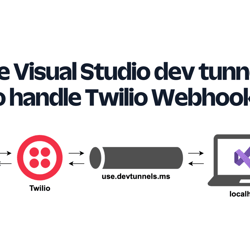
## Use Visual Studio dev tunnels to handle Twilio Webhooks

2/8/2023 - .NET

Learn how to develop webhooks on your local machine using Visual Studio dev tunnels and ASP.NET Core.


](/blog/dotnet/use-visual-studio-dev-tunnels-to-handle-twilio-webhooks)[
<picture><img class="blog-post-card__image" src="/cdn-cgi/image/width=250,format=auto,quality=90,height=250,fit=cover,gravity=0.5x0.25765433625642226/media/fbubucw4/ios-screenshot_iphone13red_portrait.png" srcset="/cdn-cgi/image/width=250,format=auto,quality=90,height=250,fit=cover,gravity=0.5x0.25765433625642226/media/fbubucw4/ios-screenshot_iphone13red_portrait.png 250w, /cdn-cgi/image/width=375,format=auto,quality=90,height=375,fit=cover,gravity=0.5x0.25765433625642226/media/fbubucw4/ios-screenshot_iphone13red_portrait.png 375w, /cdn-cgi/image/width=500,format=auto,quality=90,height=500,fit=cover,gravity=0.5x0.25765433625642226/media/fbubucw4/ios-screenshot_iphone13red_portrait.png 500w" sizes="250px" width="250" height="250" alt="Conversation between an iPhone user and the SMS bot. The user says &quot;Hi&quot; and the bot responds with &quot;Welcome to the U.S. Representative lookup bot. Respond with your address. The user sends an address and the bot responds with &quot;Your representative is Gerald E. Connolly (Democratic Party) representing Virginia&quot;s 11th congressional district. Then the bot sends an image of the representative." decoding="async" loading="lazy" style="background-color:#0f1038"></picture>

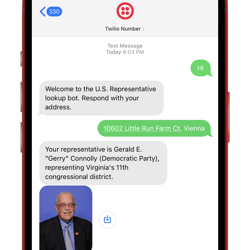
## Find your US Representatives and Congressional Districts with SMS and ASP.NET Core

8/2/2022 - .NET

Learn how to create an SMS bot that looks up U.S. Congressional Districts and Representatives using the Google Civic Information API, C#, ASP.NET Core Minimal API, and Twilio SMS.


](/blog/dotnet/find-your-us-representatives-and-congressional-districts-with-sms-and-aspdotnet-core)[

<picture><img class="blog-post-card__image" src="/cdn-cgi/image/width=250,format=auto,quality=90,height=250,fit=cover,gravity=0.5x0.5/media/daadzjni/dotnet-bot_builder.png" srcset="/cdn-cgi/image/width=250,format=auto,quality=90,height=250,fit=cover,gravity=0.5x0.5/media/daadzjni/dotnet-bot_builder.png 250w, /cdn-cgi/image/width=375,format=auto,quality=90,height=375,fit=cover,gravity=0.5x0.5/media/daadzjni/dotnet-bot_builder.png 375w, /cdn-cgi/image/width=500,format=auto,quality=90,height=500,fit=cover,gravity=0.5x0.5/media/daadzjni/dotnet-bot_builder.png 500w" sizes="250px" width="250" height="250" alt=".NET Bot holding a browser URL bar and a toolbox" decoding="async" loading="lazy"></picture>

## How to get the full public URL of ASP.NET Core

4/24/2022 - .NET

Learn how to get the public full URL of your ASP.NET Core application


](/blog/dotnet/how-to-get-the-full-public-url-of-aspdotnet-core)[

<picture><img class="blog-post-card__image" src="/cdn-cgi/image/width=250,format=auto,quality=90,height=250,fit=cover,gravity=0.5x0.5/media/3chhuuzk/dotnet-bot_builder.png" srcset="/cdn-cgi/image/width=250,format=auto,quality=90,height=250,fit=cover,gravity=0.5x0.5/media/3chhuuzk/dotnet-bot_builder.png 250w, /cdn-cgi/image/width=375,format=auto,quality=90,height=375,fit=cover,gravity=0.5x0.5/media/3chhuuzk/dotnet-bot_builder.png 375w, /cdn-cgi/image/width=500,format=auto,quality=90,height=500,fit=cover,gravity=0.5x0.5/media/3chhuuzk/dotnet-bot_builder.png 500w" sizes="250px" width="250" height="250" alt=".NET Bot holding a browser URL bar and a toolbox" decoding="async" loading="lazy"></picture>

## How to generate absolute URLs in ASP.NET Core

4/19/2022 - .NET

Learn how to generate full absolute URLs in C# and ASP.NET Core web applications.


](/blog/dotnet/how-to-generate-absolute-urls-in-aspdotnet-core)[

<picture><img class="blog-post-card__image" src="/cdn-cgi/image/width=250,format=auto,quality=90,height=250,fit=cover,gravity=0.9774396673856787x0.9247216931560068/media/nlup5klu/what-s-new-in-the-twilio-helper-library-for-asp-net-v5-73-0-march-2022.png" srcset="/cdn-cgi/image/width=250,format=auto,quality=90,height=250,fit=cover,gravity=0.9774396673856787x0.9247216931560068/media/nlup5klu/what-s-new-in-the-twilio-helper-library-for-asp-net-v5-73-0-march-2022.png 250w, /cdn-cgi/image/width=375,format=auto,quality=90,height=375,fit=cover,gravity=0.9774396673856787x0.9247216931560068/media/nlup5klu/what-s-new-in-the-twilio-helper-library-for-asp-net-v5-73-0-march-2022.png 375w, /cdn-cgi/image/width=500,format=auto,quality=90,height=500,fit=cover,gravity=0.9774396673856787x0.9247216931560068/media/nlup5klu/what-s-new-in-the-twilio-helper-library-for-asp-net-v5-73-0-march-2022.png 500w" sizes="250px" width="250" height="250" alt=".NET Bot holding a phone and bag with the Twilio logo" decoding="async" loading="lazy"></picture>

## What's new in the Twilio helper library for ASP.NET (v5.73.0 - April 2022)

4/6/2022 - .NET

Learn about what's new and old with the Twilio helper library for ASP.NET in version 5.73.0


](/blog/dotnet/whats-new-in-the-twilio-helper-library-for-aspdotnet-april-2022)[

<picture><img class="blog-post-card__image" src="/cdn-cgi/image/width=250,format=auto,quality=90,height=250,fit=cover,gravity=1x1/media/jn2ohzgd/how-to-prevent-email-html-injection-in-c-and-net.png" srcset="/cdn-cgi/image/width=250,format=auto,quality=90,height=250,fit=cover,gravity=1x1/media/jn2ohzgd/how-to-prevent-email-html-injection-in-c-and-net.png 250w, /cdn-cgi/image/width=375,format=auto,quality=90,height=375,fit=cover,gravity=1x1/media/jn2ohzgd/how-to-prevent-email-html-injection-in-c-and-net.png 375w, /cdn-cgi/image/width=500,format=auto,quality=90,height=500,fit=cover,gravity=1x1/media/jn2ohzgd/how-to-prevent-email-html-injection-in-c-and-net.png 500w" sizes="250px" width="250" height="250" alt="How to prevent Email HTML injection in C# and .NET" decoding="async" loading="lazy" style="background-color:#06033a"></picture>

## How to prevent email HTML injection in C# and .NET

4/1/2022 - .NET

Learn how bad actors can inject HTML into your emails in your C# .NET applications and how to mitigate it.


](/blog/dotnet/how-to-prevent-email-html-injection-in-csharp-and-dotnet)[

<picture><img class="blog-post-card__image" src="/cdn-cgi/image/width=250,format=auto,quality=90,height=250,fit=cover,gravity=0.5x0.5/media/xw3pvku3/sendgrid-logomark.png" srcset="/cdn-cgi/image/width=250,format=auto,quality=90,height=250,fit=cover,gravity=0.5x0.5/media/xw3pvku3/sendgrid-logomark.png 250w, /cdn-cgi/image/width=375,format=auto,quality=90,height=375,fit=cover,gravity=0.5x0.5/media/xw3pvku3/sendgrid-logomark.png 375w, /cdn-cgi/image/width=500,format=auto,quality=90,height=500,fit=cover,gravity=0.5x0.5/media/xw3pvku3/sendgrid-logomark.png 500w" sizes="250px" width="250" height="250" alt="Twilio SendGrid logo" decoding="async" loading="lazy"></picture>

## How to send ASP.NET Core Identity emails with Twilio SendGrid

3/15/2022 - .NET

Learn how to use SendGrid to send account verification and password recovery emails in ASP.NET Core


](/blog/dotnet/send-aspdotnet-core-identity-emails-with-twilio-sendgrid)[

<picture><img class="blog-post-card__image" src="/cdn-cgi/image/width=250,format=auto,quality=90,height=250,fit=cover,gravity=0.5x0.5/media/tfxb3k4r/ngrok-square.png" srcset="/cdn-cgi/image/width=250,format=auto,quality=90,height=250,fit=cover,gravity=0.5x0.5/media/tfxb3k4r/ngrok-square.png 250w, /cdn-cgi/image/width=375,format=auto,quality=90,height=375,fit=cover,gravity=0.5x0.5/media/tfxb3k4r/ngrok-square.png 375w, /cdn-cgi/image/width=500,format=auto,quality=90,height=500,fit=cover,gravity=0.5x0.5/media/tfxb3k4r/ngrok-square.png 500w" sizes="250px" width="250" height="250" alt="ngrok logo" decoding="async" loading="lazy" style="background-color:#fff"></picture>

## Integrate ngrok into ASP.NET Core startup and automatically update your webhook URLs

2/15/2022 - .NET

Learn to integrate ngrok into ASP.NET Core's startup process to create secure public tunnels and automatically handle Twilio's webhooks with a single command


](/blog/dotnet/integrate-ngrok-into-aspdotnet-core-startup-and-automatically-update-your-webhook-urls)[

<picture><img class="blog-post-card__image" src="/cdn-cgi/image/width=250,format=auto,quality=90,height=250,fit=cover,gravity=0.5x0.5/media/dftnx1t5/umbraco_logo_blue05.png" srcset="/cdn-cgi/image/width=250,format=auto,quality=90,height=250,fit=cover,gravity=0.5x0.5/media/dftnx1t5/umbraco_logo_blue05.png 250w, /cdn-cgi/image/width=375,format=auto,quality=90,height=375,fit=cover,gravity=0.5x0.5/media/dftnx1t5/umbraco_logo_blue05.png 375w, /cdn-cgi/image/width=500,format=auto,quality=90,height=500,fit=cover,gravity=0.5x0.5/media/dftnx1t5/umbraco_logo_blue05.png 500w" sizes="250px" width="250" height="250" alt="Umbraco logo" decoding="async" loading="lazy" style="background-color:#fff"></picture>

## Integrate IndexNow with Umbraco CMS to submit content to search engines

2/7/2022 - Umbraco

Umbraco is very extensible for ASP.NET developers. Learn how to integrate IndexNow into the Umbraco backoffice, so you can easily submit Umbraco content URLs to search engines that they will (re)crawl.


](/blog/umbraco/integrate-indexnow-with-umbraco-cms-to-submit-content-to-search-engines)[

<picture><img class="blog-post-card__image" src="/media/dikleklg/dotnet-bot_builder.svg" width="250" height="250" alt=".NET Bot" decoding="async" loading="lazy" style="background-color:#fff"></picture>

## How to get ASP.NET Core's local server URLs

1/25/2022 - .NET

Learn how to access the ASP.NET Core's local server URLs in Program.cs, in controllers using Dependency Injection, and in IHostedService or BackgroundService.


](/blog/dotnet/how-to-get-aspdotnet-core-server-urls)[

<picture><img class="blog-post-card__image" src="/cdn-cgi/image/width=250,format=auto,quality=90,height=250,fit=cover,gravity=0.5x0.5/media/ql4ck34n/umbraco-9-as-a-linux-docker-container-square.png" srcset="/cdn-cgi/image/width=250,format=auto,quality=90,height=250,fit=cover,gravity=0.5x0.5/media/ql4ck34n/umbraco-9-as-a-linux-docker-container-square.png 250w, /cdn-cgi/image/width=375,format=auto,quality=90,height=375,fit=cover,gravity=0.5x0.5/media/ql4ck34n/umbraco-9-as-a-linux-docker-container-square.png 375w, /cdn-cgi/image/width=500,format=auto,quality=90,height=500,fit=cover,gravity=0.5x0.5/media/ql4ck34n/umbraco-9-as-a-linux-docker-container-square.png 500w" sizes="250px" width="250" height="250" alt="Umbraco logo and Docker logo" decoding="async" loading="lazy" style="background-color:#fff"></picture>

## How to run Umbraco 9 as a Linux Docker container

11/25/2021 - Umbraco

Umbraco 9 has been built on top of .NET 5. As a result, you can now containerize your Umbraco 9 websites in Linux containers. Learn how to containerize Umbraco 9 with Docker.


](/blog/umbraco/how-to-run-umbraco-9-as-a-linux-docker-container)[

<picture><img class="blog-post-card__image" src="/cdn-cgi/image/width=250,format=auto,quality=90,height=250,fit=cover,gravity=0.5x0.5/media/gjtmjbmp/umbraco-9-to-azure-app-service-for-linux-square.png" srcset="/cdn-cgi/image/width=250,format=auto,quality=90,height=250,fit=cover,gravity=0.5x0.5/media/gjtmjbmp/umbraco-9-to-azure-app-service-for-linux-square.png 250w, /cdn-cgi/image/width=375,format=auto,quality=90,height=375,fit=cover,gravity=0.5x0.5/media/gjtmjbmp/umbraco-9-to-azure-app-service-for-linux-square.png 375w, /cdn-cgi/image/width=500,format=auto,quality=90,height=500,fit=cover,gravity=0.5x0.5/media/gjtmjbmp/umbraco-9-to-azure-app-service-for-linux-square.png 500w" sizes="250px" width="250" height="250" alt="Umbraco, Azure, and Linux logo" decoding="async" loading="lazy" style="background-color:#fff"></picture>

## Deploying Umbraco 9 to Azure App Service for Linux

11/7/2021 - Umbraco

Learn how to create the Azure infrastructure using the Azure CLI to host an Umbraco 9 website using Azure SQL and Azure App Service for Linux, and how to deploy your Umbraco 9 site.


](/blog/umbraco/deploying-umbraco-9-to-azure-app-service-for-linux)[

<picture><img class="blog-post-card__image" src="/cdn-cgi/image/width=250,format=auto,quality=90,height=250,fit=cover,gravity=0.5x0.5/media/52satp20/twilio-mark-red-8e37be43e.png" srcset="/cdn-cgi/image/width=250,format=auto,quality=90,height=250,fit=cover,gravity=0.5x0.5/media/52satp20/twilio-mark-red-8e37be43e.png 250w, /cdn-cgi/image/width=375,format=auto,quality=90,height=375,fit=cover,gravity=0.5x0.5/media/52satp20/twilio-mark-red-8e37be43e.png 375w, /cdn-cgi/image/width=500,format=auto,quality=90,height=500,fit=cover,gravity=0.5x0.5/media/52satp20/twilio-mark-red-8e37be43e.png 500w" sizes="250px" width="250" height="250" alt="Twilio logo" decoding="async" loading="lazy" style="background-color:#fff"></picture>

## Handle No-Answer Scenarios with Voicemail and Callback

10/28/2021 - .NET

With Twilio Programmable Voice you can ask customers to leave a message and their phone number if there's nobody available to take the call so you can give them a callback later


](/blog/dotnet/handle-no-answer-scenarios-with-voicemail-and-callback)[

<picture><img class="blog-post-card__image" src="/cdn-cgi/image/width=250,format=auto,quality=90,height=250,fit=cover,gravity=0.5x0.5/media/31pdfsmi/moving-to-umbraco-9-square.png" srcset="/cdn-cgi/image/width=250,format=auto,quality=90,height=250,fit=cover,gravity=0.5x0.5/media/31pdfsmi/moving-to-umbraco-9-square.png 250w, /cdn-cgi/image/width=375,format=auto,quality=90,height=375,fit=cover,gravity=0.5x0.5/media/31pdfsmi/moving-to-umbraco-9-square.png 375w, /cdn-cgi/image/width=500,format=auto,quality=90,height=500,fit=cover,gravity=0.5x0.5/media/31pdfsmi/moving-to-umbraco-9-square.png 500w" sizes="250px" width="250" height="250" alt=".NET Bot on a scooter riding from Umbraco 8 to 9" decoding="async" loading="lazy" style="background-color:#fff"></picture>

## Thoughts and tips on moving to Umbraco 9 from Umbraco 8

10/24/2021 - Umbraco

.NET Core was a groundbreaking change to the .NET platform. It is blazing fast, open-source, and cross-platform across Windows, Linux, and macOS. With Umbraco 9, we finally get to enjoy all the new innovations from .NET Core. Read about my experience upgrading an Umbraco 8 website to Umbraco 9.


](/blog/umbraco/thoughts-and-tips-on-moving-to-umbraco-9-from-umbraco-8)[

<picture><img class="blog-post-card__image" src="/cdn-cgi/image/width=250,format=auto,quality=90,height=250,fit=cover,gravity=0.5x0.5/media/4hxim0g5/brandblazor_nohalo_1000x.png" srcset="/cdn-cgi/image/width=250,format=auto,quality=90,height=250,fit=cover,gravity=0.5x0.5/media/4hxim0g5/brandblazor_nohalo_1000x.png 250w, /cdn-cgi/image/width=375,format=auto,quality=90,height=375,fit=cover,gravity=0.5x0.5/media/4hxim0g5/brandblazor_nohalo_1000x.png 375w, /cdn-cgi/image/width=500,format=auto,quality=90,height=500,fit=cover,gravity=0.5x0.5/media/4hxim0g5/brandblazor_nohalo_1000x.png 500w" sizes="250px" width="250" height="250" alt="Blazor logo" decoding="async" loading="lazy"></picture>

## Get Your Head Together With Blazor’s New HeadContent and PageTitle

10/14/2021 - .NET

Let’s take a look at the three Blazor components .NET 6 is introducing to help you manage the head of your document—PageTitle, HeadContent, and HeadOutlet.


](/blog/dotnet/get-your-head-together-with-blazors-new-headcontent-and-pagetitle)[

<picture><img class="blog-post-card__image" src="/cdn-cgi/image/width=250,format=auto,quality=90,height=250,fit=cover,gravity=0.6080352198975559x0.5/media/aqwjy45w/e3s921dwuaeaft.jpg" srcset="/cdn-cgi/image/width=250,format=auto,quality=90,height=250,fit=cover,gravity=0.6080352198975559x0.5/media/aqwjy45w/e3s921dwuaeaft.jpg 250w, /cdn-cgi/image/width=375,format=auto,quality=90,height=375,fit=cover,gravity=0.6080352198975559x0.5/media/aqwjy45w/e3s921dwuaeaft.jpg 375w, /cdn-cgi/image/width=500,format=auto,quality=90,height=500,fit=cover,gravity=0.6080352198975559x0.5/media/aqwjy45w/e3s921dwuaeaft.jpg 500w" sizes="250px" width="250" height="250" alt="Picture of Niels—white male with long blond hair— with a shocked expression" decoding="async" loading="lazy" style="background-color:#fff"></picture>

## Guest on .NET Docs Show: Making Phone Calls 📞 from Blazor WebAssembly with Twilio Voice

6/11/2021 - .NET

Earlier this week, the folks at the .NET Docs Show invited me over to talk about Twilio, .NET, and Blazor WebAssembly. We discussed different architectures, workflow diagrams, Twilio capabilities, and how to integrate them using ASP.NET WebAPI's and Blazor WebAssembly.


](/blog/dotnet/guest-on-dotnet-docs-show-making-phone-calls-from-blazor-webassembly-with-twilio-voice)[

<picture><img class="blog-post-card__image" src="/cdn-cgi/image/width=250,format=auto,quality=90,height=250,fit=cover,gravity=0.5x0.5/media/p5zpm4uh/recaptcha-s-selenium-ui-tests-square.png" srcset="/cdn-cgi/image/width=250,format=auto,quality=90,height=250,fit=cover,gravity=0.5x0.5/media/p5zpm4uh/recaptcha-s-selenium-ui-tests-square.png 250w, /cdn-cgi/image/width=375,format=auto,quality=90,height=375,fit=cover,gravity=0.5x0.5/media/p5zpm4uh/recaptcha-s-selenium-ui-tests-square.png 375w, /cdn-cgi/image/width=500,format=auto,quality=90,height=500,fit=cover,gravity=0.5x0.5/media/p5zpm4uh/recaptcha-s-selenium-ui-tests-square.png 500w" sizes="250px" width="250" height="250" alt=".NET Bot surfing a wave" decoding="async" loading="lazy" style="background-color:#fff"></picture>

## How to bypass Captchas in Selenium UI tests

5/19/2021 - .NET

Captchas are often used as a way to combat spam on website forms. Unfortunately, this also makes it harder to verify the functionality of the forms using UI tests like Selenium. To work around this you can extend your website with a bypass form.


](/blog/dotnet/how-to-bypass-recaptchas-in-selenium-ui-tests)[

<picture><img class="blog-post-card__image" src="/cdn-cgi/image/width=250,format=auto,quality=90,height=250,fit=cover,gravity=0.5x0.5/media/alanyim4/smtp4dev-selenium-email-capture-square.png" srcset="/cdn-cgi/image/width=250,format=auto,quality=90,height=250,fit=cover,gravity=0.5x0.5/media/alanyim4/smtp4dev-selenium-email-capture-square.png 250w, /cdn-cgi/image/width=375,format=auto,quality=90,height=375,fit=cover,gravity=0.5x0.5/media/alanyim4/smtp4dev-selenium-email-capture-square.png 375w, /cdn-cgi/image/width=500,format=auto,quality=90,height=500,fit=cover,gravity=0.5x0.5/media/alanyim4/smtp4dev-selenium-email-capture-square.png 500w" sizes="250px" width="250" height="250" alt=".NET Bot holding a letter" decoding="async" loading="lazy" style="background-color:#fff"></picture>

## Capture emails during development using smtp4dev and UI Test with Selenium

4/21/2021 - .NET

You can use smtp4dev during development to prevent emails from going out to real customers. This tool also supports IMAP which you can use to query emails for automated testing.


](/blog/dotnet/capture-emails-during-development-using-smtp4dev-and-ui-test-with-selenium)[

<picture><img class="blog-post-card__image" src="/cdn-cgi/image/width=250,format=auto,quality=90,height=250,fit=cover,gravity=0.5x0.5002501250625312/media/5j2pvfql/aspdotnet-zip-square.png" srcset="/cdn-cgi/image/width=250,format=auto,quality=90,height=250,fit=cover,gravity=0.5x0.5002501250625312/media/5j2pvfql/aspdotnet-zip-square.png 250w, /cdn-cgi/image/width=375,format=auto,quality=90,height=375,fit=cover,gravity=0.5x0.5002501250625312/media/5j2pvfql/aspdotnet-zip-square.png 375w, /cdn-cgi/image/width=500,format=auto,quality=90,height=500,fit=cover,gravity=0.5x0.5002501250625312/media/5j2pvfql/aspdotnet-zip-square.png 500w" sizes="250px" width="250" height="250" alt=".NET Bot holding a package with &quot;ZIP&quot; on it. " decoding="async" loading="lazy" style="background-color:#fff"></picture>

## Create ZIP files on HTTP request without intermediate files using ASP.NET MVC Framework

4/5/2021 - .NET

The ZipArchive wraps any stream to read, create, and update ZIP archives. You can send the result to the client using ASP.NET MVC Framework.


](/blog/dotnet/create-zip-files-on-http-request-without-intermediate-files-using-aspdotnet-mvc-framework)[

<picture><img class="blog-post-card__image" src="/cdn-cgi/image/width=250,format=auto,quality=90,height=250,fit=cover,gravity=0.5x0.5/media/lrdndfux/blazor-digitalocean-app-square.png" srcset="/cdn-cgi/image/width=250,format=auto,quality=90,height=250,fit=cover,gravity=0.5x0.5/media/lrdndfux/blazor-digitalocean-app-square.png 250w, /cdn-cgi/image/width=375,format=auto,quality=90,height=375,fit=cover,gravity=0.5x0.5/media/lrdndfux/blazor-digitalocean-app-square.png 375w, /cdn-cgi/image/width=500,format=auto,quality=90,height=500,fit=cover,gravity=0.5x0.5/media/lrdndfux/blazor-digitalocean-app-square.png 500w" sizes="250px" width="250" height="250" alt="Blazor logo pointing to the GitHub logo pointing to the DigitalOcean logo" decoding="async" loading="lazy" style="background-color:#fff"></picture>

## How to deploy Blazor WebAssembly to DigitalOcean App Platform

3/30/2021 - .NET

Blazor WebAssembly can be served as static files. These files can be hosted in static hosting services such as DigitalOcean App Platform.


](/blog/dotnet/how-to-deploy-blazor-webassembly-to-digitalocean-app-platform)[

<picture><img class="blog-post-card__image" src="/cdn-cgi/image/width=250,format=auto,quality=90,height=250,fit=cover,gravity=0.5x0.5/media/hwffejap/net-bot-doctor-thumbnail.png" srcset="/cdn-cgi/image/width=250,format=auto,quality=90,height=250,fit=cover,gravity=0.5x0.5/media/hwffejap/net-bot-doctor-thumbnail.png 250w, /cdn-cgi/image/width=375,format=auto,quality=90,height=375,fit=cover,gravity=0.5x0.5/media/hwffejap/net-bot-doctor-thumbnail.png 375w, /cdn-cgi/image/width=500,format=auto,quality=90,height=500,fit=cover,gravity=0.5x0.5/media/hwffejap/net-bot-doctor-thumbnail.png 500w" sizes="250px" width="250" height="250" alt=".NET Bot dressed up as a doctor" decoding="async" loading="lazy"></picture>

## Don't use HttpContext.Current, especially when using async

3/25/2021 - .NET

Avoid using HttpContext.Current if possible, especially in asynchronous code. Use the properties provided on the Page or Controller instead and pass them on to the asynchronous code.


](/blog/dotnet/dont-use-httpcontext-current-especially-when-using-async)[

<picture><img class="blog-post-card__image" src="/cdn-cgi/image/width=250,format=auto,quality=90,height=250,fit=cover,gravity=0.5x0.5002501250625312/media/krafsxcd/aspdotnet-zip-square.png" srcset="/cdn-cgi/image/width=250,format=auto,quality=90,height=250,fit=cover,gravity=0.5x0.5002501250625312/media/krafsxcd/aspdotnet-zip-square.png 250w, /cdn-cgi/image/width=375,format=auto,quality=90,height=375,fit=cover,gravity=0.5x0.5002501250625312/media/krafsxcd/aspdotnet-zip-square.png 375w, /cdn-cgi/image/width=500,format=auto,quality=90,height=500,fit=cover,gravity=0.5x0.5002501250625312/media/krafsxcd/aspdotnet-zip-square.png 500w" sizes="250px" width="250" height="250" alt=".NET Bot holding a package with &quot;ZIP&quot; on it. " decoding="async" loading="lazy" style="background-color:#fff"></picture>

## Create ZIP files on HTTP request without intermediate files using ASP.NET Core MVC, Razor Pages, and endpoints

3/21/2021 - .NET

The ZipArchive wraps any stream to read, create, and update ZIP archives. You can send the result to the client using ASP.NET MVC, Razor Pages, and endpoints.


](/blog/dotnet/create-zip-files-on-http-request-without-intermediate-files-using-aspdotnet-mvc-razor-pages-and-endpoints)[
<picture><img class="blog-post-card__image" src="/cdn-cgi/image/width=250,format=auto,quality=90,height=250,fit=cover,gravity=0.5x0.5/media/bwpo5hbt/blazor-cloudflare-pages-square.png" srcset="/cdn-cgi/image/width=250,format=auto,quality=90,height=250,fit=cover,gravity=0.5x0.5/media/bwpo5hbt/blazor-cloudflare-pages-square.png 250w, /cdn-cgi/image/width=375,format=auto,quality=90,height=375,fit=cover,gravity=0.5x0.5/media/bwpo5hbt/blazor-cloudflare-pages-square.png 375w, /cdn-cgi/image/width=500,format=auto,quality=90,height=500,fit=cover,gravity=0.5x0.5/media/bwpo5hbt/blazor-cloudflare-pages-square.png 500w" sizes="250px" width="250" height="250" alt="Blazor logo pointing to the GitHub logo pointing to the Cloudflare Pages logo" decoding="async" loading="lazy" style="background-color:#fff"></picture>

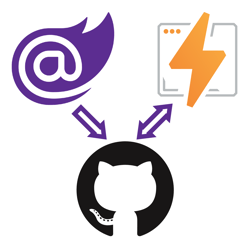
## How to deploy Blazor WebAssembly to Cloudflare Pages

3/14/2021 - .NET

Blazor WebAssembly can be served as static files. These files can be hosted in static hosting services such as Cloudflare Pages.


](/blog/dotnet/how-to-deploy-blazor-webassembly-to-cloudflare-pages)[

<picture><img class="blog-post-card__image" src="/cdn-cgi/image/width=250,format=auto,quality=90,height=250,fit=cover,gravity=0.5x0.5/media/bx5dy2pl/blazor-heroku-square.png" srcset="/cdn-cgi/image/width=250,format=auto,quality=90,height=250,fit=cover,gravity=0.5x0.5/media/bx5dy2pl/blazor-heroku-square.png 250w, /cdn-cgi/image/width=375,format=auto,quality=90,height=375,fit=cover,gravity=0.5x0.5/media/bx5dy2pl/blazor-heroku-square.png 375w, /cdn-cgi/image/width=500,format=auto,quality=90,height=500,fit=cover,gravity=0.5x0.5/media/bx5dy2pl/blazor-heroku-square.png 500w" sizes="250px" width="250" height="250" alt="Heroku and Blazor logo" decoding="async" loading="lazy" style="background-color:#fff"></picture>

## How to deploy Blazor WebAssembly to Heroku

2/28/2021 - .NET

Heroku doesn't officially offer a static hosting service but does have an experimental 'buildpack' which gives you static hosting capabilities you can use to deploy and host Blazor WebAssembly.


](/blog/dotnet/how-to-deploy-blazor-webassembly-to-heroku)[

<picture><img class="blog-post-card__image" src="/cdn-cgi/image/width=250,format=auto,quality=90,height=250,fit=cover,gravity=0.5x0.5/media/l3rhhbsm/blazor-amplify-square.png" srcset="/cdn-cgi/image/width=250,format=auto,quality=90,height=250,fit=cover,gravity=0.5x0.5/media/l3rhhbsm/blazor-amplify-square.png 250w, /cdn-cgi/image/width=375,format=auto,quality=90,height=375,fit=cover,gravity=0.5x0.5/media/l3rhhbsm/blazor-amplify-square.png 375w, /cdn-cgi/image/width=500,format=auto,quality=90,height=500,fit=cover,gravity=0.5x0.5/media/l3rhhbsm/blazor-amplify-square.png 500w" sizes="250px" width="250" height="250" alt="Blazor logo pointing to the GitHub logo pointing to the AWS Amplify logo." decoding="async" loading="lazy" style="background-color:#fff"></picture>

## How to deploy Blazor WebAssembly to AWS Amplify

2/21/2021 - .NET

Blazor WebAssembly can be served as static files. These files can be hosted in static hosting services such as AWS Amplify.


](/blog/dotnet/how-to-deploy-blazor-webassembly-to-aws-amplify)[

<picture><img class="blog-post-card__image" src="/cdn-cgi/image/width=250,format=auto,quality=90,height=250,fit=cover,gravity=0.5x0.5002459542608448/media/ggrmwooo/dotnet-yarp-square.png" srcset="/cdn-cgi/image/width=250,format=auto,quality=90,height=250,fit=cover,gravity=0.5x0.5002459542608448/media/ggrmwooo/dotnet-yarp-square.png 250w, /cdn-cgi/image/width=375,format=auto,quality=90,height=375,fit=cover,gravity=0.5x0.5002459542608448/media/ggrmwooo/dotnet-yarp-square.png 375w, /cdn-cgi/image/width=500,format=auto,quality=90,height=500,fit=cover,gravity=0.5x0.5002459542608448/media/ggrmwooo/dotnet-yarp-square.png 500w" sizes="250px" width="250" height="250" alt=".NET Bot building an application" decoding="async" loading="lazy" style="background-color:#fff"></picture>

## Use project Tye to host Blazor WASM and ASP.NET Web API on a single origin to avoid CORS

2/14/2021 - .NET

Using Microsoft's experimental Project Tye, you configured the proxy to forward requests to '/api' to the Web API, and all other requests to the Blazor WASM client.


](/blog/dotnet/use-project-tye-to-host-blazor-wasm-and-aspdotnet-web-api-on-a-single-origin)[

<picture><img class="blog-post-card__image" src="/cdn-cgi/image/width=250,format=auto,quality=90,height=250,fit=cover,gravity=0.5x0.5/media/2qddoewj/blazor-netlify-square.png" srcset="/cdn-cgi/image/width=250,format=auto,quality=90,height=250,fit=cover,gravity=0.5x0.5/media/2qddoewj/blazor-netlify-square.png 250w, /cdn-cgi/image/width=375,format=auto,quality=90,height=375,fit=cover,gravity=0.5x0.5/media/2qddoewj/blazor-netlify-square.png 375w, /cdn-cgi/image/width=500,format=auto,quality=90,height=500,fit=cover,gravity=0.5x0.5/media/2qddoewj/blazor-netlify-square.png 500w" sizes="250px" width="250" height="250" alt="Blazor logo pointing to the GitHub logo and the GitHub logo pointing to the Netlify logo." decoding="async" loading="lazy" style="background-color:#fff"></picture>

## How to deploy Blazor WebAssembly to Netlify

2/7/2021 - .NET

Now that you can run .NET web applications without server-side code, you can deploy these applications to various static site hosts, such as Netlify.


](/blog/dotnet/how-to-deploy-blazor-webassembly-to-netlify)[

<picture><img class="blog-post-card__image" src="/cdn-cgi/image/width=250,format=auto,quality=90,height=250,fit=cover,gravity=0.5x0.5/media/3cxh1whu/dotnet-yarp-square.png" srcset="/cdn-cgi/image/width=250,format=auto,quality=90,height=250,fit=cover,gravity=0.5x0.5/media/3cxh1whu/dotnet-yarp-square.png 250w, /cdn-cgi/image/width=375,format=auto,quality=90,height=375,fit=cover,gravity=0.5x0.5/media/3cxh1whu/dotnet-yarp-square.png 375w, /cdn-cgi/image/width=500,format=auto,quality=90,height=500,fit=cover,gravity=0.5x0.5/media/3cxh1whu/dotnet-yarp-square.png 500w" sizes="250px" width="250" height="250" alt=".NET Bot building an application" decoding="async" loading="lazy" style="background-color:#fff"></picture>

## Use YARP to host client and API server on a single origin to avoid CORS

1/24/2021 - .NET

Using Microsoft's new reverse proxy "YARP", you configured the proxy to forward requests to '/api' to the Web API, and all other requests to the Blazor WASM client.


](/blog/dotnet/use-yarp-to-host-client-and-api-server-on-a-single-origin)[

<picture><img class="blog-post-card__image" src="/cdn-cgi/image/width=250,format=auto,quality=90,height=250,fit=cover,gravity=0.5x0.5/media/q02nayce/blazor-github-firebase-square.png" srcset="/cdn-cgi/image/width=250,format=auto,quality=90,height=250,fit=cover,gravity=0.5x0.5/media/q02nayce/blazor-github-firebase-square.png 250w, /cdn-cgi/image/width=375,format=auto,quality=90,height=375,fit=cover,gravity=0.5x0.5/media/q02nayce/blazor-github-firebase-square.png 375w, /cdn-cgi/image/width=500,format=auto,quality=90,height=500,fit=cover,gravity=0.5x0.5/media/q02nayce/blazor-github-firebase-square.png 500w" sizes="250px" width="250" height="250" alt=" Blazor logo next to an arrow pointing to the GitHub logo next to a double arrow pointing from the GitHub logo to the Firebase Hosting logo " decoding="async" loading="lazy" style="background-color:#fff"></picture>

## Video: How to deploy Blazor WebAssembly to Firebase Hosting

1/21/2021 - .NET

With ASP.NET Blazor WebAssembly you can create .NET applications that run completely inside of the browser. The output of a Blazor WASM project are all static files. You can deploy these applications to various static site hosts like Firebase Hosting.


](/blog/dotnet/video-how-to-deploy-blazor-webassembly-to-firebase-hosting)[

<picture><img class="blog-post-card__image" src="/cdn-cgi/image/width=250,format=auto,quality=90,height=250,fit=cover,gravity=0.5x0.5/media/3tmmtvxg/blazor-square.png" srcset="/cdn-cgi/image/width=250,format=auto,quality=90,height=250,fit=cover,gravity=0.5x0.5/media/3tmmtvxg/blazor-square.png 250w, /cdn-cgi/image/width=375,format=auto,quality=90,height=375,fit=cover,gravity=0.5x0.5/media/3tmmtvxg/blazor-square.png 375w, /cdn-cgi/image/width=500,format=auto,quality=90,height=500,fit=cover,gravity=0.5x0.5/media/3tmmtvxg/blazor-square.png 500w" sizes="250px" width="250" height="250" alt="Blazor logo" decoding="async" loading="lazy" style="background-color:#fafafa"></picture>

## Pre-render Blazor WebAssembly at build time to optimize for search engines

1/3/2021 - .NET

Using pre-rendering tools like react-snap, you can pre-render Blazor WASM. Additionally, you can integrate these pre-rendering tools inside of your continuous integration and continuous deployment pipelines.


](/blog/dotnet/pre-render-blazor-webassembly-at-build-time-to-optimize-for-search-engines)[

<picture><img class="blog-post-card__image" src="/cdn-cgi/image/width=250,format=auto,quality=90,height=250,fit=cover,gravity=0.5x0.5/media/ttaf0suj/blazor-square.png" srcset="/cdn-cgi/image/width=250,format=auto,quality=90,height=250,fit=cover,gravity=0.5x0.5/media/ttaf0suj/blazor-square.png 250w, /cdn-cgi/image/width=375,format=auto,quality=90,height=375,fit=cover,gravity=0.5x0.5/media/ttaf0suj/blazor-square.png 375w, /cdn-cgi/image/width=500,format=auto,quality=90,height=500,fit=cover,gravity=0.5x0.5/media/ttaf0suj/blazor-square.png 500w" sizes="250px" width="250" height="250" alt="Blazor logo" decoding="async" loading="lazy" style="background-color:#fafafa"></picture>

## Fix Blazor WebAssembly PWA integrity checks

12/30/2020 - .NET

The service-worker-assets.js file is generated during publish and any modification made to the listed files after publish will cause the integrity check to fail.


](/blog/dotnet/fix-blazor-webassembly-pwa-integrity-checks)[

<picture><img class="blog-post-card__image" src="/cdn-cgi/image/width=250,format=auto,quality=90,height=250,fit=cover,gravity=0.5x0.5/media/sabcadlf/blazor-github-firebase-square.png" srcset="/cdn-cgi/image/width=250,format=auto,quality=90,height=250,fit=cover,gravity=0.5x0.5/media/sabcadlf/blazor-github-firebase-square.png 250w, /cdn-cgi/image/width=375,format=auto,quality=90,height=375,fit=cover,gravity=0.5x0.5/media/sabcadlf/blazor-github-firebase-square.png 375w, /cdn-cgi/image/width=500,format=auto,quality=90,height=500,fit=cover,gravity=0.5x0.5/media/sabcadlf/blazor-github-firebase-square.png 500w" sizes="250px" width="250" height="250" alt=" Blazor logo next to an arrow pointing to the GitHub logo next to a double arrow pointing from the GitHub logo to the Firebase Hosting logo " decoding="async" loading="lazy" style="background-color:#fff"></picture>

## How to deploy Blazor WebAssembly to Firebase Hosting

12/27/2020 - .NET

With ASP.NET Blazor WebAssembly you can create .NET applications that run completely inside of the browser. The output of a Blazor WASM project are all static files. You can deploy these applications to various static site hosts like Firebase Hosting.


](/blog/dotnet/how-to-deploy-blazor-webassembly-to-firebase-hosting)[

<picture><img class="blog-post-card__image" src="/cdn-cgi/image/width=250,format=auto,quality=90,height=250,fit=cover,gravity=0.5x0.5/media/aqmeempb/blazor-github-square.png" srcset="/cdn-cgi/image/width=250,format=auto,quality=90,height=250,fit=cover,gravity=0.5x0.5/media/aqmeempb/blazor-github-square.png 250w, /cdn-cgi/image/width=375,format=auto,quality=90,height=375,fit=cover,gravity=0.5x0.5/media/aqmeempb/blazor-github-square.png 375w, /cdn-cgi/image/width=500,format=auto,quality=90,height=500,fit=cover,gravity=0.5x0.5/media/aqmeempb/blazor-github-square.png 500w" sizes="250px" width="250" height="250" alt="Blazor and GitHub logo" decoding="async" loading="lazy" style="background-color:#fff"></picture>

## Video: How to deploy ASP.NET Blazor WebAssembly to GitHub Pages

12/23/2020 - .NET

With ASP.NET Blazor WebAssembly you can create .NET applications that run completely inside of the browser. The output of a Blazor WASM project are all static files. You can deploy these applications to various static site hosts like GitHub Pages.


](/blog/dotnet/video-how-to-deploy-aspnet-blazor-webassembly-to-github-pages)[

<picture><img class="blog-post-card__image" src="/cdn-cgi/image/width=250,format=auto,quality=90,height=250,fit=cover,gravity=0.4982464937912058x0.4982464937912058/media/ad2llt0w/javascript-in-blazor-ijso-square.png" srcset="/cdn-cgi/image/width=250,format=auto,quality=90,height=250,fit=cover,gravity=0.4982464937912058x0.4982464937912058/media/ad2llt0w/javascript-in-blazor-ijso-square.png 250w, /cdn-cgi/image/width=375,format=auto,quality=90,height=375,fit=cover,gravity=0.4982464937912058x0.4982464937912058/media/ad2llt0w/javascript-in-blazor-ijso-square.png 375w, /cdn-cgi/image/width=500,format=auto,quality=90,height=500,fit=cover,gravity=0.4982464937912058x0.4982464937912058/media/ad2llt0w/javascript-in-blazor-ijso-square.png 500w" sizes="250px" width="250" height="250" alt="Blazor next to JavaScript logo" decoding="async" loading="lazy" style="background-color:#fafafa"></picture>

## Interacting with JavaScript Objects using the new IJSObjectReference in Blazor

12/21/2020 - .NET

A new type is introduced in .NET 5 called IJSObjectReference. This type holds a reference to a JavaScript object and can be used to invoke functions available on that JavaScript object.


](/blog/dotnet/interacting-with-javascript-objects-using-the-new-ijsobjectreference-in-blazor)[

<picture><img class="blog-post-card__image" src="/cdn-cgi/image/width=250,format=auto,quality=90,height=250,fit=cover,gravity=0.4982464937912058x0.4984916607169275/media/ifzbm55o/dotnet-framework-square.png" srcset="/cdn-cgi/image/width=250,format=auto,quality=90,height=250,fit=cover,gravity=0.4982464937912058x0.4984916607169275/media/ifzbm55o/dotnet-framework-square.png 250w, /cdn-cgi/image/width=375,format=auto,quality=90,height=375,fit=cover,gravity=0.4982464937912058x0.4984916607169275/media/ifzbm55o/dotnet-framework-square.png 375w, /cdn-cgi/image/width=500,format=auto,quality=90,height=500,fit=cover,gravity=0.4982464937912058x0.4984916607169275/media/ifzbm55o/dotnet-framework-square.png 500w" sizes="250px" width="250" height="250" alt=".NET Bot" decoding="async" loading="lazy" style="background-color:#fff"></picture>

## Harden Anti-Forgery Tokens with IAntiforgeryAdditionalDataProvider in ASP.NET Core

12/13/2020 - .NET

Using IAntiforgeryAdditionalDataProvider you can harden ASP.NET Core's anti-forgery token feature by adding additional data and validating the additional data.


](/blog/dotnet/harden-anti-forgery-tokens-with-iantiforgeryadditionaldataprovider-in-aspnet-core)[

<picture><img class="blog-post-card__image" src="/cdn-cgi/image/width=250,format=auto,quality=90,height=250,fit=cover,gravity=0.5x0.5/media/rfhjjgka/blazor-twilio-calls-square.png" srcset="/cdn-cgi/image/width=250,format=auto,quality=90,height=250,fit=cover,gravity=0.5x0.5/media/rfhjjgka/blazor-twilio-calls-square.png 250w, /cdn-cgi/image/width=375,format=auto,quality=90,height=375,fit=cover,gravity=0.5x0.5/media/rfhjjgka/blazor-twilio-calls-square.png 375w, /cdn-cgi/image/width=500,format=auto,quality=90,height=500,fit=cover,gravity=0.5x0.5/media/rfhjjgka/blazor-twilio-calls-square.png 500w" sizes="250px" width="250" height="250" alt="Blazor and Twilio logo" decoding="async" loading="lazy" style="background-color:#fafafa"></picture>

## Making Phone Calls from Blazor WebAssembly with Twilio Voice

11/30/2020 - .NET

Using Twilio Voice you can add the ability to make and receive phone calls from your own ASP.NET web applications. Twilio’s helper library for JavaScript makes it easy to integrate client functionality into web front ends built with Blazor WebAssembly, and the Twilio NuGet packages provide you with convenient interfaces to Twilio’s APIs for server-side tasks.


](/blog/dotnet/making-phone-calls-from-blazor-webassembly-with-twilio-voice)[

<picture><img class="blog-post-card__image" src="/cdn-cgi/image/width=250,format=auto,quality=90,height=250,fit=cover,gravity=0.5x0.5/media/ku0blkjc/javascript-in-blazor-square.png" srcset="/cdn-cgi/image/width=250,format=auto,quality=90,height=250,fit=cover,gravity=0.5x0.5/media/ku0blkjc/javascript-in-blazor-square.png 250w, /cdn-cgi/image/width=375,format=auto,quality=90,height=375,fit=cover,gravity=0.5x0.5/media/ku0blkjc/javascript-in-blazor-square.png 375w, /cdn-cgi/image/width=500,format=auto,quality=90,height=500,fit=cover,gravity=0.5x0.5/media/ku0blkjc/javascript-in-blazor-square.png 500w" sizes="250px" width="250" height="250" alt="Blazor logo next to JavaScript logo" decoding="async" loading="lazy" style="background-color:#fafafa"></picture>

## Communicating between .NET and JavaScript in Blazor with in-browser samples

11/5/2020 - .NET

The success of Blazor relies heavily upon how well it can integrate with the existing rich JavaScript ecosystem. The way Blazor allows you to integrate, is by enabling you to call JavaScript functions from Blazor and .NET functions from JavaScript also referred to as 'JavaScript interoperability'.


](/blog/dotnet/communicating-between-dotnet-and-javascript-in-blazor-with-in-browser-samples)[

<picture><img class="blog-post-card__image" src="/cdn-cgi/image/width=250,format=auto,quality=90,height=250,fit=cover,gravity=0.5x0.5/media/kvwcs54s/net-framework-square.png" srcset="/cdn-cgi/image/width=250,format=auto,quality=90,height=250,fit=cover,gravity=0.5x0.5/media/kvwcs54s/net-framework-square.png 250w, /cdn-cgi/image/width=375,format=auto,quality=90,height=375,fit=cover,gravity=0.5x0.5/media/kvwcs54s/net-framework-square.png 375w, /cdn-cgi/image/width=500,format=auto,quality=90,height=500,fit=cover,gravity=0.5x0.5/media/kvwcs54s/net-framework-square.png 500w" sizes="250px" width="250" height="250" alt=".NET Bot writing on a whiteboard" decoding="async" loading="lazy" style="background-color:#fff"></picture>

## Configure CORS using AppSettings or Custom Configuration Sections in ASP.NET Web API

10/26/2020 - .NET

Microsoft's CORS library works, but the attributes force you to hardcode the CORS headers. By creating custom CORS attributes, you can read the CORS configuration from AppSettings or a custom config section.


](/blog/dotnet/configure-cors-using-appsettings-or-custom-configuration-sections-in-aspnet-web-api)[

<picture><img class="blog-post-card__image" src="/cdn-cgi/image/width=250,format=auto,quality=90,height=250,fit=cover,gravity=0.5002263467632413x0.5002263467632413/media/fjjjglcr/blazor-firebase-square.png" srcset="/cdn-cgi/image/width=250,format=auto,quality=90,height=250,fit=cover,gravity=0.5002263467632413x0.5002263467632413/media/fjjjglcr/blazor-firebase-square.png 250w, /cdn-cgi/image/width=375,format=auto,quality=90,height=375,fit=cover,gravity=0.5002263467632413x0.5002263467632413/media/fjjjglcr/blazor-firebase-square.png 375w, /cdn-cgi/image/width=500,format=auto,quality=90,height=500,fit=cover,gravity=0.5002263467632413x0.5002263467632413/media/fjjjglcr/blazor-firebase-square.png 500w" sizes="250px" width="250" height="250" alt="Blazor and Firebase logo" decoding="async" loading="lazy" style="background-color:#fafafa"></picture>

## Real-time applications with Blazor Server and Firestore

10/16/2020 - DotNet

Blazor Server is built on SignalR, which is built on websockets. Among things, websockets enable Blazor Server to push changes from the server to the browser at any time. You can build real-time UI's when you combine this with a real-time database.


](/blog/dotnet/real-time-applications-with-blazor-server-and-firestore)[

<picture><img class="blog-post-card__image" src="/cdn-cgi/image/width=250,format=auto,quality=90,height=250,fit=cover,gravity=0.5x0.5/media/bkdbc3rw/blazor-logo.png" srcset="/cdn-cgi/image/width=250,format=auto,quality=90,height=250,fit=cover,gravity=0.5x0.5/media/bkdbc3rw/blazor-logo.png 250w, /cdn-cgi/image/width=375,format=auto,quality=90,height=375,fit=cover,gravity=0.5x0.5/media/bkdbc3rw/blazor-logo.png 375w, /cdn-cgi/image/width=500,format=auto,quality=90,height=500,fit=cover,gravity=0.5x0.5/media/bkdbc3rw/blazor-logo.png 500w" sizes="250px" width="250" height="250" alt="Blazor logo" decoding="async" loading="lazy" style="background-color:#fafafa"></picture>

## Pushing UI changes from Blazor Server to browser on server raised events

10/12/2020 - .NET

Blazor Server is built on SignalR, and SignalR is built on websockets among other techniques. The combination of these technologies allow Blazor Server to push UI changes into the client without the client requesting those changes.


](/blog/dotnet/pushing-ui-changes-from-blazor-server-to-browser-on-server-raised-events)[

<picture><img class="blog-post-card__image" src="/cdn-cgi/image/width=250,format=auto,quality=90,height=250,fit=cover,gravity=0.5x0.5/media/fxujfoot/introducing-umbraco-square.png" srcset="/cdn-cgi/image/width=250,format=auto,quality=90,height=250,fit=cover,gravity=0.5x0.5/media/fxujfoot/introducing-umbraco-square.png 250w, /cdn-cgi/image/width=375,format=auto,quality=90,height=375,fit=cover,gravity=0.5x0.5/media/fxujfoot/introducing-umbraco-square.png 375w, /cdn-cgi/image/width=500,format=auto,quality=90,height=500,fit=cover,gravity=0.5x0.5/media/fxujfoot/introducing-umbraco-square.png 500w" sizes="250px" width="250" height="250" alt="Umbraco logo" decoding="async" loading="lazy" style="background-color:#2d2d2d"></picture>

## Introducing Umbraco's KeepAlive Ping configuration

9/15/2020 - Umbraco

Umbraco 8.6 introduces the new keepAlive configuration inside of \`umbracoSettings.config\` which allows you to change "keepAlivePingUrl" and "disableKeepAliveTask"


](/blog/umbraco/introducing-umbracos-keepalive-ping-configuration)[

<picture><img class="blog-post-card__image" src="/cdn-cgi/image/width=250,format=auto,quality=90,height=250,fit=cover,gravity=0.5x0.5/media/eqhh2qrt/application-insights-square-logo.png" srcset="/cdn-cgi/image/width=250,format=auto,quality=90,height=250,fit=cover,gravity=0.5x0.5/media/eqhh2qrt/application-insights-square-logo.png 250w, /cdn-cgi/image/width=375,format=auto,quality=90,height=375,fit=cover,gravity=0.5x0.5/media/eqhh2qrt/application-insights-square-logo.png 375w, /cdn-cgi/image/width=500,format=auto,quality=90,height=500,fit=cover,gravity=0.5x0.5/media/eqhh2qrt/application-insights-square-logo.png 500w" sizes="250px" width="250" height="250" alt="Azure Application Insights logo" decoding="async" loading="lazy" style="background-color:#fff"></picture>

## Capturing ASP.NET Framework RawUrl with Azure Application Insights

9/14/2020 - Azure

By default, Application Insights will capture a lot of data about your ASP.NET applications including HTTP Requests made to your website. Unfortunately, the URL captured by Application Insights doesn't always match the URL originally requested by the client.


](/blog/azure/capturing-aspnet-framework-rawurl-with-azure-application-insights)[

<picture><img class="blog-post-card__image" src="/cdn-cgi/image/width=250,format=auto,quality=90,height=250,fit=cover,gravity=0.5x0.5/media/zlzdyga4/application-insights-square-logo.png" srcset="/cdn-cgi/image/width=250,format=auto,quality=90,height=250,fit=cover,gravity=0.5x0.5/media/zlzdyga4/application-insights-square-logo.png 250w, /cdn-cgi/image/width=375,format=auto,quality=90,height=375,fit=cover,gravity=0.5x0.5/media/zlzdyga4/application-insights-square-logo.png 375w, /cdn-cgi/image/width=500,format=auto,quality=90,height=500,fit=cover,gravity=0.5x0.5/media/zlzdyga4/application-insights-square-logo.png 500w" sizes="250px" width="250" height="250" alt="Azure Application Insights logo" decoding="async" loading="lazy" style="background-color:#fff"></picture>

## Capturing ASP.NET Core original URL with Azure Application Insights

9/14/2020 - Azure

By default, Application Insights will capture a lot of data about your ASP.NET applications including HTTP Requests made to your website. Unfortunately, the URL captured by Application Insights doesn't always match the URL originally requested by the client.


](/blog/azure/capturing-aspnet-core-original-url-with-azure-application-insights)[

<picture><img class="blog-post-card__image" src="/cdn-cgi/image/width=250,format=auto,quality=90,height=250,fit=cover,gravity=0.5x0.5/media/rivavmck/blazor-github-square.png" srcset="/cdn-cgi/image/width=250,format=auto,quality=90,height=250,fit=cover,gravity=0.5x0.5/media/rivavmck/blazor-github-square.png 250w, /cdn-cgi/image/width=375,format=auto,quality=90,height=375,fit=cover,gravity=0.5x0.5/media/rivavmck/blazor-github-square.png 375w, /cdn-cgi/image/width=500,format=auto,quality=90,height=500,fit=cover,gravity=0.5x0.5/media/rivavmck/blazor-github-square.png 500w" sizes="250px" width="250" height="250" alt="Blazor and GitHub logo" decoding="async" loading="lazy" style="background-color:#fff"></picture>

## How to deploy ASP.NET Blazor WebAssembly to GitHub Pages

8/31/2020 - .NET

With ASP.NET Blazor WebAssembly you can create .NET applications that run completely inside of the browser. The output of a Blazor WASM project are all static files. You can deploy these applications to various static site hosts like GitHub Pages.


](/blog/dotnet/how-to-deploy-aspnet-blazor-webassembly-to-github-pages)[

<picture><img class="blog-post-card__image" src="/cdn-cgi/image/width=250,format=auto,quality=90,height=250,fit=cover,gravity=0.5x0.5/media/jqilmp1y/blazor-github-azure-square.png" srcset="/cdn-cgi/image/width=250,format=auto,quality=90,height=250,fit=cover,gravity=0.5x0.5/media/jqilmp1y/blazor-github-azure-square.png 250w, /cdn-cgi/image/width=375,format=auto,quality=90,height=375,fit=cover,gravity=0.5x0.5/media/jqilmp1y/blazor-github-azure-square.png 375w, /cdn-cgi/image/width=500,format=auto,quality=90,height=500,fit=cover,gravity=0.5x0.5/media/jqilmp1y/blazor-github-azure-square.png 500w" sizes="250px" width="250" height="250" alt="How to deploy ASP.NET Blazor WebAssembly to Azure Static Web Apps. Blazor logo pointing to a GitHub logo pointing to an Azure logo." decoding="async" loading="lazy" style="background-color:#fff"></picture>

## How to deploy Blazor WASM & Azure Functions to Azure Static Web Apps using GitHub

8/24/2020 - .NET

With ASP.NET Blazor WebAssembly you can create .NET applications that run inside of the browser . The output of a Blazor WASM project are all static files. You can deploy these applications to static site hosts, such as Azure Static Web Apps and GitHub Pages.


](/blog/dotnet/how-to-deploy-aspnet-blazor-webassembly-to-azure-static-web-apps)[

<picture><img class="blog-post-card__image" src="/cdn-cgi/image/width=250,format=auto,quality=90,height=250,fit=cover,gravity=0.5x0.5/media/npyes0h2/blazor-logo.png" srcset="/cdn-cgi/image/width=250,format=auto,quality=90,height=250,fit=cover,gravity=0.5x0.5/media/npyes0h2/blazor-logo.png 250w, /cdn-cgi/image/width=375,format=auto,quality=90,height=375,fit=cover,gravity=0.5x0.5/media/npyes0h2/blazor-logo.png 375w, /cdn-cgi/image/width=500,format=auto,quality=90,height=500,fit=cover,gravity=0.5x0.5/media/npyes0h2/blazor-logo.png 500w" sizes="250px" width="250" height="250" alt="ASP.NET Blazor Logo" decoding="async" loading="lazy" style="background-color:#fff"></picture>

## How to run code after Blazor component has rendered

8/17/2020 - .NET

Blazor components render their template whenever state has changed and sometimes you need to invoke some code after rendering has completed. This blog post will show you how to run code after your Blazor component has rendered, on every render or as needed.


](/blog/dotnet/how-to-run-code-after-blazor-component-has-rendered)[

<picture><img class="blog-post-card__image" src="/cdn-cgi/image/width=250,format=auto,quality=90,height=250,fit=cover,gravity=0.5x0.5/media/qbfo2sl3/dnnlogo.png" srcset="/cdn-cgi/image/width=250,format=auto,quality=90,height=250,fit=cover,gravity=0.5x0.5/media/qbfo2sl3/dnnlogo.png 250w, /cdn-cgi/image/width=375,format=auto,quality=90,height=375,fit=cover,gravity=0.5x0.5/media/qbfo2sl3/dnnlogo.png 375w, /cdn-cgi/image/width=500,format=auto,quality=90,height=500,fit=cover,gravity=0.5x0.5/media/qbfo2sl3/dnnlogo.png 500w" sizes="250px" width="250" height="250" alt="DNN Logo" decoding="async" loading="lazy" style="background-color:#fff"></picture>

## How to add Hangfire to DNN

8/6/2020 - .NET

DNN already has an excellent built-in scheduler you can use to schedule tasks. But you may be more familiar with and prefer Hangfire for running background jobs. These instruction will walk you through configuring Hangfire in with DNN.


](/blog/dotnet/how-to-add-hangfire-to-dnn)[
<picture><img class="blog-post-card__image" src="/cdn-cgi/image/width=250,format=auto,quality=90,height=250,fit=cover,gravity=0.0710139009711151x0.22766818987527038/media/i2knqbmn/capture.png" srcset="/cdn-cgi/image/width=250,format=auto,quality=90,height=250,fit=cover,gravity=0.0710139009711151x0.22766818987527038/media/i2knqbmn/capture.png 250w, /cdn-cgi/image/width=375,format=auto,quality=90,height=375,fit=cover,gravity=0.0710139009711151x0.22766818987527038/media/i2knqbmn/capture.png 375w, /cdn-cgi/image/width=500,format=auto,quality=90,height=500,fit=cover,gravity=0.0710139009711151x0.22766818987527038/media/i2knqbmn/capture.png 500w" sizes="250px" width="250" height="250" alt="Screenshot of NCrontab Expression Tester tool" decoding="async" loading="lazy" style="background-color:#fff"></picture>

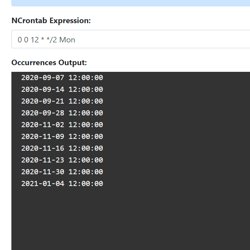
## Introducing NCrontab Tester (Blazor WebAssembly)

8/5/2020 - .NET

Introducing NCrontab Expression tester, made using NCrontab .NET library, Blazor WebAssembly, and hosted on Azure Static Web Apps


](/blog/dotnet/introducing-ncrontab-tester-blazor-webassembly)[

<picture><img class="blog-post-card__image" src="/cdn-cgi/image/width=250,format=auto,quality=90,height=250,fit=cover,gravity=0.5x0.5/media/kaklx3z1/dotnet-logo.png" srcset="/cdn-cgi/image/width=250,format=auto,quality=90,height=250,fit=cover,gravity=0.5x0.5/media/kaklx3z1/dotnet-logo.png 250w, /cdn-cgi/image/width=375,format=auto,quality=90,height=375,fit=cover,gravity=0.5x0.5/media/kaklx3z1/dotnet-logo.png 375w, /cdn-cgi/image/width=500,format=auto,quality=90,height=500,fit=cover,gravity=0.5x0.5/media/kaklx3z1/dotnet-logo.png 500w" sizes="250px" width="250" height="250" alt=".NET" decoding="async" loading="lazy" style="background-color:#512BD4"></picture>

## Download .NET Windows Theme based on the new .NET Brand GitHub repo

6/15/2020 - .NET

The .NET GitHub org has a new Brand repository containing a detailed Brand guidelines PDF, logo's, illustrations, and wallpapers. Using these resources I put together a Windows Theme for .NET which you can download here!


](/blog/dotnet/download-dotnet-windows-theme-based-on-the-new-dotnet-brand-github-repo)[

<picture><img class="blog-post-card__image" src="/cdn-cgi/image/width=250,format=auto,quality=90,height=250,fit=cover,gravity=0.5x0.5000116669388952/media/fodlodm5/dotnet_redhat-square.png" srcset="/cdn-cgi/image/width=250,format=auto,quality=90,height=250,fit=cover,gravity=0.5x0.5000116669388952/media/fodlodm5/dotnet_redhat-square.png 250w, /cdn-cgi/image/width=375,format=auto,quality=90,height=375,fit=cover,gravity=0.5x0.5000116669388952/media/fodlodm5/dotnet_redhat-square.png 375w, /cdn-cgi/image/width=500,format=auto,quality=90,height=500,fit=cover,gravity=0.5x0.5000116669388952/media/fodlodm5/dotnet_redhat-square.png 500w" sizes="250px" width="250" height="250" alt=".NET Core logo + Dotnet bot wearing Red Hat" decoding="async" loading="lazy" style="background-color:#2D2D2D"></picture>

## How to run ASP.NET Core Web Application as a service on Linux without reverse proxy, no NGINX or Apache

2/10/2020 - .NET

This article walks us through running a ASP.NET Core web application on Linux (RHEL) using systemd. The end goal is to serve ASP.NET Core directly via the built-in Kestrel webserver over port 80/443.


](/blog/dotnet/how-to-run-aspnet-core-as-a-service-on-linux)[

<picture><img class="blog-post-card__image" src="/cdn-cgi/image/width=250,format=auto,quality=90,height=250,fit=cover/media/0xmbgtlb/umbraco-images-square.png" srcset="/cdn-cgi/image/width=250,format=auto,quality=90,height=250,fit=cover/media/0xmbgtlb/umbraco-images-square.png 250w, /cdn-cgi/image/width=375,format=auto,quality=90,height=375,fit=cover/media/0xmbgtlb/umbraco-images-square.png 375w, /cdn-cgi/image/width=500,format=auto,quality=90,height=500,fit=cover/media/0xmbgtlb/umbraco-images-square.png 500w" sizes="250px" width="250" height="250" alt="Phone/Tablet/Laptop displaying Umbraco logo" decoding="async" loading="lazy" style="background-color:#2D2D2D"></picture>

## Implementing Responsive Images in Umbraco

12/24/2019 - Umbraco

The web platform has responsive image capabilities such as the srcset-attribute, sizes-attribute, and the picture-element. These capabilities may seem daunting sometimes. We'll learn how to make them available and maintainable to Umbraco content editors.


](/blog/umbraco/implementing-responsive-images-in-umbraco)[

<picture><img class="blog-post-card__image" src="/cdn-cgi/image/width=250,format=auto,quality=90,height=250,fit=cover,gravity=0.5x0.5/media/5cxfbnm2/html-agility-pack-net_.png" srcset="/cdn-cgi/image/width=250,format=auto,quality=90,height=250,fit=cover,gravity=0.5x0.5/media/5cxfbnm2/html-agility-pack-net_.png 250w, /cdn-cgi/image/width=375,format=auto,quality=90,height=375,fit=cover,gravity=0.5x0.5/media/5cxfbnm2/html-agility-pack-net_.png 375w, /cdn-cgi/image/width=500,format=auto,quality=90,height=500,fit=cover,gravity=0.5x0.5/media/5cxfbnm2/html-agility-pack-net_.png 500w" sizes="250px" width="250" height="250" alt="Screenshot of the HTML Agility Pack homepage" decoding="async" loading="lazy" style="background-color:#c00"></picture>

## Auto generate Heading Anchors using HTML AgilityPack DOM Manipulation

9/22/2019 - .NET

Manually adding an anchor to every heading would be a painful solution. So let's learn how we can achieve this by generating the Heading Anchors using the HTML AgilityPack .NET library.


](/blog/dotnet/auto-generate-heading-anchors-using-html-agilitypack-dom-manipulation)[

<picture><img class="blog-post-card__image" src="/cdn-cgi/image/width=250,format=auto,quality=90,height=250,fit=cover,gravity=0.5x0.5/media/1091/robot-umbraco-square.png" srcset="/cdn-cgi/image/width=250,format=auto,quality=90,height=250,fit=cover,gravity=0.5x0.5/media/1091/robot-umbraco-square.png 250w, /cdn-cgi/image/width=375,format=auto,quality=90,height=375,fit=cover,gravity=0.5x0.5/media/1091/robot-umbraco-square.png 375w, /cdn-cgi/image/width=500,format=auto,quality=90,height=500,fit=cover,gravity=0.5x0.5/media/1091/robot-umbraco-square.png 500w" sizes="250px" width="250" height="250" alt="Robot with Umbraco logo" decoding="async" loading="lazy" style="background-color:#2D2D2D"></picture>

## Crawling through Umbraco with Robots

12/31/2018 - Umbraco

The robots.txt file’s main purpose is to tell robots (Google Bot, Bing Bot, etc.) what to index for their search engine, and also what not to. Usually you want most of your website crawled by Google, such as blog posts, product pages, etc., but most websites will have some pages/sections that shouldn’t be indexed or listed in search engines.


](/blog/umbraco/crawling-through-umbraco-with-robots)[

<picture><img class="blog-post-card__image" src="/cdn-cgi/image/width=250,format=auto,quality=90,height=250,fit=cover,gravity=0.5x0.5/media/1080/umbraco_and_insight.png" srcset="/cdn-cgi/image/width=250,format=auto,quality=90,height=250,fit=cover,gravity=0.5x0.5/media/1080/umbraco_and_insight.png 250w, /cdn-cgi/image/width=375,format=auto,quality=90,height=375,fit=cover,gravity=0.5x0.5/media/1080/umbraco_and_insight.png 375w, /cdn-cgi/image/width=500,format=auto,quality=90,height=500,fit=cover,gravity=0.5x0.5/media/1080/umbraco_and_insight.png 500w" sizes="250px" width="250" height="250" alt="Azure Application Insights logo + Umbraco logo" decoding="async" loading="lazy" style="background-color:#691C7C"></picture>

## Ignoring Umbraco ping.aspx from Azure Application Insights

10/30/2018 - Umbraco

Application Performance Monitors provide you with a lot of data, but some of that data may not be relevant. Specifically, in Umbraco there is a page at \\umbraco\\ping.aspx that is being called frequently to keep the site alive. This is very useful to prevent the site from "dying" (?), but the data for this request isn't that relevant and could skew your statistics. Using Azure Application Insights ITelemetryProcessor, we can prevent ping request from being sent to Azure Application Insights.


](/blog/umbraco/ignoring-umbraco-ping-from-azure-application-insights)[

<picture><img class="blog-post-card__image" src="/cdn-cgi/image/width=250,format=auto,quality=90,height=250,fit=cover,gravity=0.5017667844522968x0.5017667844522968/media/1084/crawling-through-umbraco-square.png" srcset="/cdn-cgi/image/width=250,format=auto,quality=90,height=250,fit=cover,gravity=0.5017667844522968x0.5017667844522968/media/1084/crawling-through-umbraco-square.png 250w, /cdn-cgi/image/width=375,format=auto,quality=90,height=375,fit=cover,gravity=0.5017667844522968x0.5017667844522968/media/1084/crawling-through-umbraco-square.png 375w, /cdn-cgi/image/width=500,format=auto,quality=90,height=500,fit=cover,gravity=0.5017667844522968x0.5017667844522968/media/1084/crawling-through-umbraco-square.png 500w" sizes="250px" width="250" height="250" alt="Spider Web with Umbraco logo" decoding="async" loading="lazy" style="background-color:#2D2D2D"></picture>

## Crawling through Umbraco with Sitemaps

10/14/2018 - Umbraco

Websites come in all shapes and sizes. Some are fast, some are beautiful, and some are a complete mess. Whether it's a high-quality site is irrelevant if people can’t find it, but search engines are here to help. Though the competition to get on first page is tough, this series will dive into some common practices to make your website crawlable.


](/blog/umbraco/crawling-through-umbraco-with-sitemaps)
